Power / USB Chargers
Sitecom 165W GaN Power Delivery Wall Charger
Quick guide for the Sitecom 165W GaN Power Delivery Wall Charger. Learn about port specifications, power output combinations, safety instructions, and technical support.
Table of contents
Quick guide from the manual
The Sitecom 165W GaN Power Delivery Wall Charger is a high-performance power adapter designed for worldwide use. It features three USB-C ports and one USB-A port, capable of delivering a total power output of 165W. It is suitable for charging notebooks, smartphones, tablets, and other USB-powered devices.
Device Overview
The charger is equipped with the following ports and features:
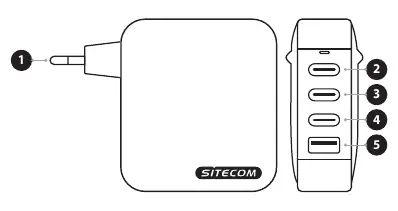
- EURO plug: Standard mains plug for most European countries.
- USB-C 1: High-power port, supports up to 140W.
- USB-C 2: Supports up to 100W.
- USB-C 3: Supports up to 65W.
- USB-A: Supports up to 30W.
Power Output and Compatibility
The charger supports a wide range of devices, including MacBook Pro (140W on USB-C1). The unit is compatible with mains voltages of 100–240V, making it suitable for global use, though a country-specific adapter may be required. The charger intelligently adjusts output based on the connected device's demand.
Safety Instructions
Please adhere to the following safety guidelines to ensure proper operation and longevity of the device:
- Do not drop the device, as frequent impacts may cause malfunctions.
- Do not disassemble the unit; repairs must be performed by qualified service centers.
- Do not use the product if the AC adapter, adapter cable, or power cable is damaged.
- Do not extend the cable, as this may lead to poor performance. Always pull the plug, not the cable, when disconnecting.
- Keep the device away from damp environments, liquid, steam, rain, or snow.
- Unplug the device when not in use for long periods to prevent damage from overvoltage.
- The operating environment temperature should be 25°C or less, and the altitude should be 5000m or less.
Support and Warranty
The product comes with a 24-month warranty and lifetime technical support. If you encounter issues such as liquid ingress, dampness, or obvious defects, disconnect the device immediately and contact support. For further assistance, visit www.sitecom.com or contact [email protected].
Official resources from the manual
Practical help
Common problems
Device not charging or charging slowly
Check the cable connection, ensure the wall outlet is live, and verify that the device's power requirements do not exceed the port's output capacity.
Device malfunction or damage
If liquid enters the device, if it has been in a damp environment, or if there is an obvious defect, disconnect from the power supply immediately and contact a service technician.
Before use
- Verify the wall outlet voltage is within the 100-240V range.
- Ensure you are using a compatible cable for your device.
- Check the power requirements of your device to select the appropriate port.
- Ensure the device is used indoors only.
- Confirm if a country-specific adapter is needed for your location.
Images and diagrams
- The diagram illustrates the charger unit with a standard Euro plug on the left and four output ports on the right, numbered 2 through 5 for identification.
Model compatibility
- Supports worldwide voltage (100-240V).
- Requires a country-specific adapter for use in the UK.
- Supports MacBook Pro with 140W power consumption on the USB-C1 port.

Manual page author
Michael Turner
Technical manual editor
Reviews PDF manuals for structure, safety notes, and practical product details so readers can find the right information quickly.