Tools / Measuring Tools
Quick Start Guide for Sauermann KISTOCK Wireless Data Loggers
Quick start guide for Sauermann KISTOCK wireless data loggers (KP 110-RF, KT 110-RF, KT 150-RF, KTU 210-RF, KTR 310-RF, KTT 310-RF). Includes instructions for activation, recording modes, mounting, and maintenance.
Table of contents
Manual images
Click an image to enlargeQuick Start Guide
This guide provides essential information for the KISTOCK wireless data logger series. The devices are designed for various measurement parameters including pressure, temperature, current, voltage, pulses, and light, depending on the specific model.
Display Indicators
The LCD screen provides real-time status updates:
- REC: One value is being recorded.
- LOG: Dataset is in progress (flashing means not started yet).
- END: Dataset is finished.
- FULL: Storage capacity status (slow flash: 80-90%, fast flash: 90-100%, constant: full).
- ACT: Refresh of displayed measurements.
- MIN/MAX: Displayed values correspond to min/max values of channels.
- Alarm Icon: Indicates rising or falling action.
- Signal Icon: Indicates reception power of the datalogger.
Recorder Function
The KISTOCK is supplied turned off to save battery life.
- To activate: Press the "OK" key for 5 seconds until the green LED "On" blinks.
- To turn off: Press "Select" and "OK" keys simultaneously for 5 seconds. Note: It is impossible to turn off the device during a recording or data download.
- Deactivate/Reactivate Keys: During a measurement dataset, press "Select" and "OK" for 5 seconds to deactivate buttons (red LED flashes twice). Repeat to reactivate (green LED flashes twice).
Autozero (KP 110-RF)
To perform an autozero during a measurement dataset:
- Ensure keys are activated.
- Disconnect the pressure tube from the instrument.
- Press the "OK" key for 5 seconds. The screen will display "0".
- Reconnect the pressure tubes to resume recording.
Recording Modes
The device supports 5 recording modes:
- Immediate: Records values according to a predefined interval.
- Minimum/Maximum/Average: Automatically calculates and records these values during an interval.
- Monitoring: Records at different intervals based on whether readings are within or beyond setpoints.
- Loop: Allows non-stop recording by overwriting memory.
Mounting
The KISTOCK can be installed using:
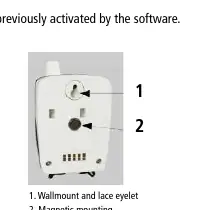

- Magnetic mounting.
- Wall mounting (using the wallmount and lace eyelet).
- Secured mounting (optional).
Maintenance
Avoid using aggressive solvents for cleaning. If cleaning rooms or ducts with products containing formalin, protect the device to prevent damage.
Manufacturer information
Sauermann
Practical help
Common problems
Cannot turn off the device
The device cannot be turned off while a recording is in progress or during data download.
Buttons are unresponsive
The keys may be deactivated. Press "Select" and "OK" simultaneously for 5 seconds to reactivate them.
Autozero not working
Ensure the pressure tubes are disconnected before pressing the "OK" key for 5 seconds.
Before use
- Check that the device is activated (press 'OK' for 5 seconds).
- Verify the specific model's measurement parameters (e.g., Pressure for KP 110-RF, Temperature for KT 150-RF).
- Ensure the battery (Lithium AA 3.6 V) is installed.
- Check the connection type (Ribbed, Mini-Din, etc.) required for your probes.
- If using in a network, ensure the Kilog RF software is configured.
Specs in practice
- Operating Temperature
- 5 to 50 °C for KP models; -40 to 70 °C for KT/KTU/KTR/KTT models.
Images and diagrams
- The display section shows icons for recording status (REC, LOG, END) and storage capacity (FULL).
- The connections section illustrates the specific ports for different probes (Ribbed, Mini-Din, Thermocouple).
Model compatibility
- KP 110-RF/KP 111-RF: Pressure measurement.
- KT 110-RF: Temperature, Current, Voltage, Pulses.
- KTT 310-RF: Thermocouple temperature.
- KTR 310-RF: Pt100 temperature.

Manual page author
Emily Carter
User documentation editor
Prepares concise manual descriptions and highlights the most useful setup, operation, and maintenance information for readers.