Power / Batteries Chargers
User Manual for Scangrip NOVA 10 CONNECT Floodlight
Quick guide for the Scangrip NOVA 10 CONNECT floodlight, covering battery compatibility, Bluetooth control, operation, and technical specifications.
Table of contents
Quick guide from the manual
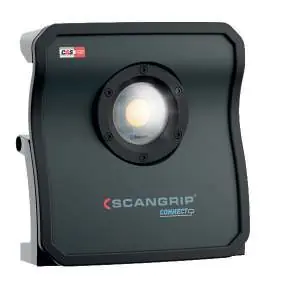
The Scangrip NOVA 10 CONNECT is a high-efficiency COB LED floodlight designed for professional use. It features a flexible power system compatible with Metabo CAS batteries and various other 18V battery packs via the Scangrip Connector system. The device includes built-in Bluetooth for light control and a USB power bank function.
Operation
The lamp is controlled via the buttons on the rear panel:
- Button A: Turn the lamp on or off.
- Button B: Increase brightness.
- Button C: Decrease brightness.
- Button D: Enable/disable Bluetooth.
The lamp saves the last brightness level used. To reset the Bluetooth PIN code, turn on Bluetooth and press the Bluetooth button for 10 seconds.
Battery and Power
The lamp accepts 12V and 18V batteries. When using a Scangrip power supply, the battery cover must be removed. The device also features an internal backup battery that provides 1 hour of light at 1000 lm if the main power is disconnected. If the lamp is in backup mode, the 10% LED will blink, and the USB power outlet is disabled.
IP Ratings
The protection rating depends on the configuration:
- IP65: When used with a Scangrip power supply.
- IP54: When the battery cover is mounted and closed.
- IP30: When the battery cover is removed and an external battery is used.
Safety and Maintenance
- Maintain a minimum distance of 0.1m from lighted objects to prevent fire risk.
- Do not look directly into the light beam.
- Do not leave the battery flat for extended periods.
- The light source is not replaceable; the entire unit must be replaced at the end of its life.
- Mount only on non-combustible surfaces.
Manufacturer information
SCANGRIP A/S
Practical help
Common problems
Lamp is in backup mode
If disconnected from mains and the battery is empty, push the power button to enable internal backup. The 10% LED will blink.
Bluetooth PIN code forgotten
Turn on Bluetooth and press the Bluetooth button for 10 seconds to reset the PIN.
USB power bank not working
The USB outlet is disabled when the lamp is operating in backup mode.
Before use
- Ensure the battery cover is closed for IP54 protection.
- Remove the battery cover if using a Scangrip power supply.
- Check that the battery voltage is 12V or 18V.
- Use a compatible Scangrip Connector if using a 3rd party 18V battery.
- Register your product at scangrip.com for the 3-year warranty.
Specs in practice
- IP65/IP54/IP30
- Ingress protection rating varies based on whether a power supply or battery cover is used.
- Backup: 1h @ 1000 lm
- Internal battery capacity when main power is lost.
- USB Output: 5V / 1A
- Power available for charging mobile devices when not in backup mode.
Images and diagrams
- A: Power button (On/Off)
- B: Increase brightness
- C: Decrease brightness
- D: Bluetooth enable/disable
Model compatibility
- Compatible with Metabo CAS battery system.
- Compatible with 18V batteries from Bosch, DeWalt, Makita, Milwaukee, etc., using the Scangrip Connector system.
- Requires iOS 10.3+ or Android 5.0+ for the light control app.

Manual page author
Emily Carter
User documentation editor
Prepares concise manual descriptions and highlights the most useful setup, operation, and maintenance information for readers.