Power / Batteries Chargers
Instruction Manual for Scangrip NOVA 10 CONNECT Work Light
Quick guide for the Scangrip NOVA 10 CONNECT work light, covering battery compatibility, Bluetooth control, IP ratings, and operation steps.
Table of contents
Quick guide from the manual
The Scangrip NOVA 10 CONNECT is a high-efficiency COB LED work light designed for versatility. It is compatible with Metabo CAS battery systems and supports 18V batteries from other brands via the Scangrip Connect system. The lamp features integrated Bluetooth control for adjusting brightness and linking up to 4 lamps.
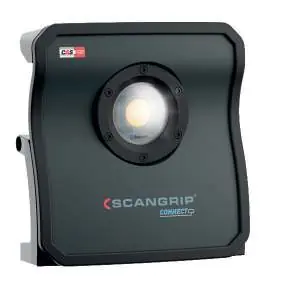
Operation
- A button: Turn the lamp on or off.
- B button: Increase brightness.
- C button: Decrease brightness.
- D button: Enable/disable Bluetooth.
The lamp saves the last brightness level used and will start at that level when turned on again.
Bluetooth Control
To delete a PIN code: Turn on Bluetooth, then press and hold the Bluetooth button for 10 seconds. You can connect up to 4 lamps and assign a PIN to prevent unauthorized control via the mobile app (available on iTunes App Store and Google Play).
IP Ratings and Usage
The lamp's IP rating changes based on the power source and configuration:
- IP65: When used with a Scangrip power supply.
- IP54: When the battery cover is mounted and closed.
- IP30: When the battery cover is removed and an external battery is used.
Battery and Power
The lamp accepts 12V and 18V batteries. If the lamp is disconnected from mains and the battery is empty, press the power button to activate the internal backup battery (10% LED will blink). The built-in USB power outlet (5V, 1A) is disabled when the lamp is in backup mode.
Safety and Maintenance
- Do not look directly into the light beam.
- Protect the mains cable from oil, heat, and sharp edges.
- The internal backup battery must be replaced with an original Scangrip battery.
- The light source is not replaceable; the entire unit must be replaced at the end of its life.
- Mount only on non-combustible surfaces.
Manufacturer information
SCANGRIP A/S
Practical help
Common problems
Lamp is in backup mode
The 10% LED will blink. Note that the USB power outlet is disabled in this mode.
Battery will not charge
Do not leave the battery flat, as this may render it incapable of being charged again.
Need to reset PIN code
Turn on Bluetooth, then press and hold the Bluetooth button for 10 seconds.
Before use
- Ensure the battery cover is mounted and closed for IP54 protection.
- Remove the battery cover if using a Scangrip power supply.
- Check that the surface for mounting is non-combustible.
- Ensure the battery voltage is 12V or 18V.
- Download the Scangrip app for Bluetooth control.
Images and diagrams
- A: Power button (On/Off)
- B: Brightness increase button
- C: Brightness decrease button
- D: Bluetooth button
Model compatibility
- Compatible with Metabo CAS battery systems.
- Compatible with 18V 3rd party batteries using Scangrip Connect system.
- Supports 12V and 18V battery voltages.

Manual page author
David Miller
Documentation analyst
Organizes user manual content into clear summaries, with attention to model details, product context, and everyday usability.