Smart Home / Smart Switches
User Manual for Schneider Electric Iconic Connected Switch 10AX
Comprehensive user guide for the Schneider Electric Iconic Connected Switch 10AX. Includes installation instructions, wiring diagrams, Wiser by SE app configuration, and technical specifications.
Table of contents
Manual images
Click an image to enlargeImportant Information
The Schneider Electric Iconic Connected Switch 10AX is a smart switch designed for residential use. It supports Bluetooth Low Energy (BLE) by default and can be integrated into a Zigbee network when paired with a Wiser Hub. Installation must be performed by a licensed electrician or authorized personnel in accordance with local wiring rules.
Installation
Before beginning, ensure the power supply is isolated. The device is designed for indoor use only.
Wiring and Connections
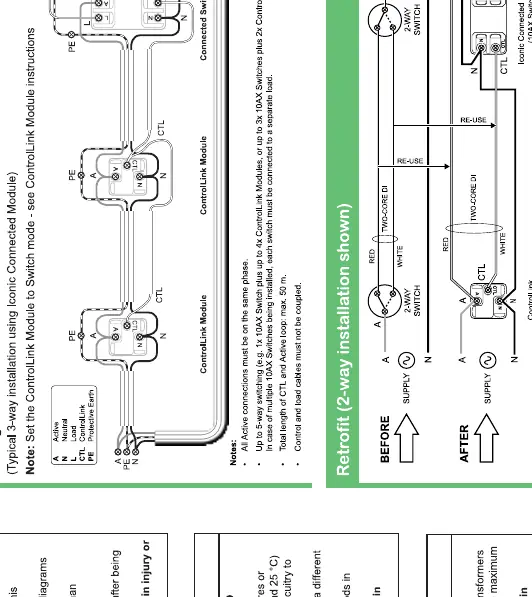
- 3-way switching: Follow the specific wiring diagrams provided in the manual for standard 3-way configurations.
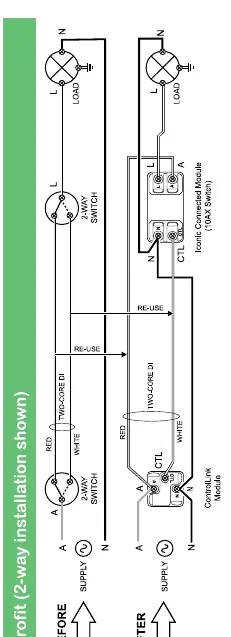
- Retrofit: Ensure existing wiring is compatible. The device requires a Neutral connection.
- Multi-gang installation: When installing multiple modules in a single plate, refer to the derating table to ensure the load does not exceed the maximum rating for the plate.
Fitting
- Ensure the wall box depth is at least 70 mm.
- The module must be fitted into the mounting grid securely.
- Ensure all connections are on the same phase.
Configuration
The device is configured using the Wiser by SE app.
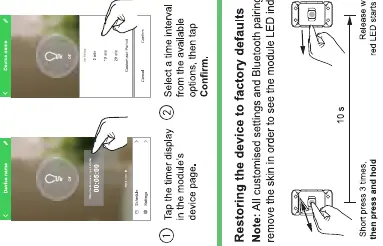
- Pairing: Ensure your mobile device is within 8-10 meters of the switch. Use the Wiser by SE app to add the device.
- LED Indicator: The LED behavior indicates the status of the device (e.g., pairing mode, active, off).
- Timer and Scheduler: You can set delay timers (e.g., pantry light) or schedules directly through the app.
Technical Data
- Operating Voltage: 220-240 V a.c., 50 Hz.
- Max Load: 10 A.
- Switching Technique: Relay.
- Protection: Over-temperature protection included.
- Communication: BLE (default), Zigbee (requires Wiser Hub).
- IP Rating: IP20 (indoor use only).
Troubleshooting and Reset
If the device is not functioning as expected, you may need to perform a factory reset. Note that this will clear all settings and Bluetooth pairing information.
- Factory Reset: Press the button 3 times, then press and hold. The LED will flash red.
- Wiser Hub Mode: The module can be converted to Zigbee mode using the Wiser Hub.
Manufacturer information
Schneider Electric
Practical help
Common problems
Device not pairing with the app
Ensure your mobile device is within 8-10 meters of the switch and that Bluetooth is enabled.
Settings lost after reset
Performing a factory reset clears all custom settings and pairing information; you will need to reconfigure the device.
Load not operating correctly
Verify that the load does not exceed 10A and check that all wiring connections are secure and on the same phase.
Before use
- Ensure power is isolated before starting installation.
- Verify the wall box depth is at least 70 mm.
- Download the Wiser by SE app on your mobile device.
- Check that the load type is compatible (Resistive, LED, etc.).
- Ensure the installation environment is indoors and dry.
Specs in practice
- Operating Voltage
- 220-240 V a.c., 50 Hz; ensure your mains supply matches this range.
- Communication
- Supports BLE by default; Zigbee support requires a Wiser Hub.
Images and diagrams
- Wiring diagrams illustrate standard 3-way switching and retrofit configurations.
- The derating table provides the maximum load capacity per plate based on the number of modules installed.
Model compatibility
- Compatible with Iconic, Styl, and Essence plates.
- Requires Wiser Hub for Zigbee mode functionality.

Manual page author
David Miller
Documentation analyst
Organizes user manual content into clear summaries, with attention to model details, product context, and everyday usability.