Sports / Fitness
User Manual for Scosche GoBat 10K Power Bank
Quick guide for the Scosche GoBat 10K power bank. Learn how to charge the device, use the USB-A and USB-C ports, and understand the LED charge indicators.
Table of contents
Manual images
Click an image to enlargeQuick guide from the manual
The Scosche GoBat 10K is a portable power bank designed to charge mobile devices. Before first use, it is recommended to fully charge the unit to 100%. The device supports both USB-C and USB-A connections for charging external devices.
Device Overview
The power bank features the following components:
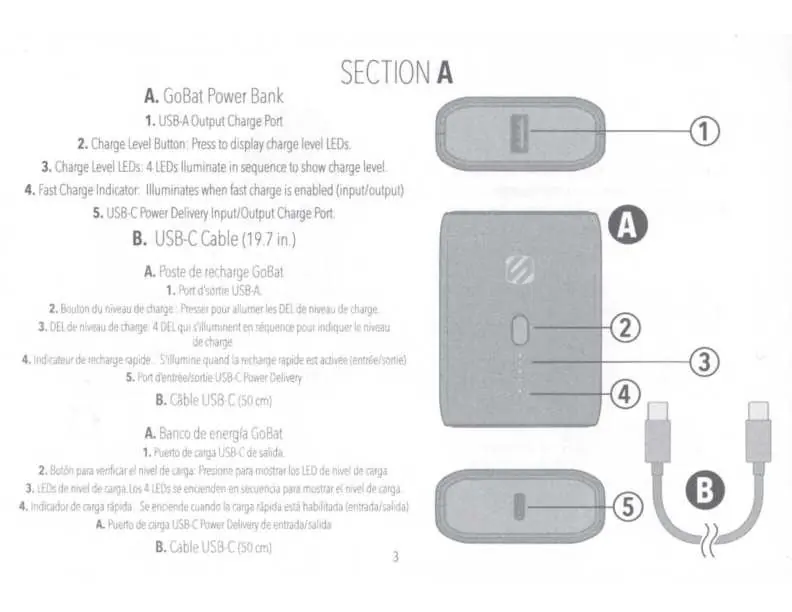
- USB-A Output Charge Port: For charging devices using a USB-A cable.
- Charge Level Button: Press to activate the LED indicators and check battery status.
- Charge Level LEDs: Four LEDs that illuminate in sequence to display the current charge level.
- Fast Charge Indicator: Illuminates when fast charging (input or output) is active.
- USB-C Power Delivery Port: Used for both charging the power bank itself and charging devices.
Charging the Power Bank
To charge the GoBat 10K:
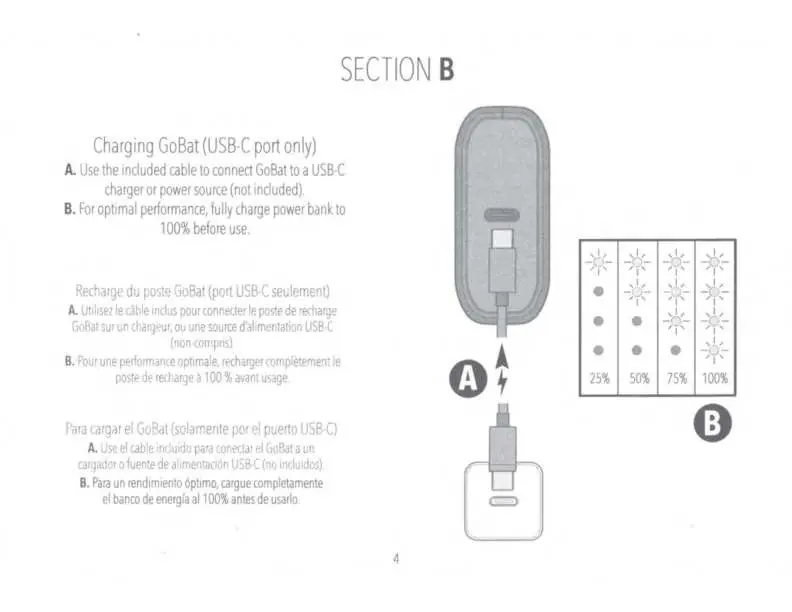
- Use the included USB-C cable.
- Connect the cable to the USB-C port on the power bank and to a compatible USB-C charger or power source (not included).
- The LEDs will indicate the charging progress.
Charging Devices
To charge your mobile device using the GoBat:
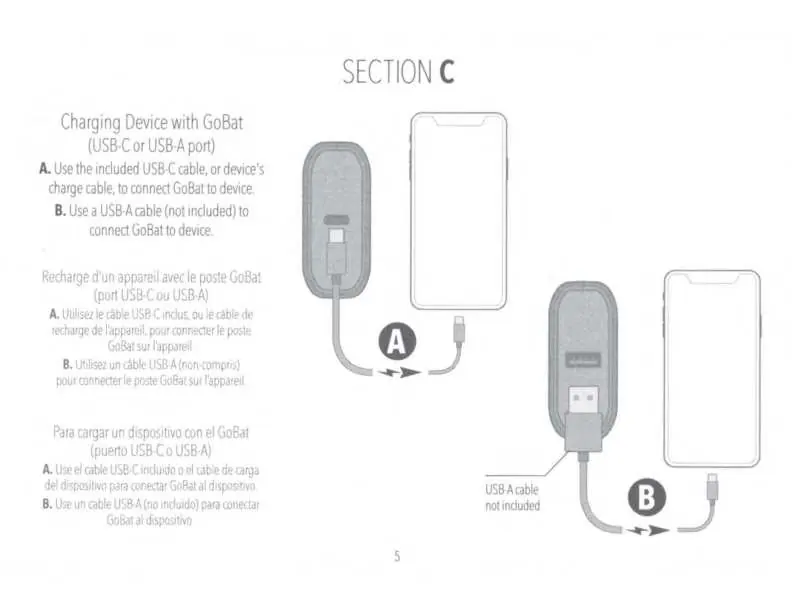
- Using USB-C: Connect the included USB-C cable (or your device's own cable) to the USB-C port on the power bank and your device.
- Using USB-A: Connect a USB-A cable (not included) to the USB-A port on the power bank and your device.
Specifications
- Battery Capacity: 10,000 mAh
- USB-C PD Input/Output: 5V/3A, 9V/2.2A, 12V/1.67A (20W)
- USB-A Output: 5V/3A, 9V/2A, 12V/1.5A (18W)
- Combined Output (USB-C + USB-A): 5V/3A Max
Manufacturer information
Scosche Industries, Inc.
Practical help
Common problems
Power bank not charging
Ensure you are using the USB-C port on the power bank and a compatible USB-C power source.
Fast charge indicator not illuminating
Ensure the connected device is compatible with fast charging and the cable is securely connected.
Before use
- Fully charge the power bank to 100% before first use.
- Verify you have the included USB-C cable.
- Check if your device requires a USB-A or USB-C cable.
Specs in practice
- Battery Capacity
- 10,000 mAh total energy storage.
- USB-A Output
- Standard USB output supporting up to 18W.
Images and diagrams
- The power bank features a charge level button and 4 LEDs to indicate remaining battery.
- The USB-C port serves as both input (to charge the bank) and output (to charge devices).
Model compatibility
- USB-C cable included.
- USB-A cable not included for device charging.

Manual page author
Michael Turner
Technical manual editor
Reviews PDF manuals for structure, safety notes, and practical product details so readers can find the right information quickly.