Lighting / Work Lights
User Manual for Sealey CB20V Cordless Leaf Blower
Quick guide for the Sealey CB20V Cordless Leaf Blower. Includes assembly instructions, safety warnings, maintenance tips, and technical specifications.
Quick answers from the manual
Quick answer
- The Sealey CB20V is a cordless leaf blower. To assemble, attach the blower tube to the main unit and secure it with the provided screw. Always remove the battery before maintenance. p. 2
Key actions
- Assemble the blower p. 2
- Operate the blower p. 2
First start
- Insert the battery into the battery socket on the handle. p. 2
Problems and fixes
Tool vibrates abnormally
Switch off, remove battery, and inspect.
p. 1Maintenance and reset
- Remove battery before maintenance. p. 1, 2
Technical specifications
| Parameter | Value | Meaning | Pages |
|---|---|---|---|
| Air Speed | 58m/s | Maximum air speed | p. 2 |
Where to find it in the PDF
- Specifications and Operation p. 2
Table of contents
Quick guide from the manual
The Sealey CB20V is a cordless leaf blower designed for clearing leaves and waste from driveways, patios, and small gardens. This document provides essential safety, assembly, and maintenance instructions. Always remove the battery before performing any maintenance, adjustments, or when leaving the tool unattended.
Safety
General Safety:
- Always wear appropriate eye protection, ear protection, substantial footwear, gloves, and long trousers.
- Remove loose clothing, ties, watches, rings, and contain long hair.
- Inspect the equipment for damage before use.
- Do not operate in bad weather, especially if there is a risk of lightning.
- Do not use if the tool vibrates abnormally; switch off and remove the battery immediately.
- Keep bystanders and pets away from the work area.
- Store in a dry, childproof location with the battery removed.
Hand-Arm Vibration:
This tool is subject to vibration testing. Users should conduct a health and safety assessment to determine suitable duration of use. Maintain the tool properly to reduce vibration risks.
Assembly and Operation
Assembly:
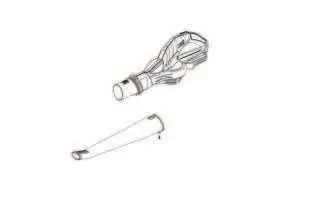
- Connect the blower tubes to the main unit.
- Secure the tubes using the provided screw.
Operation:
- Insert the battery into the battery socket.
- Hold the machine approximately 3cm above the ground during operation.
- Use the switch on the handle to operate.
- Do not blow hot, flammable, or explosive materials.
Maintenance
- Battery: Always remove the battery before maintenance, tool changes, or storage.
- Cleaning: Keep the garden product and ventilation slots clean. Never spray with or immerse in water.
- Inspection: Regularly check that all nuts, bolts, and screws are tight. Replace worn or damaged parts with genuine Sealey parts.
Specifications
- Battery: 20V Lithium-ion (2Ah - 6Ah, not included)
- Maximum Air Speed: 58m/s (130mph)
- Maximum Air Volume: 150m³/hr
- Noise Power: 93dB(A) LWA
- Noise Pressure: 90dB(A) LPA
Manufacturer information
Sealey Group
Practical help
Common problems
Tool vibrates abnormally
Switch off, remove the battery, and inspect the unit for damage or blockages.
Blower not starting
Ensure the battery is fully charged and correctly inserted into the battery socket.
Before use
- Ensure you have a compatible 20V Sealey battery (2Ah, 4Ah, or 6Ah).
- Wear appropriate PPE: eye protection, ear protection, gloves, and sturdy footwear.
- Check that the air holes are clear and unobstructed.
- Inspect the unit for any damage or missing parts.
- Clear the work area of bystanders and pets.
Specs in practice
- Battery Voltage
- 20V Lithium-ion system.
Images and diagrams
- The blower consists of a main unit with a handle and battery socket.
- The air outlet pipe attaches to the front of the main unit.
- A self-tapping screw is used to secure the air outlet pipe to the main unit.
Model compatibility
- Compatible with Sealey CP20V series batteries (CP20VBP2, CP20VBP4, CP20VBP6).
- Requires CP20VMC mains charger (not included).

Manual page author
David Miller
Documentation analyst
Organizes user manual content into clear summaries, with attention to model details, product context, and everyday usability.