Documents / Warranty Safety
Sealey AK9623EV Digital Vernier Caliper User Guide
Quick guide for the Sealey AK9623EV digital vernier caliper. Includes operating instructions, battery replacement steps, safety warnings, and technical specifications.
Table of contents
Quick guide from the manual
This document provides essential operating instructions for the Sealey AK9623EV digital vernier caliper. Key procedures include zeroing the device, switching between metric and imperial units, and performing comparative measurements. Always ensure the measuring surfaces are clean before use and store the tool in a dry, childproof location.
Safety
- Do not use if damaged.
- Keep the caliper clean and dry; use only a dry cotton cloth.
- Do not submerge in liquid or expose to bright sunlight, dust, or condensation.
- Do not apply electrical voltage to the caliper.
- Handle as a precision instrument; avoid force, knocks, or shocks.
- Operate in temperatures of approximately 20°C.
Operation
To begin, clean the measuring surfaces and press the ON button. Wait at least one second before taking a measurement.
- Zeroing: Close the caliper completely and press the ZERO button if the display does not read zero. You can also set a new zero at any position by pressing the ZERO button.
- Unit Selection: Use the mm/inch selector to toggle between measurement systems.
- Comparative Measurement: After taking a first measurement, press the ABS/0 switch (display will show 'INC'). Move the caliper to the second position. Press the ABS/0 switch again to display the total of both measurements.
Battery Fitting
A flashing display indicates the battery is exhausted. To replace:
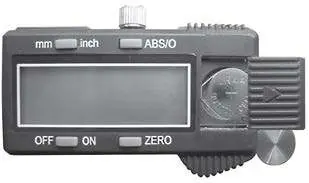
- Switch off the device.
- Slide the battery cover (9) to the right to remove it.
- Remove the old battery and insert a new one with the positive side facing up.
- Refit the battery cover.
- If the display does not respond after moving the slide, remove the battery, wait 30 seconds, and reinsert it.
Technical Specifications
- Range: 0-300mm (0-12 inches)
- Resolution: 0.01mm (0.0005 inches)
- Accuracy (<100mm): ±0.02mm (0.001 inches)
- Accuracy (>100mm): ±0.04mm (0.002 inches)
Manufacturer information
Sealey Group
Practical help
Common problems
Display is flashing
The battery is exhausted and needs to be replaced.
Display does not change when slide is moved
Remove the battery, wait at least 30 seconds, and refit it.
Read-out does not show zero when closed
Ensure the caliper is fully closed and press the zero control button.
Before use
- Ensure all measuring surfaces are clean.
- Check that the display shows the required units (mm or inch).
- Verify the display reads zero when the caliper is fully closed.
- Ensure the work area is clean and well-lit.
- Confirm the battery is not exhausted (no flashing display).
Images and diagrams
- 1: Internal measure
- 2: Metric/Imperial selector
- 3: Locking screw
- 4: ABS/0 switch
- 6: External measure

Manual page author
David Miller
Documentation analyst
Organizes user manual content into clear summaries, with attention to model details, product context, and everyday usability.