Automotive / Electric Scooters
User Manual for Segway Ninebot eKickScooter E2 Pro
Quick guide and user manual for the Segway Ninebot eKickScooter E2 Pro. Includes setup, maintenance, troubleshooting, and technical specifications.
Table of contents
Manual images
Click an image to enlargeQuick Start Guide
To begin using your Segway Ninebot eKickScooter E2 Pro, you must first install the Segway-Ninebot app on your mobile device. Use the app to activate your scooter and obtain the latest firmware updates and safety instructions. Ensure the scooter is fully charged before your first ride.
Device Diagram
The scooter features several key components for operation and safety, including the dashboard, electronic throttle, brake lever, folding mechanism, and hub motor. Familiarize yourself with these parts to ensure safe operation. The charging port is located on the side of the footboard.
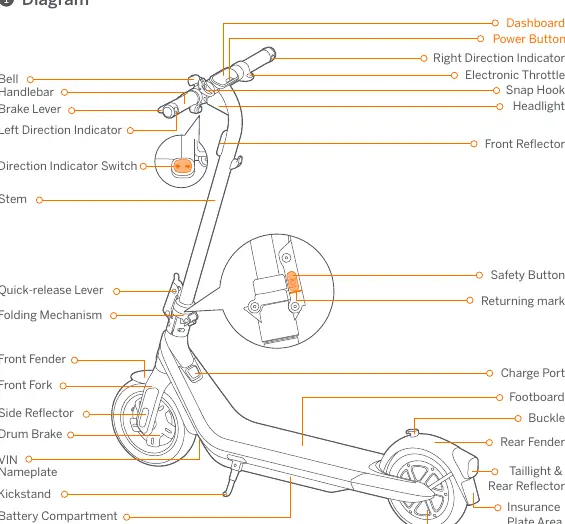
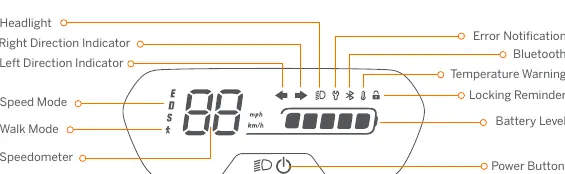
Dashboard and Controls
The dashboard displays current speed, battery level, and status indicators. The power button is used to turn the scooter on and off (hold for 2 seconds). When the scooter is on, press the button to toggle the headlight and taillight, and press twice to switch between the four speed modes (ECO, Standard, Sport, and Walk mode). The dashboard also provides error notifications and temperature warnings.
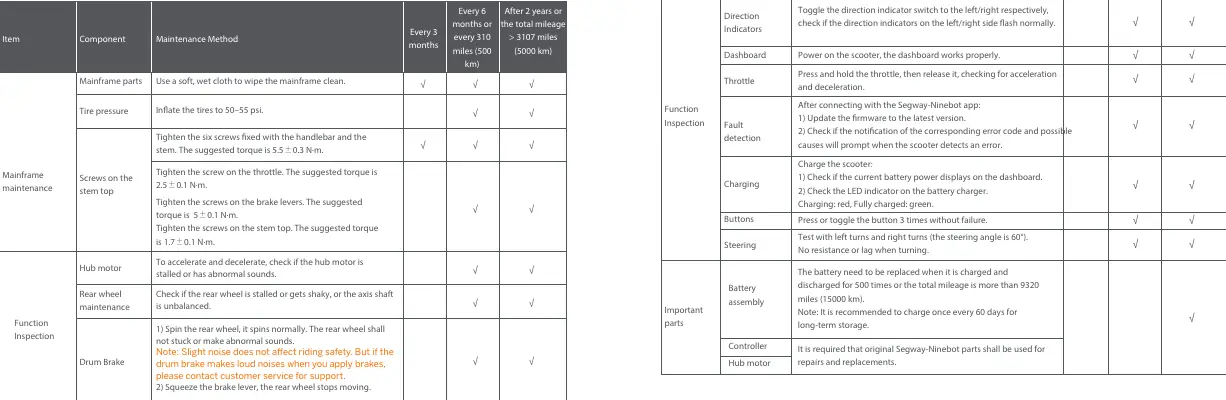
Maintenance Schedule
Regular maintenance is essential for safe riding. Perform checks every 3 months, every 6 months (or 500 km), and after 2 years (or 5000 km). Key maintenance tasks include cleaning the mainframe, checking tire pressure (50-55 psi), and tightening screws on the handlebar, stem, throttle, and brake levers. Always use original Segway-Ninebot parts for repairs.
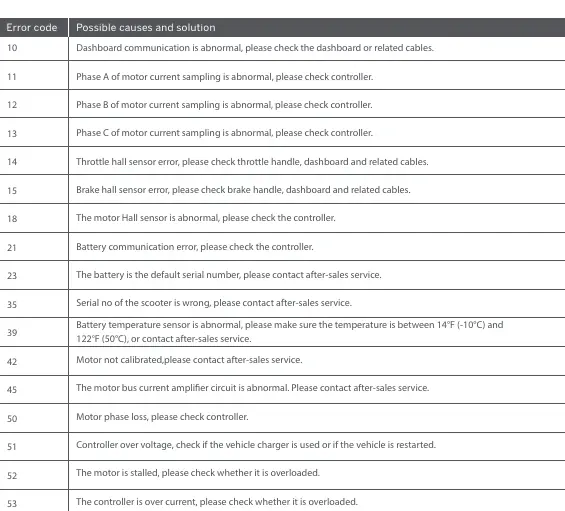
Troubleshooting
If the scooter detects an error, an error code will appear on the dashboard. Common issues include abnormal dashboard communication, motor current sampling errors, and sensor errors. Check the error code via the Segway-Ninebot app. If the battery temperature is abnormal, ensure the temperature is between -10°C and 50°C.
Technical Specifications
The E2 Pro has a maximum payload of 100 kg and a recommended age of 16+. It features 10-inch tubeless pneumatic tires and an IPX4 water resistance rating. The battery management system provides protection against overvoltage, undervoltage, short circuits, and overcurrent.
Manufacturer information
Segway
Practical help
Common problems
Dashboard communication abnormal
Check the dashboard or related cables.
Motor current sampling abnormal
Check the controller.
Throttle or brake hall sensor error
Check the handle, dashboard, and related cables.
Battery temperature abnormal
Ensure the temperature is between -10°C (14°F) and 50°C (122°F) or contact after-sales service.
Motor stalled or overloaded
Check if the motor is overloaded.
Before use
- Install the Segway-Ninebot app
- Activate the KickScooter via the app
- Check tire pressure (50-55 psi)
- Charge the battery fully
- Update firmware to the latest version
- Check for any error codes on the dashboard
Specs in practice
- Charging Time
- Approx. 5.5 hours
Images and diagrams
- Dashboard: Displays speed, battery, and status
- Throttle: Controls acceleration
- Brake Lever: Controls braking
- Folding Mechanism: Allows for compact storage
Model compatibility
- App requires Bluetooth connection
- Use original Segway-Ninebot parts for repairs

Manual page author
Michael Turner
Technical manual editor
Reviews PDF manuals for structure, safety notes, and practical product details so readers can find the right information quickly.