Sports / Fitness
User Manual for Segway SuperScooter ST2 Pro
Comprehensive user guide for the Segway SuperScooter ST2 Pro. Includes setup, dashboard functions, speed modes, damper adjustment, specifications, and troubleshooting error codes.
Table of contents
Manual images
Jump to the sectionQuick guide from the manual
The Segway SuperScooter ST2 Pro is a high-performance electric scooter. Before your first ride, ensure the scooter is unlocked via the Segway-Ninebot App. Power on by pressing the Power Button. Use the Right Control Switch to toggle between speed modes (Walk, Park, ECO, Sport, Race).
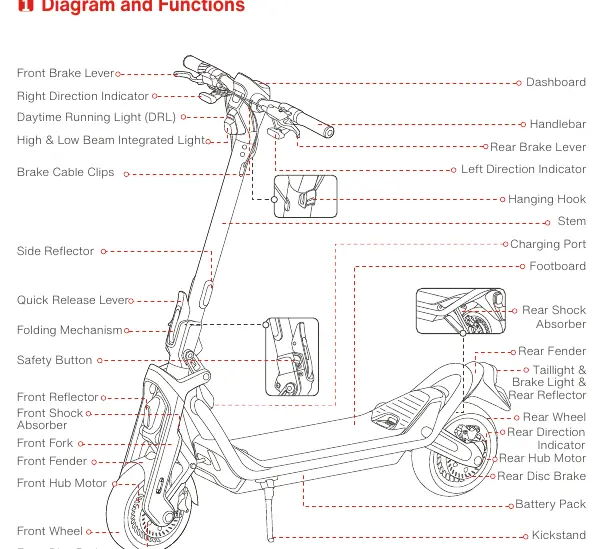
Diagram and Functions
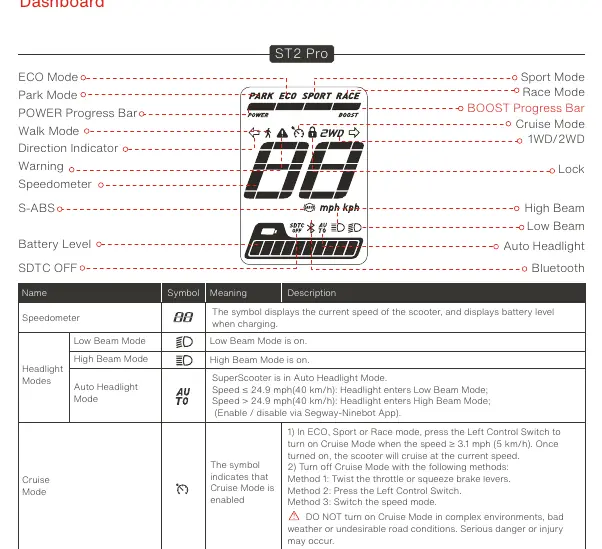
The scooter features a comprehensive dashboard and handlebar controls. Key components include the throttle, power button, horn, and direction indicators. The dashboard displays current speed, battery level, and active modes.
Handlebar Functions
The handlebar houses the primary controls:
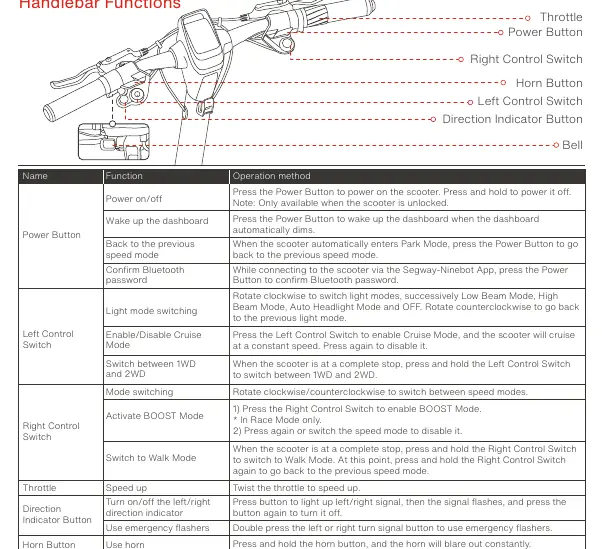
- Power Button: Power on/off, wake dashboard, confirm Bluetooth password.
- Left Control Switch: Light mode switching, Cruise Mode, 1WD/2WD switching.
- Right Control Switch: Speed mode switching, BOOST Mode, Walk Mode.
- Throttle: Twist to accelerate.
Speed Modes
The scooter offers several speed modes, adjustable via the Right Control Switch:
- Walk Mode: 4 mph (6 km/h).
- Park Mode: 0 mph (0 km/h).
- ECO Mode: 24.9 mph (40 km/h).
- Sport Mode: 50 mph (80 km/h).
- Race Mode: 50 mph (80 km/h).
Damper Adjustment
The damper can be adjusted to suit your riding habits:
- S (Slow rebound): Rotate clockwise to increase rebound resistance.
- F (Fast rebound): Rotate counterclockwise to decrease rebound resistance.
Specifications
Key technical parameters:
- Max Payload: 330 lbs (150 kg).
- Max Speed: Approx. 49.7 mph (80 km/h).
- Typical Range: Approx. 31.1 miles (50 km).
- IP Rating: IPX5.
- Charging Duration: Approx. 5 hours.
Troubleshooting
If an error occurs, the dashboard will display an error code. Common issues include:
- Error 0: Throttle abnormality. Contact service.
- Error 7: Under-voltage protection. Try charging.
- Error 9: High battery temperature. Apply heat dissipation.
- Error 12: Front-drive-wheel stall. Restart the scooter.
Manufacturer information
Segway
Practical help
Common problems
Error 0: Throttle abnormality
Contact after-sales service or an authorized dealer.
Error 7: Under-voltage protection
Try to charge the scooter.
Error 9: High battery temperature
Apply heat dissipation for the scooter.
Error 12: Front-drive-wheel stall
Restart the scooter and try again.
Before use
- Ensure the scooter is unlocked via the Segway-Ninebot App.
- Check tire pressure (29-35 psi).
- Verify battery level.
- Adjust damper settings to your riding habits.
- Ensure the scooter is powered on.
Specs in practice
- Typical Range
- Approx. 31.1 miles (50 km)
Images and diagrams
- Handlebar: Contains throttle, power button, horn, and direction indicators.
- Dashboard: Displays speed, battery level, active modes, and warnings.
- Damper Adjustment Knob: Located near the front suspension for rebound control.
Model compatibility
- Requires Segway-Ninebot App for full functionality, including locking, unlocking, and mode customization.

Manual page author
Emily Carter
User documentation editor
Prepares concise manual descriptions and highlights the most useful setup, operation, and maintenance information for readers.