Automotive / Electric Scooters
User Manual for Segway eKickScooter 051801E / 051801D
Quick guide and user manual for the Segway eKickScooter 051801E and 051801D. Includes assembly, operation, safety, app features, and specifications.
Table of contents
Quick guide from the manual
This manual provides essential instructions for the Segway eKickScooter models 051801E and 051801D. Before riding, ensure you have assembled the scooter correctly, activated the battery via the Segway-Ninebot app, and are wearing appropriate safety gear (helmet, elbow pads, and knee pads). Always check tire pressure and ensure the folding mechanism is securely locked before every ride.
Assembly
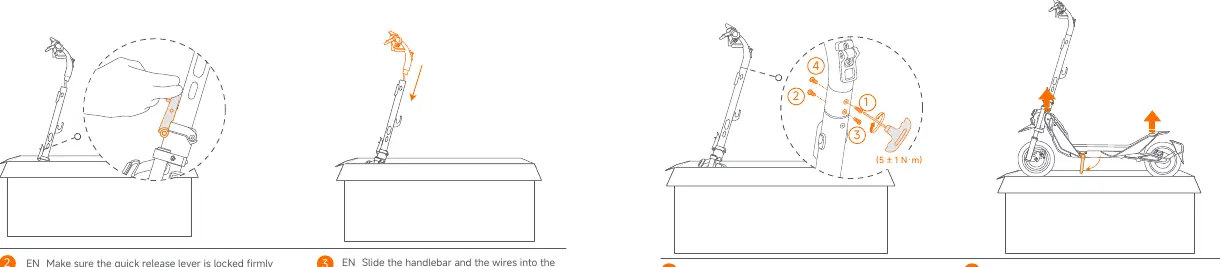
To assemble the scooter, unfold the stem and close the quick-release lever until the folding latch reaches the bottom. Slide the handlebar and wires into the stem with the headlight facing forward. Install the four provided screws in order using the included Allen wrench. Ensure the quick-release lever is locked firmly without lifting the folding latch.
Handlebar Functions
The handlebar features several controls:
- Mode switching: Press the button to switch speed modes.
- Direction Indicator Button: Press to signal turns; press and hold for emergency flashers.
- Custom Button: Default is Automatic Hill Hold. Can be customized in the app.
- Bell: Press to sound the bell.
- Power Button/Headlight: Press to power on/off. After powering on, press to toggle the headlight.
- Throttle: Twist or press to accelerate.
Dashboard
The dashboard displays critical information, including speed, battery level (10 bars), Bluetooth status, and warning icons. If the first battery bar is red, charge the scooter immediately. The dashboard also indicates if the Traction Control System (TCS) or Boost function is active.
App Features and Activation
The scooter must be activated via the Segway-Ninebot app. An unactivated scooter will beep and have a speed limit of 10 km/h. The app allows you to customize features like Energy Recovery, locking functions, and speed modes. You can also set up Apple Find My for tracking and use CodeLock (Digital or Pattern) for security.
Charging
Open the rubber plug on the charging port. Connect the charger. The scooter is fully charged when the LED on the charger changes from red to green. Always fasten the rubber plug when finished.
Riding Instructions
Fold up the kickstand. Stand on the footboard with one foot and push off with the other to start gliding. Once balanced, press the throttle to accelerate. Note that the motor will not engage until the scooter reaches 3 km/h. To slow down, release the throttle and squeeze the brake lever.
Safety Warnings
- Do not ride on public roads, motorways, or highways unless local laws permit.
- Do not use a mobile phone or wear earphones while riding.
- Do not carry passengers or heavy objects on the handlebar.
- Do not ride in the rain or through puddles.
- Do not ride up/down stairs or jump over obstacles.
- Do not touch the hub motor or brake after riding as they may be hot.
Specifications
The scooter supports a maximum payload of 120 kg. The 051801E model has a max speed of 25 km/h, while the 051801D has a max speed of 20 km/h. It features front dual telescopic suspension and rear spring suspension, with front disc and rear disc/electronic braking systems.
Manufacturer information
Segway
Practical help
Common problems
Scooter beeping and speed limited to 10 km/h
The scooter is not activated. Follow the activation steps in the Segway-Ninebot app.
Scooter will not power on
If the battery is under 30% and unused for 7 days, it enters sleep mode. Charge for 3 seconds to activate.
Folding latch cannot be locked
Stop riding immediately. Serious danger may occur.
Before use
- Wear a helmet, elbow pads, and knee pads.
- Check tire pressure (42-48 psi).
- Ensure the folding latch is in the locked position.
- Charge the battery fully.
- Ensure the brake cable is not wrapped around the stem.
Specs in practice
- Charging Time
- Approx. 4±1 hours
Images and diagrams
- Handlebar controls include throttle, bell, and mode switching.
- Folding mechanism is located on the stem.
- Charging port is on the side of the deck.
Model compatibility
- Compatible with Segway-Ninebot App.
- Supports Apple Find My network.
- Max 3 iOS devices can be connected per scooter.

Manual page author
Emily Carter
User documentation editor
Prepares concise manual descriptions and highlights the most useful setup, operation, and maintenance information for readers.