Automotive / Electric Scooters
User Manual for Segway Ninebot KickScooter F2 Series
Comprehensive user guide for the Segway Ninebot KickScooter F2, F2 Plus, and F2 Pro. Includes parts diagrams, dashboard controls, speed modes, technical specifications, and a detailed maintenance schedule.
Table of contents
Manual images
Click an image to enlargeQuick guide from the manual
This manual provides essential operating and maintenance instructions for the Segway Ninebot KickScooter F2, F2 Plus, and F2 Pro. Users must install the Segway-Ninebot app to activate the scooter, perform firmware updates, and access safety instructions. The scooter features multiple speed modes and a cruise control function, which can be managed via the app or the dashboard.
Parts Identification
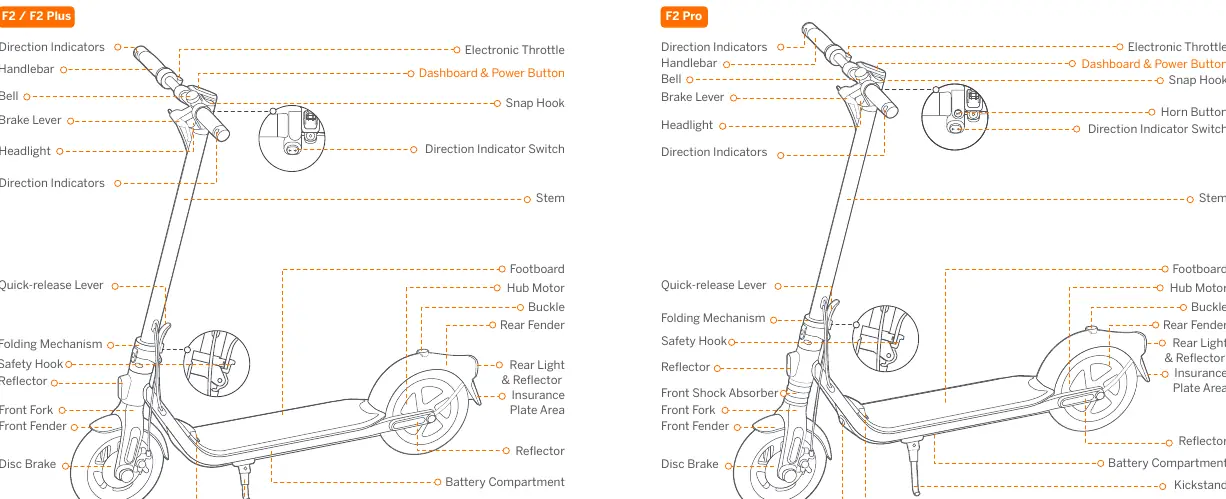
The KickScooter consists of several key components, including the handlebar, electronic throttle, brake lever, folding mechanism, hub motor, and battery compartment. Refer to the diagrams in the manual to identify specific parts such as the charging port, kickstand, and direction indicators.
Dashboard and Controls
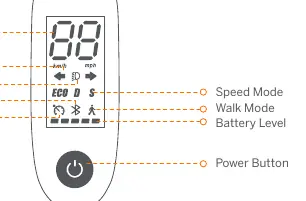
The dashboard displays current speed and error codes. Use the power button to turn the unit on/off, toggle the headlight/rear light, and switch between speed modes. Direction indicators are operated via a switch on the handlebar. The scooter includes a Parking mode (P) that engages if the starting speed is set below 1.86 mph (3 km/h); exit this mode by squeezing the brake lever or accelerating.
Speed Modes
There are three available speed modes:
- ECO (Energy-saving mode): Optimized for battery life.
- D (Standard mode): Balanced performance.
- S (Sport mode): Maximum speed and acceleration (adjustable via app).
A Walk Mode is also available, limiting speed to 3.1 mph (5 km/h) with lights permanently on.
Specifications
The F2 series models vary in weight, range, and motor power. All models feature 10-inch self-sealing tubeless tires, IPX5 water resistance, and a 36V battery system with over-heating, short circuit, and over-current protection. Charging time varies by model (approx. 6.5 to 8 hours).
Maintenance Schedule
Regular maintenance is the owner's responsibility. Key tasks include:
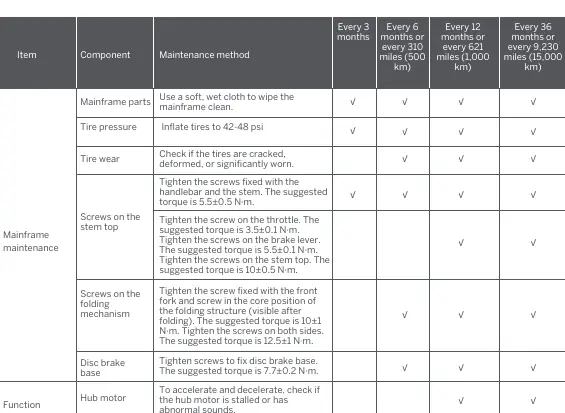
- Mainframe: Clean with a soft, wet cloth.
- Tires: Maintain pressure at 42-48 psi and check for cracks or wear.
- Screws: Regularly tighten screws on the handlebar, stem, folding mechanism, and disc brake base to specified torques.
- Brakes: Adjust brake caliper alignment and cable tension as needed.
- Functional Inspection: Periodically test control buttons, steering, throttle, and buzzer.
After 3 years or 9,320 miles (15,000 km), abnormal parts must be replaced immediately.
Manufacturer information
Segway
Practical help
Common problems
Scooter will not accelerate
Check if the scooter is in Parking mode (P). Squeeze the brake lever once or accelerate to over 1.86 mph (3 km/h) to exit.
Battery level is low
If the first battery bar is red, the power is very low. Charge the scooter immediately.
Cruise mode not activating
Ensure speed is above 3.1 mph (5 km/h). Enable via the app, then press and hold the throttle for more than 5 seconds until a long beep sounds.
Brake feels too tight or loose
Use a 4 mm Allen key to loosen the caliper screw, adjust the brake line tension, and retighten.
Before use
- Check tire pressure (42-48 psi).
- Inspect tires for cracks, deformation, or significant wear.
- Ensure handlebar and stem screws are tightened to 5.5±0.5 N·m.
- Verify brake lever and caliper alignment.
- Ensure the battery is sufficiently charged.
- Connect to the Segway-Ninebot app for activation and firmware updates.
Specs in practice
- IP Rating (IPX5)
- The scooter is protected against low-pressure water jets from any angle.
- Nominal Voltage
- 36V DC system.
Images and diagrams
- The dashboard shows speed, Bluetooth connection status, headlight status, cruise mode, speed mode, and battery level.
- The folding mechanism is located near the base of the stem; ensure it is secure before riding.
Model compatibility
- Requires Segway-Ninebot app for full functionality, including firmware updates and settings adjustment.
- Cruise mode requires activation via the app.

Manual page author
Michael Turner
Technical manual editor
Reviews PDF manuals for structure, safety notes, and practical product details so readers can find the right information quickly.