Automotive / Electric Scooters
User Manual for W-TEC Tendeal 10-Inch Electric Scooter
Quick guide for the W-TEC Tendeal 10-Inch Electric Scooter. Includes setup, control panel settings, riding techniques, maintenance, and technical specifications.
Table of contents
Manual images
Click an image to enlargeQuick guide from the manual
This guide provides essential information for operating the W-TEC Tendeal 10-Inch Electric Scooter. Before your first ride, ensure the scooter is fully assembled, the folding mechanism is locked, and the battery is charged. Always wear protective gear, including a helmet and sturdy boots. Do not ride in water, on slippery surfaces, or in poor weather conditions.
Product description
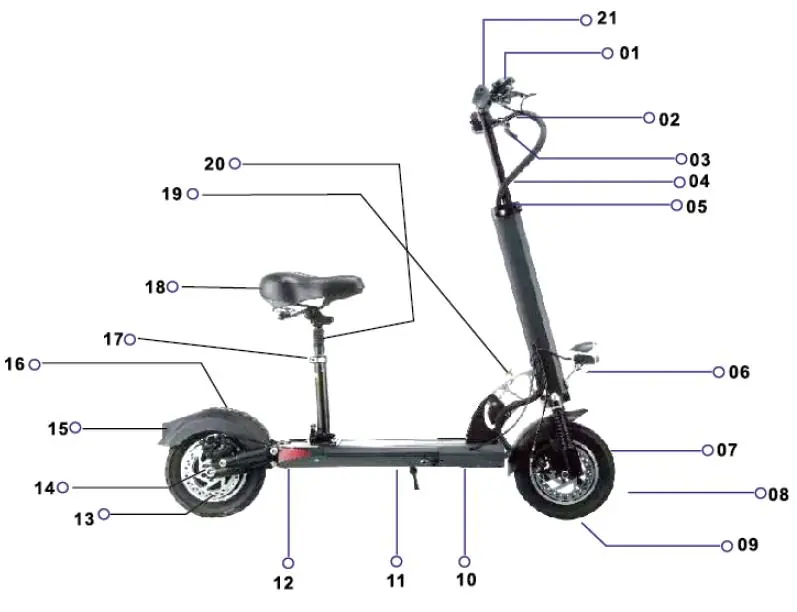
The scooter features a foldable design with a height-adjustable handlebar. Key components include the control panel, brake levers, charging port, and seat. Ensure all screws are tightened and parts are secure before use.
Unfolding
Follow these steps to prepare the scooter for riding:
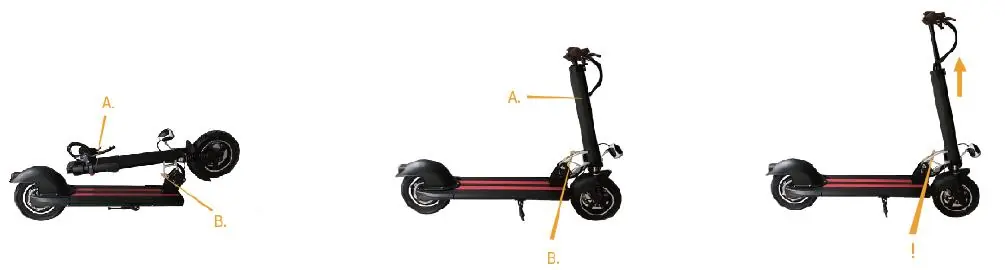
- Press the button on the folding mechanism (B) and slowly lift the handlebars (A).
- Raise the handlebars until they are locked into position (B).
- Loosen the handlebar clamp to set the desired height, then secure the clamp.
To fold the scooter, perform these steps in reverse. Do not step on the folding mechanism while riding.
Control panel and settings
The control panel displays current speed, distance traveled, and battery status. Hold the power button for 3 seconds to turn the unit on or off. Use the mode button to cycle through speed modes (L1, L2, L3). The scooter enters power-saving mode after 90 seconds of inactivity.
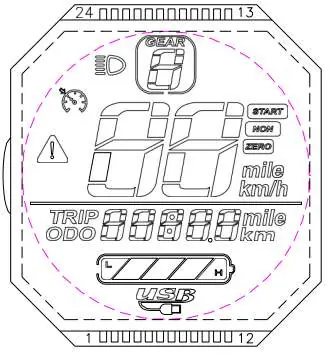
Advanced settings can be adjusted via P-codes (e.g., P01 for backlight, P02 for speed units, P03 for voltage). To enter settings, hold the power and mode buttons simultaneously. Use the power button to switch between parameters and the mode button to adjust values.
Remote controller
The remote includes an alarm lock (triggers alarm if the scooter moves), lock without alarm (locks display), and a horn button. Press the start button twice to unlock the scooter and turn on the display.
Charging and battery
Connect the charger to the charging port. The indicator light is red while charging and turns green when fully charged. The ideal charging temperature is +10°C to +30°C. Do not open or modify the battery. If the battery is damaged or leaks, stop using it immediately.
Riding technique
Place one foot on the board as close to the front as possible and the other on the ground. Push off, then press the throttle. Shift your weight backwards when braking to ensure stability. Practice in an open area without obstacles before riding in traffic.
Cleaning and maintenance
Switch off the scooter and disconnect the charger before cleaning. Use a damp cloth and mild detergent. Do not use high-pressure cleaners or solvents. Keep water away from the charging port. If brake stiffness needs adjustment, use the M5 screw; loosen to the right, tighten to the left.
Technical specifications
- Load capacity: 150 kg
- Maximal speed: ≤40 km/h
- Battery: 48V, 8-26 Ah
- Motor: DC brushless, 350W/500W
- Charging time: 5-8 hours
- Tires: 10 inches, inflatable
Practical help
Common problems
Scooter does not start
Check if the battery is fully charged and the display is turned on. Ensure the scooter is unlocked using the remote.
Error codes on display
ERRO 1: Motor error; ERRO 2: Handle error; ERRO 3: Control error; ERRO 4: Brake failure; ERRO 5: Surge protection; ERRO 6/7: Communication error.
Reduced braking efficiency
Adjust the brake stiffness by loosening or tightening the M5 screw.
Battery range is low
Check tire pressure, ensure the battery is fully charged, and avoid riding in cold environments.
Before use
- Check that all parts are properly assembled and tightened.
- Ensure the folding mechanism is securely locked.
- Verify battery charge level.
- Check tire condition and pressure.
- Wear personal protective equipment (helmet, sturdy shoes).
Specs in practice
- Load capacity
- Maximum weight the scooter can safely carry (150 kg).
- Maximal speed
- Top speed of the scooter (up to 40 km/h).
- Charging time
- Time required to fully charge the battery (5-8 hours).
Images and diagrams
- Folding mechanism: Press button B to release the lock and lift handlebars A.
- Control panel: Displays speed, gear, battery status, and distance.
Model compatibility
- Not for commercial use.
- Do not ride in water, oil, or on frozen surfaces.
- Do not use high-pressure cleaners for maintenance.

Manual page author
Michael Turner
Technical manual editor
Reviews PDF manuals for structure, safety notes, and practical product details so readers can find the right information quickly.