Home Appliances / Small Kitchen Appliances
Sencor SWK 1798BK Electric Kettle
Quick guide for the Sencor SWK 1798BK electric kettle. Learn how to operate, clean, descale, and safely use your 1.7L kettle with temperature indicator.
Table of contents
Quick guide from the manual
The Sencor SWK 1798BK is an electric kettle designed for heating water. Before first use, remove all packaging and boil a full kettle of water 2-3 times, discarding the water each time to clean the interior. Always ensure the water level is between the MIN and MAX marks before switching on. Never operate the kettle empty. If the kettle is accidentally turned on without water, the thermostat will interrupt the circuit; wait at least 10 minutes for the heating element to cool down before using it again.
Description of the appliance
The kettle consists of the following components:
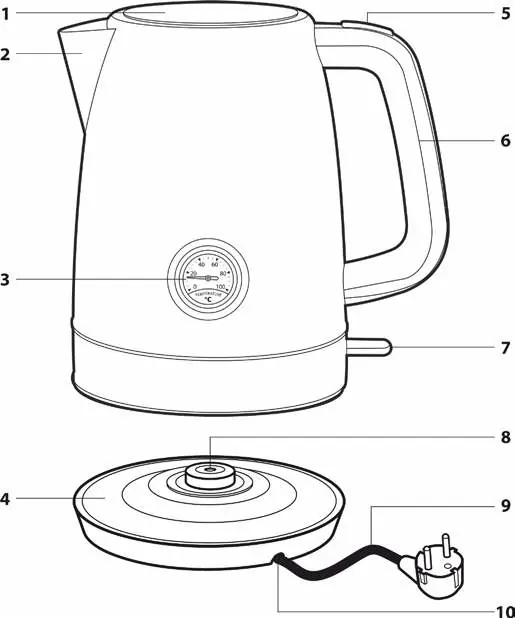
- A1: Lid
- A2: Spout
- A3: Water temperature indicator
- A4: Base stand
- A5: Open lid button
- A6: Handle
- A7: Backlit On/Off switch
- A8: Central connector
- A9: Power cord
- A10: Power cord groove
Operation
To operate the kettle:
- Set the required power cord length and place the base stand on a stable, even surface.
- Fill the kettle with water through the spout or by opening the lid using button A5. Ensure the water level is between the MIN and MAX marks.
- Place the kettle on the base stand and plug it into a grounded power socket.
- Push down the switch A7 to start the kettle. The backlight will turn on.
- The kettle will turn off automatically when the water boils. You can stop it manually at any time by setting the switch A7 to the off position.
- After use, disconnect the power cord and allow the kettle to cool down.
Cleaning and maintenance
Always disconnect the base stand from the power socket and allow the kettle to cool down before cleaning. Do not submerge the kettle, base stand, or power cord in water.
- External parts: Use a dry cloth or a cloth dipped in a weak solution of neutral kitchen detergent. Wipe dry afterwards.
- Internal parts: Use a soft sponge or clean cloth dipped in clean warm water. Do not use detergents.
- Filtration strainer: Clean regularly under running water using a fine nylon brush or soak in a vinegar-water solution (1:2 ratio).
Removing limescale deposits
Limescale buildup can affect the kettle's lifetime. Remove deposits based on water hardness (every month for hard water, every 2-3 months for soft/medium water) using one of these methods:
- Vinegar solution: Fill with 1L of water and 0.25L of 8% white vinegar. Boil, leave for 2 hours, empty, and boil clean water 4-5 times.
- Citric acid: Boil 1L of water, add 30g of citric acid, leave for 30 minutes, empty, and boil clean water 4-5 times.
Technical specifications
- Rated voltage range: 220-240 V
- Rated frequency: 50/60 Hz
- Rated power input: 1850-2200 W
- Volume: 1.7 L
Manufacturer information
Sencor
Practical help
Common problems
Kettle does not turn on
Ensure the power plug is connected to a grounded socket and the kettle is properly placed on the base stand.
Water temperature indicator not working
Ensure the water level is not significantly below the minimum (MIN) mark.
Kettle turns off prematurely
Check if the kettle was accidentally turned on without water; wait 10 minutes for the heating element to cool down.
Before use
- Remove all packaging materials.
- Place the base stand on a stable, dry surface.
- Fill the kettle to the MAX mark with clean water.
- Boil the water and discard it.
- Repeat the boiling process 2-3 times to clean the interior.
Images and diagrams
- A1-A10 identify the main parts including the lid, spout, temperature gauge, base, and power switch.
- The diagram shows the kettle separated from the base stand, illustrating the central connector (A8).
Model compatibility
- Only use the kettle with the base stand supplied with it.
- Not designed to be controlled by external timers or remote control devices.

Manual page author
Emily Carter
User documentation editor
Prepares concise manual descriptions and highlights the most useful setup, operation, and maintenance information for readers.