Home Appliances / Dehumidifiers
User Manual for Sencor SDH 1210WH Smart Dehumidifier & Air Purifier
Quick guide for the Sencor SDH 1210WH Smart Dehumidifier & Air Purifier. Learn how to install, operate, maintain, and troubleshoot your device, including Wi-Fi setup and filter replacement.
Table of contents
Manual images
Click an image to enlargeQuick Guide from the Manual
The Sencor SDH 1210WH is a smart dehumidifier and air purifier. Important Safety Note: This appliance uses R290 flammable refrigerant. It must be installed, operated, and stored in a room with a floor area greater than 9m². Do not puncture or burn the cooling circuit. Ensure the room is well-ventilated and free from ignition sources.
Description of the Appliance
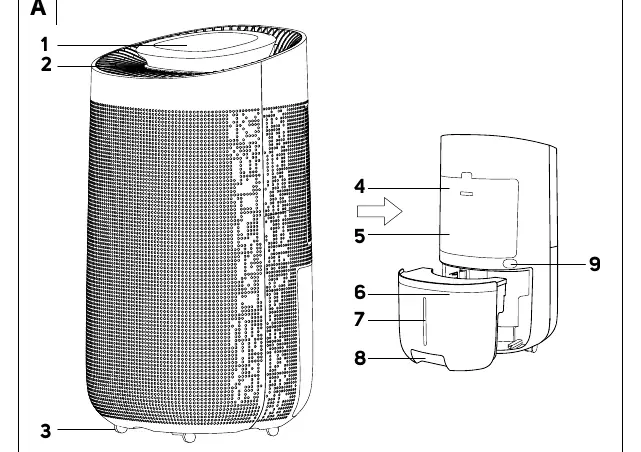
The appliance features an air inlet grille (A4), air outlet grille (A2), condensate tank (A6), and travel wheels (A3). The control panel (A1) includes indicators for Wi-Fi, humidity, fan speed, and tank status.
Installation
Before first use, remove all packaging and promotional stickers. Attach the travel wheels to the bottom of the appliance. Place the unit on a stable, level surface with at least 20 cm of free space on the sides and rear, and 50 cm in front and above. Ensure the condensate tank is correctly installed.
Filter Installation
The pre-filter is pre-installed. The H11 filter is supplied separately. To install the H11 filter: remove the grille, remove the pre-filter, insert the H11 filter, and replace the grille. Warning: Never use both filters at the same time.
Operation
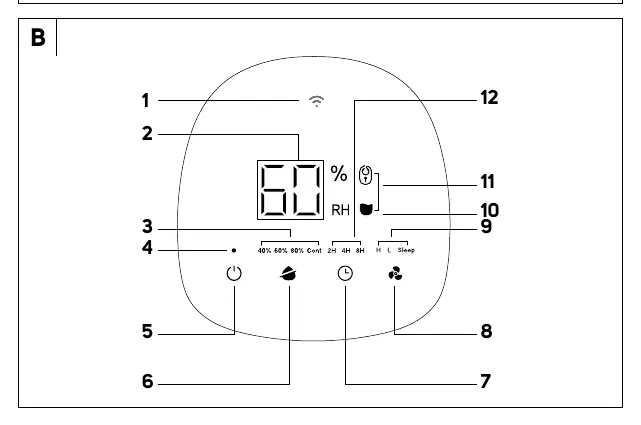
Connect to a grounded power socket. Press the power button to turn the unit on. It will start in default continuous dehumidification mode. Use the control panel buttons to set target humidity, fan speed (H/L/Sleep), and timer (2H/4H/8H).
App Control
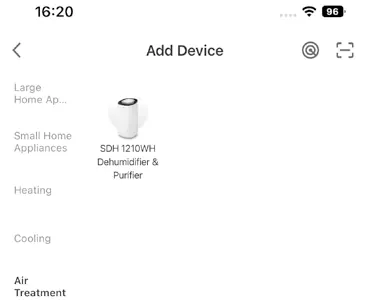
The device can be controlled via the Sencor HOME application. You can pair the device via Bluetooth or by using the QR code provided in the app. Ensure the device is in stand-by mode and the Wi-Fi icon is flashing to initiate pairing.
Maintenance
Disconnect the power plug before cleaning. Clean the condensate tank monthly. Clean the pre-filter and H11 filter every two weeks (or more often if used daily). Use a soft brush or vacuum on the lowest setting for the H11 filter. Do not wash the H11 filter in water.
Troubleshooting
If the unit stops, check if the condensate tank is full or incorrectly installed. If the Power On light flashes, the H11 filter needs replacement. If error codes E1, E2, or C8 appear, turn off the unit and contact an authorized service center. L3 or L4 codes indicate ambient temperature issues (too high or too low).
Manufacturer information
Sencor
Practical help
Common problems
Power On indicator light is flashing quickly
The H11 filter needs to be replaced. Follow the replacement instructions in the manual.
Dehumidifier is not removing humidity
Check if room temperature and humidity are low. Ensure air inlet/outlet vents are not blocked.
Dehumidifier stops running
Check if the condensate tank is full or incorrectly installed. Empty the tank if necessary.
Error codes E1, E2, or C8 on display
These indicate sensor or refrigerant issues. Turn off the unit and contact an authorized service center.
Before use
- Remove all packaging material and promotional labels.
- Attach the travel wheels to the bottom of the appliance.
- Ensure the appliance is placed on a dry, stable, and horizontal surface.
- Check that the condensate tank is correctly installed.
- Verify that the power socket voltage matches the rating label.
- Ensure there is at least 20 cm of clearance on the sides/rear and 50 cm in front/above.
Specs in practice
- Dehumidification capacity
- 12 liters per 24 hours (at 30°C/80% humidity).
- Operating temperature
- The unit functions between 5°C and 35°C.
- Recommended room area
- Suitable for rooms between 18 and 30 m².
Images and diagrams
- A1-A12: Identifies physical components including the control panel, grilles, tank, and filters.
- B1-B12: Identifies control panel elements including Wi-Fi, humidity display, fan speed, and timer settings.
Model compatibility
- Requires 220–240 V, 50 Hz power supply.
- Compatible with Sencor HOME application via Wi-Fi and Bluetooth.
- Do not use in rooms with open flames or ignition sources.

Manual page author
David Miller
Documentation analyst
Organizes user manual content into clear summaries, with attention to model details, product context, and everyday usability.