Power / Batteries & Chargers
User Manual for SKYRC eFUEL 2000W Adjustable DC Power Supply
Quick guide for the SKYRC eFUEL 2000W DC power supply. Includes setup instructions, operation steps, safety warnings, and technical specifications.
PDF source: ZH · summary: English
Quick answers from the manual
Quick answer
- The SKYRC eFUEL 2000W is an adjustable DC power supply that converts AC input to an 8V-36V DC output with up to 55A of current. p. 2
Key actions
- Adjusting voltage and current p. 9
First start
- Connect to AC power, ensure switch is OFF, then turn on. p. 8
Show 2 more answers Show less
Technical specifications
| Parameter | Value | Meaning | Pages |
|---|---|---|---|
| Output Voltage | 8.0V-36.0V | Adjustable output range | p. 7 |
| Output Current | 1.0A-55.0A | Adjustable output range | p. 7 |
Where to find it in the PDF
- Product Diagram p. 3
- Specifications p. 7
Table of contents
Manual images
Click an image to enlargeQuick Guide
The SKYRC eFUEL 2000W is a high-power adjustable DC power supply. Important: This device is available in two specific AC input voltage versions (100-120V or 200-240V). These versions are not interchangeable. Ensure you have the correct version for your region before connecting to power to avoid damage.
Product Overview
The eFUEL 2000W converts AC power into an adjustable 8V-36V DC output, providing up to 55A of continuous current. It features an LCD display for real-time monitoring and multiple protection systems.
Key Features
- Adjustable Output: 8V-36V voltage range and 1A-55A current range.
- Protection Systems: Includes Over Current Protection (OCP), Over Temperature Protection (OTP), Short Circuit Protection (SCP), and Over Load Protection (OLP).
- Smart Cooling: Fan speed adjusts automatically based on internal temperature.
- Output Interface: Equipped with an XT90 connector for safer and more convenient charging.
Operation
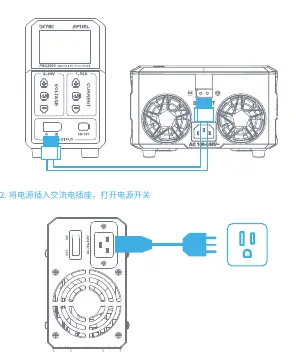
- Connection: Ensure the power switch is in the OFF position. Connect the device to the AC power source.
- Power On: Plug the power cord into the AC outlet and turn on the power switch.
- Adjustment: The LCD screen will display real-time voltage and current. Press the Enter/Start button to enter edit mode. Use the + or - buttons to adjust the values.
- Output Control: Use the DC Power Switch to enable or disable the DC output.
Safety Precautions
- Do not use the power supply near water sources (e.g., bathtubs, sinks, wet basements, or swimming pools).
- Do not disassemble the device. Repairs should only be performed by qualified service personnel.
- Do not use unauthorized accessories.
- Avoid overloading power outlets or extension cords.
- Do not insert objects into the power slots to prevent short circuits or electric shock.
Technical Specifications
- Input Voltage: AC 100-120V or AC 200-240V (Version dependent, not compatible).
- Output Voltage: 8.0V-36.0V (Default 12V).
- Output Current: 1.0A-55.0A (Default 30A).
- Efficiency: >85% (at AC230V).
- Operating Temperature: 0°C to 40°C.
- Dimensions: 289 x 90 x 158 mm.
- Weight: 2.9 kg.
Warranty and Service
The product includes a one-year warranty. If the product malfunctions within the warranty period, contact your dealer for assistance. For further inquiries, you can contact the manufacturer via email at [email protected].
Practical help
Common problems
Device does not turn on
Verify the AC power cord is securely connected and the power switch is in the ON position.
Voltage or current cannot be adjusted
Ensure you have pressed the Enter/Start button to enter the edit mode before attempting to change values with the +/- buttons.
Before use
- Verify your local AC voltage matches the device version (100-120V or 200-240V).
- Ensure the power switch is in the OFF position before connecting to AC power.
- Check that the XT90 output connector is securely connected to your load.
- Ensure the device is placed in a well-ventilated area.
Show more Show less
Specs in practice
- Output Voltage
- Adjustable range from 8.0V to 36.0V.
- Output Current
- Adjustable range from 1.0A to 55.0A.
- Protection (OCP/OTP/SCP/OLP)
- Safety features that shut down or limit output during over-current, over-temperature, short-circuit, or over-load conditions.
Images and diagrams
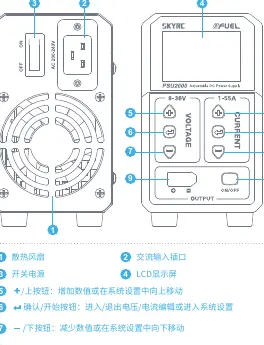
- 1: Cooling Fan
- 2: AC Input Socket
- 3: Power Switch
- 4: LCD Display
- 5: +/- Buttons for adjustment
Model compatibility
- The device is sold in two distinct voltage versions (100-120V or 200-240V) which are not interchangeable.

Manual page author
Michael Turner
Technical manual editor