Electronics / Monitor Accessories
User Manual for StarTech.com 160W-POWER-ADAPTER Universal DC Power Adapter
Quick-start guide for the StarTech.com 160W-POWER-ADAPTER. Includes wiring instructions for two and three-conductor terminal block connectors, output specifications, and connection procedures.
Table of contents
Manual images
Click an image to enlargeQuick Guide
The StarTech.com 160W-POWER-ADAPTER is a universal DC power adapter designed for devices requiring a terminal block connection. The most critical aspect of installation is ensuring correct polarity: the Black wire with the Red flag is Positive (+), and the Black wire with the White flag is Negative (-). Always disconnect the adapter from the power cord before performing any wiring or connector changes.
Package Contents
- Universal Power Adapter with 4ft (1.2m) Cable
- 4ft (1.2m) Power Cords (x4)
- Two Conductor Terminal Block Connector (Preinstalled)
- Three Conductor Terminal Block Connector
- Quick-Start Guide
Requirements
- Small Flat Head Screwdriver
- Device with a Two or Three Conductor Terminal Block Connector
Wiring and Connection
The adapter comes with a Two Conductor Terminal Block preinstalled. If your device requires a Three Conductor Terminal Block, you must swap the connector.
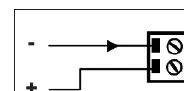
Using the Two Conductor Terminal Block Connector
- Plug the Two Conductor Terminal Block Connector on the adapter into the terminal connector on your device.
- Ensure the polarity of the input power is correctly matched with the terminal block pins. Refer to your device's vendor manual for specific wiring requirements.
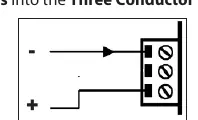
Using the Three Conductor Terminal Block Connector
- Disconnect the adapter from the power cord.
- Use a small flat head screwdriver to loosen the screws on the preinstalled Two Conductor Terminal Block Connector and remove the terminal block wires.
- Use a small flat head screwdriver to loosen the screws on the Three Conductor Terminal Block Connector (included).
- Insert the terminal block wires into the Three Conductor Terminal Block Connector, ensuring the Red flag wire is connected to Positive and the White flag wire is connected to Negative.
- Tighten the screws to secure the wires.
- Plug the Three Conductor Terminal Block Connector on the adapter into the terminal connector on your device.
Technical Specifications
- Output Voltage: 24V
- Output Current: 6.6A
- Total Power: 158.4W
Regulatory Compliance
This equipment has been tested and complies with the limits for a Class B digital device, pursuant to part 15 of the FCC Rules. It also complies with Canadian ICES-003. For warranty information, visit www.startech.com/warranty.
Official resources from the manual
Practical help
Common problems
Device not powering on
Ensure the polarity of the input power is correctly matched with the Terminal Block Pins. Verify that the Red flag wire is Positive and the White flag wire is Negative.
Connector does not fit device
The adapter includes both a Two Conductor and a Three Conductor Terminal Block Connector. If the preinstalled connector does not match your device, swap it for the included Three Conductor version.
Before use
- Ensure you have a small flat head screwdriver.
- Verify your device uses a two or three-conductor terminal block.
- Disconnect the adapter from the power cord before wiring.
- Identify the positive (Red flag) and negative (White flag) wires.
Specs in practice
- Output Voltage
- 24V DC
- Output Current
- 6.6A
Images and diagrams
- The wiring diagrams illustrate the polarity for the terminal block connectors: Black wire with Red flag is Positive (+), Black wire with White flag is Negative (-).
Model compatibility
- Compatible with devices requiring a 24V DC power input via terminal block.

Manual page author
David Miller
Documentation analyst
Organizes user manual content into clear summaries, with attention to model details, product context, and everyday usability.