Power / Solar Inverters
User Manual for Sol-Ark 15K Inverter and Pytes Battery System
Quick guide for connecting and configuring the Sol-Ark 15K inverter with Pytes V5 batteries. Includes cable specifications, DIP switch settings, and inverter programming steps.
Table of contents
Manual images
Click an image to enlargeQuick guide from the manual
This document provides instructions for integrating Pytes V5 batteries with Sol-Ark 15K, 12K, and 8K inverters. Key steps include connecting power and communication cables, setting the master battery DIP switch, and configuring the inverter software settings to recognize the battery.
Cable connections
Connect the power cables between the inverter and the battery or busbars. Ensure the correct cable gauge is used based on your model:
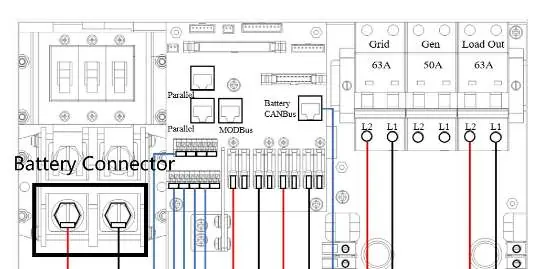
- Sol-Ark 15K: 4/0 gauge power cable.
- Sol-Ark 8K/12K: 3/0 gauge power cable.
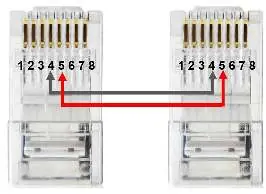
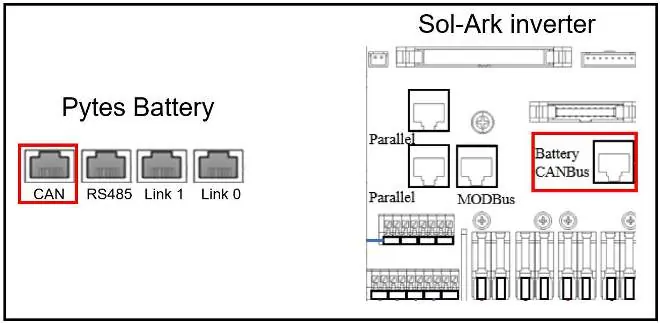
For communication, a standard ethernet cable can be used as the Sol-Ark pin assignment matches the Pytes V Series battery. Plug one end into the CAN port of the Pytes battery and the other into the Sol-Ark Battery CANBus port.
DIP switch configuration
Set the DIP switch on every master battery according to the provided diagram. If your battery model only has four levers, configure only the first four levers as shown in the manual.
Inverter programming
To configure the inverter for the battery, follow these steps on the inverter screen:
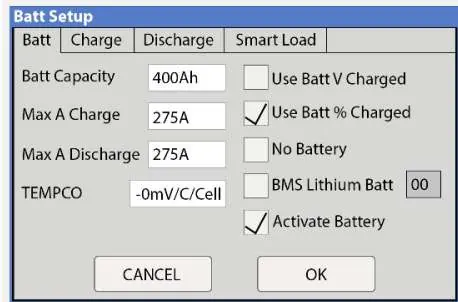
- Press the gear icon on the top right of the screen.
- Select the Battery Setup menu.
- Select Use Batt% Charged.
- Select BMS Lithium Batt and set the value to 00.
- Turn on Activate Battery.
- Touch OK to save settings.
Confirming communication
Once configured, verify the connection by checking the inverter screen. If communication is successful, the battery information (such as Voltage, Current, SOC, and SOH) will be displayed on the screen. For further settings like Grid Setup or PV settings, refer to the main Sol-Ark inverter manual.
Practical help
Common problems
Communication failure between battery and inverter
Check that the ethernet cable is securely plugged into the CAN port on the battery and the Battery CANBus port on the inverter. Verify that the DIP switch settings are correct.
Battery not recognized by inverter
Ensure 'BMS Lithium Batt' is set to '00' in the Battery Setup menu and 'Activate Battery' is turned on.
Before use
- Verify you are using the correct power cable gauge (4/0 for 15K, 3/0 for 8K/12K).
- Ensure the communication cable is a standard ethernet cable.
- Set the master battery DIP switch correctly.
- Access the Battery Setup menu on the inverter screen.
Specs in practice
- BMS Lithium Batt: 00
- Required setting for Pytes battery communication.
Images and diagrams
- Battery Connectors: Shows the physical connection points for power cables on the inverter.
- DIP Switch Setting: Visual guide for the correct lever positions on the master battery.
- Communication Cable: Pinout diagram for the ethernet cable connection.
Model compatibility
- Compatible with Pytes V5 series batteries.
- Standard ethernet cable is sufficient for communication.

Manual page author
Michael Turner
Technical manual editor
Reviews PDF manuals for structure, safety notes, and practical product details so readers can find the right information quickly.