Electronics / Speakers & Soundbars
Somogyi DB 2130AC Wireless Doorbell
Quick guide for the Somogyi DB 2130AC wireless doorbell. Learn how to install the battery, mount the transmitter, adjust volume and melodies, and troubleshoot common range issues.
Quick answers from the manual
Quick answer
- The Somogyi DB 2130AC is a wireless doorbell with 36 melodies and 5 volume levels. It operates on a 433.92 MHz frequency with a range of up to 200 meters. p. 1
Key actions
- Insert the LR23A 12V battery into the transmitter by opening the housing with a screwdriver. p. 1
- Plug the receiver into a 230V~ / 50Hz wall outlet. p. 1
First start
- Install the battery in the transmitter, plug the receiver into an outlet, and test the connection. p. 1
Show 3 more answers Show less
Problems and fixes
Doorbell not working
Check battery polarity and replace if necessary.
p. 1Technical specifications
| Parameter | Value | Meaning | Pages |
|---|---|---|---|
| Frequency | 433.92 MHz | Operating radio frequency | p. 1 |
| Range | 200m | Maximum range in open terrain | p. 1 |
Where to find it in the PDF
- Installation and Operation p. 1
Table of contents
Manual images
Click an image to enlargeQuick guide from the manual
The Somogyi DB 2130AC is a wireless doorbell system consisting of a plug-in receiver and a battery-operated transmitter. It features 36 selectable melodies and 5 adjustable volume levels. The system operates on a 433.92 MHz frequency with a range of up to 200 meters in open terrain.
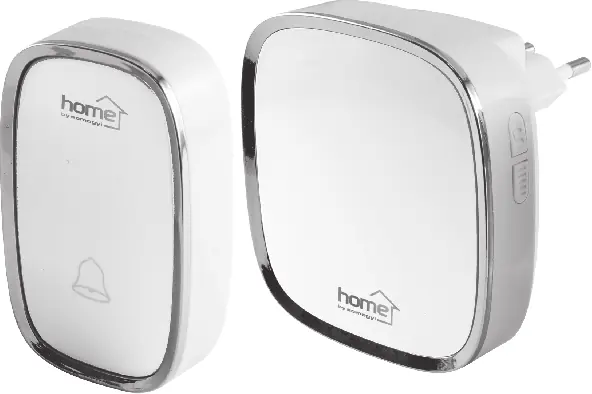
Installation
Transmitter:

- Use a flat-head screwdriver to gently pry open the transmitter housing.
- Insert an LR23A 12V battery, ensuring the correct polarity (+/-) as indicated inside the compartment.
- Close the housing securely.
- Test the connection before permanently mounting the transmitter.
Receiver:
- Plug the receiver directly into a standard 230V~ / 50Hz wall outlet.
Operation
The receiver is equipped with buttons on the side to control the doorbell functions:
- Melody Selection: Use the designated button to cycle through the 36 available melodies.
- Volume Control: Use the volume button to adjust the sound level across 5 available settings.
Safety and Maintenance
- The device is intended for indoor use only.
- Do not disassemble the unit. If the device is damaged, contact a service professional.
- Keep the transmitter away from metal objects and other electronic devices, as these can significantly reduce the operating range.
- If the doorbell stops working, first check the battery in the transmitter.
Technical Specifications
- Power Supply (Receiver): 230V~ / 50Hz
- Power Supply (Transmitter): LR23A 12V battery
- Frequency: 433.92 MHz
- Range: Up to 200 meters (open terrain)
- Protection: IP44 (protected against splashing water)
Manufacturer information
Somogyi Elektronic Kft.
Practical help
Common problems
Doorbell does not ring
Check if the battery in the transmitter is inserted correctly or if it needs to be replaced.
Short operating range
Ensure the transmitter is not placed near metal surfaces, reinforced concrete, or other electronic devices that may cause signal interference.
Before use
- Ensure the receiver is plugged into a 230V~ / 50Hz power outlet.
- Verify the LR23A 12V battery is installed in the transmitter with correct polarity.
- Test the signal range between the transmitter and receiver before final mounting.
- Ensure the transmitter is protected from direct rain if mounted outdoors.
Show more Show less
Images and diagrams
- The transmitter housing can be opened using a flat-head screwdriver inserted into the side slot.
- The receiver plugs directly into a wall socket and features side buttons for volume and melody selection.
Model compatibility
- The transmitter requires an LR23A 12V battery.
- The receiver requires a 230V~ / 50Hz power supply.

Manual page author
Emily Carter
User documentation editor