Electronics / Camera Lenses
Operating Instructions for Sony FE 20mm F1.8 G Lens
Quick guide for the Sony FE 20mm F1.8 G lens. Learn how to attach the lens, use the focus mode switch, adjust aperture, and understand key specifications.
PDF source: JA · summary: English
Quick answers from the manual
Quick answer
- To attach the lens, align the white index on the lens with the white index on the camera mount and rotate clockwise until it locks. Use the focus mode switch on the lens to toggle between AF and MF. p. 1
Key actions
- Attaching the lens p. 1
- Switching between AF and MF p. 1
Problems and fixes
Vignetting
Close the aperture by 1 to 2 stops.
p. 1Show 2 more answers Show less
Technical specifications
| Parameter | Value | Meaning | Pages |
|---|---|---|---|
| Focal length | 20mm | Fixed focal length lens. | p. 1 |
| Minimum aperture | f/22 | Smallest aperture setting. | p. 1 |
Where to find it in the PDF
- Operating Instructions p. 1, 2
Table of contents
Manual images
Click an image to enlargeQuick guide from the manual
This document provides essential operating instructions for the Sony FE 20mm F1.8 G lens. It covers proper attachment, focus settings, aperture control, and safety precautions. Always ensure the lens is securely mounted and handle it with care to avoid damage.
Identifying the Parts
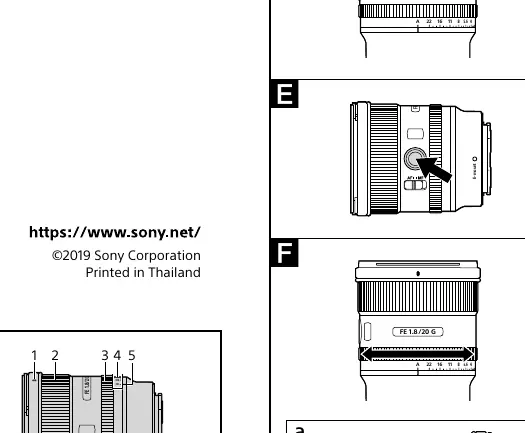
- Lens hood index: Alignment mark for the hood.
- Focusing ring: Manual focus adjustment.
- Aperture ring: Adjusts the aperture value.
- Focus mode switch: Toggle between AF and MF.
- Focus hold button: Temporarily cancels AF.
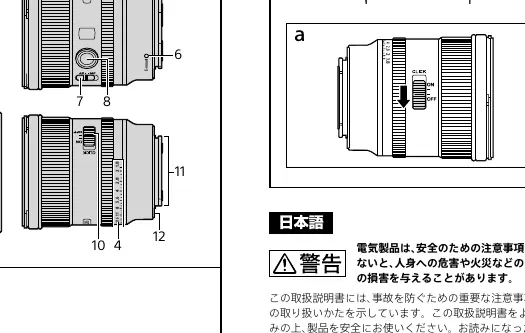
- Aperture click switch: Enables/disables aperture ring clicks (useful for video).
Attaching and Detaching the Lens
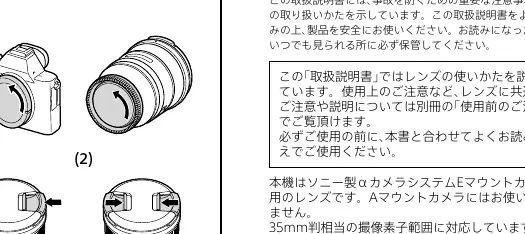
To attach:
- Remove the front and rear lens caps and the camera body cap.
- Align the white index on the lens barrel with the white index on the camera mount.
- Insert the lens into the camera mount and rotate it clockwise until it locks.
To detach:
- Hold down the lens release button on the camera.
- Rotate the lens counterclockwise until it stops, then detach it.
Attaching the Lens Hood
Using a lens hood is recommended to reduce flare and ensure image quality.
- Align the red line on the lens hood with the red line on the lens.
- Insert the hood into the mount and rotate it clockwise until it clicks into place.
- Ensure the red dot on the hood aligns with the red line on the lens.
Focusing
The focus mode can be switched between AF (Auto Focus) and MF (Manual Focus) using the switch on the lens.
- AF: Both the camera and lens must be set to AF.
- MF: Turn the focusing ring to adjust focus manually.
- Focus Hold Button: Pressing this button during AF cancels AF. The focus is fixed while the button is held.
Adjusting the Exposure
You can adjust the aperture using the aperture ring on the lens.
- Automatic Exposure: Align the 'A' on the aperture scale to the aperture index.
- Manual Exposure: Rotate the aperture ring to the desired f-stop (f/1.8 to f/22).
- Aperture Click Switch: Set to OFF when shooting movies to reduce the sound of the aperture ring.
Notes on Use
- Do not leave the lens exposed to the sun or bright light sources to prevent internal damage or fire.
- When shooting against the sun, keep the sun completely out of the angle of view.
- This lens is not waterproof. Keep water drops away from the lens.
- When using a flash, remove the lens hood to avoid blocking the flash light.
- If vignetting occurs (dark corners), close the aperture by 1 to 2 stops.
Specifications
- Focal length: 20mm
- Minimum focus: 0.19m (AF) / 0.18m (MF)
- Minimum aperture: f/22
- Filter diameter: 67mm
- Dimensions: Approx. 73.5mm x 84.7mm
- Mass: Approx. 373g
Manufacturer information
Sony Group Corporation
Practical help
Common problems
Vignetting (dark corners in images)
Close the aperture by 1 to 2 stops.
Shadow at the bottom of the picture when using flash
Remove the lens hood and adjust the shooting distance.
Aperture ring noise during video recording
Set the aperture click switch to OFF.
Before use
- Remove front and rear lens caps.
- Remove camera body cap.
- Ensure the lens is compatible with your E-mount camera.
- Align white index marks before mounting.
- Ensure the lens hood is clicked into place.
Show more Show less
Specs in practice
- Focal length (20mm)
- The lens provides a wide-angle view suitable for landscapes and architecture.
- Minimum aperture (f/22)
- The smallest opening for light, providing the deepest depth of field.
- Filter diameter (67mm)
- The size of filters required for this lens.
Images and diagrams
- The parts diagram identifies the focus ring, aperture ring, and switches.
- The attachment diagram shows the alignment of the white index marks.
- The aperture click switch diagram shows the location of the switch for video recording.
Model compatibility
- Designed for Sony E-mount cameras.
- Not compatible with A-mount cameras.
- Compatible with 35mm format image sensors.
- Can be used on APS-C cameras (focal length equivalent changes).

Manual page author
Emily Carter
User documentation editor