Electronics / Camera Lenses
Operating Instructions for Sony FE 24-240mm F3.5-6.3 OSS Lens
A comprehensive operating guide for the Sony FE 24-240mm F3.5-6.3 OSS lens. This manual covers lens installation, focusing modes, usage precautions, and technical specifications.
PDF source: JA · summary: English
Quick answers from the manual
Quick answer
- This manual provides operating instructions for the Sony FE 24-240mm F3.5-6.3 OSS lens, including installation, focusing, and usage precautions. p. 1
Key actions
- Attaching the lens p. 1
- Attaching the lens hood p. 1
First start
- Remove caps, align white index, and rotate clockwise until it locks. p. 1
Show 3 more answers Show less
Problems and fixes
Flash shadow
Remove lens hood and shoot at least 1m away.
p. 1
Vignetting
Close aperture by 1 to 2 stops.
p. 1Technical specifications
| Parameter | Value | Meaning | Pages |
|---|---|---|---|
| Focal length | 24-240mm | Zoom range | p. 1 |
| Minimum focus | 0.5-0.8m | Closest focusing distance | p. 1 |
| Weight | 780g | Approximate mass | p. 1 |
Where to find it in the PDF
- Operating Instructions p. 1, 2
Table of contents
Manual images
Click an image to enlargeQuick guide from the manual
This lens is designed for Sony E-mount cameras. It is not compatible with A-mount cameras. Before using the lens, ensure you have read both this manual and the separate "Precautions before using" document.
Identifying the parts
The lens features a zoom ring, focal-length scale, focusing ring, and lens contacts. Always hold both the camera and the lens firmly when carrying the camera with the lens attached.
Attaching and detaching the lens
To attach:
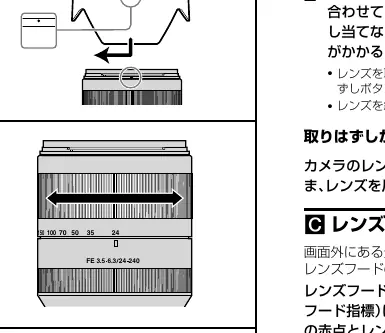
- Remove the rear and front lens caps and the camera body cap.
- Align the white index on the lens barrel with the white index on the camera (mounting index).
- Insert the lens into the camera mount and rotate it clockwise until it locks.
- Do not press the lens release button on the camera while mounting.
To detach:
- While holding down the lens release button on the camera, rotate the lens counterclockwise until it stops, then detach the lens.
Attaching the lens hood
It is recommended to use the lens hood to reduce flare and ensure maximum image quality. Align the red line on the lens hood with the red line on the lens, then insert and rotate clockwise until it clicks into place. Remove the lens hood when using a built-in camera flash to avoid blocking the light.
Zooming and focusing
Zooming: Rotate the zooming ring to the desired focal length.
Focusing: There are three ways to focus:
- Auto focus: The camera focuses automatically.
- DMF (Direct manual focus): After the camera focuses in auto focus, you can make a fine adjustment manually.
- Manual focus: You focus manually.
Notes on use
- Flash: When using a flash, remove the lens hood and shoot at least 1 meter away from the subject to avoid shadows.
- Vignetting: If the corners of the screen become darker than the center, close the aperture by 1 to 2 stops.
- Weather resistance: While designed with dust and splash-proofness in mind, the lens is not waterproof. Keep water drops away from the lens.
Specifications
- Focal length: 24-240mm
- Minimum focus: 0.5-0.8m
- Maximum magnification: 0.27x
- Minimum aperture: f/22-f/40
- Filter diameter: 72mm
- Dimensions: Approx. 80.5 x 118.5 mm
- Weight: Approx. 780g
Manufacturer information
Sony Group Corporation
Practical help
Common problems
Shadow at the bottom of the picture when using flash.
Remove the lens hood and ensure you are shooting at least 1 meter away from the subject.
Vignetting (dark corners of the screen).
Close the aperture by 1 to 2 stops to reduce this phenomenon.
Before use
- Remove front and rear lens caps.
- Remove camera body cap.
- Align white mounting index on lens with camera.
- Rotate lens clockwise until it locks.
- Attach lens hood for better image quality.
Show more Show less
Specs in practice
- Focal length
- 24-240mm range for versatile shooting.
- Minimum focus
- 0.5-0.8m distance from the image sensor to the subject.
- Filter diameter
- 72mm size for compatible filters.
Images and diagrams
- Diagrams illustrate the lens parts, including the zoom ring and focusing ring.
- Step-by-step visual guides for attaching and detaching the lens.
- Instructions for attaching the lens hood correctly.
Model compatibility
- Designed for Sony E-mount cameras.
- Not compatible with A-mount cameras.
- Compatible with 35mm format image sensors.

Manual page author
Michael Turner
Technical manual editor