Electronics / Camera Lenses
Tamron SP 24-70mm F/2.8 Di VC USD G2 Lens (Model A032) Instruction Manual
Quick guide for the Tamron SP 24-70mm F/2.8 Di VC USD G2 lens. Learn how to mount the lens, use focus and vibration compensation modes, operate the zoom lock, and troubleshoot common issues like lens creep or vignetting.
Quick answers from the manual
Quick answer
- To mount the lens, align the attachment mark with the camera mount and rotate until it clicks. Use the AF/MF switch for focus selection and the VC switch for image stabilization. Always engage the zoom lock at 24mm when carrying the lens. p. 1
Key actions
- Mounting the lens p. 1
- Activating Vibration Compensation (VC) p. 1
- Using the Zoom Lock p. 1
Problems and fixes
Lens barrel extends when carrying
Use the zoom lock switch at the 24mm position.
p. 3
Vignetting with built-in flash
Remove the lens hood.
p. 3Show 3 more answers Show less
Maintenance and reset
- Cleaning the lens p. 2
Technical specifications
| Parameter | Value | Meaning | Pages |
|---|---|---|---|
| Minimum focus distance | 0.38m (15 inches) | Closest distance the lens can focus. | p. 3 |
| Optical construction | 17 elements in 12 groups | Internal lens structure. | p. 2 |
| Diaphragm | 9-blade | Number of blades in the aperture mechanism. | p. 2 |
Where to find it in the PDF
- Warnings and Instructions p. 1
- Precautions and Function Introduction p. 2
- Common Issues p. 3
Table of contents
Quick guide from the manual
This lens is designed for DSLR cameras. Key operations include mounting the lens by aligning the attachment marks, selecting focus modes (AF/MF), and utilizing the Vibration Compensation (VC) system for handheld shooting. Always use the zoom lock switch when carrying the lens to prevent barrel extension.
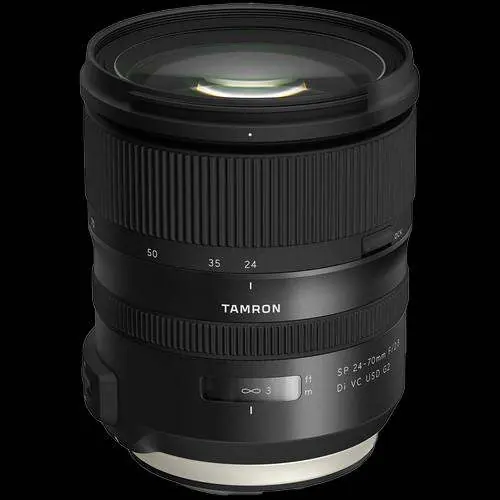
Mounting and removing the lens
Before attaching or removing the lens, ensure the camera is turned off.
- Mounting: Remove the rear lens cap. Align the lens attachment mark on the barrel with the corresponding mark on the camera mount. Insert the lens and rotate clockwise (for Canon) or counter-clockwise (for Nikon) until it clicks into the locking position.
- Removing: Press the lens release button on the camera and rotate the lens in the opposite direction.
Focus and vibration compensation
The lens features an AF/MF switch on the barrel. Set to AF for autofocus using the USD motor, or MF for manual focus. The lens supports full-time manual focus override, allowing fine-tuning even in AF mode by turning the focus ring while the shutter button is pressed halfway.
The VC (Vibration Compensation) switch activates image stabilization. Set to ON for handheld shooting (reduces shake by up to 5 stops). Use Mode 1 for general use and Mode 2 for panning shots. Set to OFF when using a tripod.
Zoom operation and lens hood
Rotate the zooming ring to adjust the focal length between 24mm and 70mm. To prevent the lens barrel from extending under its own weight while carrying, set the lens to the 24mm position and slide the zoom lock switch toward the camera. Push the switch away from the camera to release.
To attach the flower-shaped lens hood, align the hood's attachment mark with the release mark on the lens barrel and rotate clockwise. For storage, the hood can be reversed and mounted on the lens.
Precautions and maintenance
- Cleaning: Use a blower to remove surface dust. For fingerprints, use a lens cleaning tissue with a drop of cleaning solution, wiping in a rotary motion from center to edge. The front element has a protective fluorine coating.
- Storage: Always attach both front and rear lens caps and store in a cool, dry place to prevent fungal growth.
- Moisture: The lens features moisture-resistant construction with seals, but avoid changing lenses in dusty or humid environments.
- Flash: Remove the lens hood when using the camera's built-in flash to prevent vignetting (shadowing).
Technical specifications
- Minimum focus distance: 0.38m (15 inches)
- Magnification ratio: 1:5
- Optical construction: 17 elements in 12 groups
- Diaphragm: Rounded 9-blade
- Vibration Compensation: 5 stops (CIPA standard)
Troubleshooting
- Lens creep: The barrel may extend when pointed downward. Always use the zoom lock switch at 24mm when carrying.
- Image blur: Ensure VC is ON for handheld shots. For tripod use, set VC to OFF.
- Autofocus issues: Ensure the switch is set to AF and electronic contacts on the lens and camera are clean.
- Vignetting: Remove the lens hood when using the built-in flash, especially at wide-angle settings.
Manufacturer information
Tamron Corporation
Practical help
Common problems
Lens barrel extends when carrying (lens creep)
Always set the lens to the 24mm position and engage the zoom lock switch.
Image blur at slow shutter speeds
Ensure the VC switch is set to ON for handheld shooting. If using a tripod, set VC to OFF.
Vignetting (shadowing) at the bottom of the image
Remove the lens hood when using the camera's built-in flash, especially at wide-angle settings.
Autofocus not working
Verify the lens switch is set to AF and the camera's focus mode is correctly configured. Clean the electronic contacts on both the lens and camera.
Before use
- Ensure the camera is turned off before mounting or removing the lens.
- Remove the rear lens cap.
- Align the lens attachment mark with the camera mount mark.
- Rotate the lens until it clicks into the locking position.
- Check that the AF/MF switch is set to the desired mode.
Show more Show less
Specs in practice
- Minimum focus distance
- 0.38m (15 inches) throughout the zoom range.
- VC (Vibration Compensation)
- Image stabilization system providing up to 5 stops of compensation.
- Optical construction
- 17 elements in 12 groups, including specialized glass elements for aberration control.
Model compatibility
- Compatible with both full-frame and APS-C format DSLR cameras.
- On APS-C bodies, the equivalent focal length is approximately 38.6-112mm.
- Compatible with the optional TAP-in Console for firmware updates and customization.

Manual page author
Emily Carter
User documentation editor