Electronics / Camera Lenses
Operating Instructions for Sony FE 20-70mm F4 G Lens
Quick guide for the Sony FE 20-70mm F4 G lens. Learn how to attach the lens, adjust focus and aperture, use the focus hold button, and understand technical specifications.
Quick answers from the manual
Quick answer
- This manual provides operating instructions for the Sony FE 20-70mm F4 G lens, covering installation, focus modes, aperture control, and technical specifications. p. 1
Key actions
- Attach lens p. 1
- Detach lens p. 1
- Switch AF/MF p. 1
First start
- Remove caps, align white index, insert lens, rotate until it clicks. p. 1
Problems and fixes
Lens rattles
Normal, does not affect performance.
p. 1
Shadow in flash photos
Remove lens hood.
p. 1Technical specifications
| Parameter | Value | Meaning | Pages |
|---|---|---|---|
| Focal length | 20-70mm | Zoom range | p. 1 |
| Minimum aperture | f/22 | Smallest aperture | p. 1 |
| Filter diameter | 72mm | Filter size | p. 1 |
Where to find it in the PDF
- Operating Instructions p. 1
- Warranty p. 2, 3
Table of contents
Quick guide from the manual
This document provides operating instructions for the Sony FE 20-70mm F4 G lens. Key procedures include attaching and detaching the lens, adjusting focus modes (AF/MF), and controlling the aperture. Always ensure the lens is securely attached before use and handle with care to avoid damage.
Identifying the Parts
The lens features several controls, including:
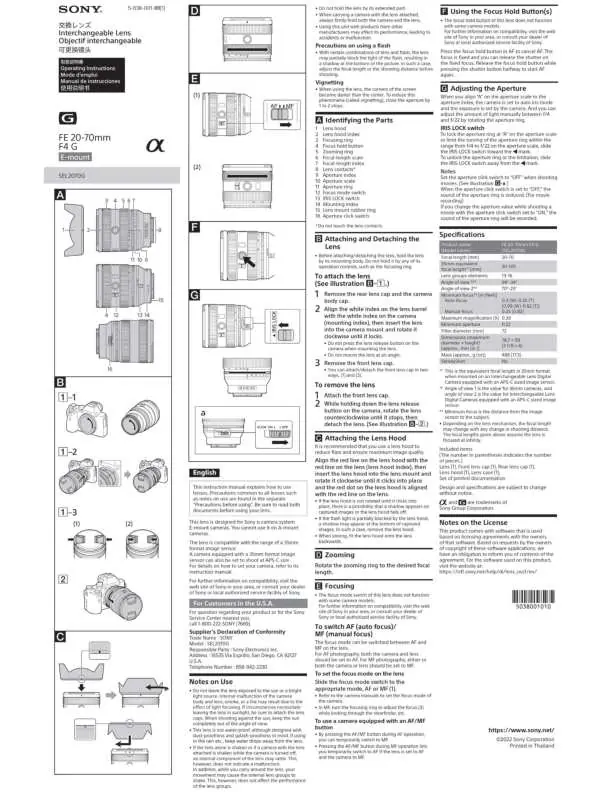
- Focusing ring: Used for manual focus.
- Zooming ring: Adjusts the focal length.
- Focus hold button: Used to fix focus (not supported on all camera models).
- Focus mode switch: Toggles between AF and MF.
- Aperture ring: Manually adjusts the aperture.
- IRIS LOCK switch: Locks the aperture ring.
- Aperture click switch: Toggles the click sound of the aperture ring (useful for movies).
Attaching and Detaching the Lens
To attach the lens:
- Remove the rear lens cap and the camera body cap.
- Align the white index on the lens barrel with the white index on the camera (mounting index).
- Insert the lens into the camera mount and rotate it clockwise until it locks.
- Remove the front lens cap.
To detach the lens:
- Attach the front lens cap.
- While holding down the lens release button on the camera, rotate the lens counter-clockwise until it stops, then detach the lens.
Attaching the Lens Hood
It is recommended to use the lens hood to reduce flare and ensure image quality. Align the red line on the lens hood with the red line on the lens (lens hood index), then insert the lens hood into the lens mount and rotate it clockwise until it clicks into place.
Zooming and Focusing
Rotate the zooming ring to the desired focal length. To switch between Auto Focus (AF) and Manual Focus (MF), use the focus mode switch on the lens. For AF photography, both the camera and lens should be set to AF. In MF mode, turn the focusing ring to adjust the focus.
Adjusting the Aperture
Align 'A' on the aperture scale to the aperture index to set the camera to auto iris mode. You can manually adjust the aperture between f/4 and f/22 using the aperture ring. Use the IRIS LOCK switch to lock the ring at 'A' or limit the range. Set the aperture click switch to 'OFF' when shooting movies to silence the aperture ring clicks.
Notes on Use
- Do not leave the lens exposed to the sun or bright light sources to prevent internal damage.
- The lens is not waterproof; keep water drops away.
- Internal rattling when the lens is shaken is normal and does not indicate a malfunction.
- If the lens hood blocks the flash, remove the hood to prevent shadows.
Specifications
- Product name: FE 20-70mm F4 G (SEL2070G)
- Focal length: 20-70mm
- Minimum aperture: f/22
- Filter diameter: 72mm
- Weight: Approx. 488g
Manufacturer information
Sony Group Corporation
Practical help
Common problems
Lens rattles when shaken
This is normal behavior due to internal lens groups and does not indicate a malfunction.
Shadow appears in flash photos
The lens hood may be partially blocking the flash. Remove the lens hood.
Focus hold button not working
The button is not supported on all camera models. Check compatibility.
Before use
- Remove rear lens cap and camera body cap.
- Align white index on lens with camera mount.
- Rotate lens clockwise until it locks.
- Set focus mode switch to AF or MF as required.
- Attach lens hood for better image quality.
Specs in practice
- Focal length
- 20-70mm range for versatile shooting.
- Minimum aperture
- f/22, the smallest opening for light.
- Filter diameter
- 72mm, required size for screw-on filters.
Images and diagrams
- Diagrams illustrate the parts of the lens including the focusing ring, zoom ring, and aperture controls.
- Visual steps show the correct alignment of the white index for mounting the lens.
- Instructions provided for attaching and detaching the lens hood.
Model compatibility
- Designed for Sony E-mount cameras.
- Not compatible with A-mount cameras.

Manual page author
Michael Turner
Technical manual editor
Reviews PDF manuals for structure, safety notes, and practical product details so readers can find the right information quickly.