Computers / Storage
User Guide for StarTech.com 1AHC-DESK-ARM-REST Height-Adjustable Ergonomic Desk Arm Rest
Quick-start guide for the StarTech.com 1AHC-DESK-ARM-REST. Includes installation steps, adjustment instructions, safety warnings, and technical specifications for this ergonomic desk arm rest.
Quick answers from the manual
Quick answer
- The 1AHC-DESK-ARM-REST is an ergonomic desk arm rest that clamps to desks up to 2 inches thick. It features adjustable height, tilt, and swivel functionality to support the forearm. p. 1, 2
Key actions
- Install the arm rest p. 1
- Adjust height p. 2
Technical specifications
| Parameter | Value | Meaning | Pages |
|---|---|---|---|
| Max Load | 5kg | Maximum weight capacity | p. 1 |
| Desk Thickness | 2in (58mm) | Maximum compatible desk thickness | p. 1 |
Where to find it in the PDF
- Quick-Start Guide p. 1
- Operation p. 2
Table of contents
Manual images
Click an image to enlargeQuick Guide
The StarTech.com 1AHC-DESK-ARM-REST is an ergonomic desk arm rest designed to support the forearm and reduce strain. It features adjustable height, tilt, and swivel capabilities. Ensure your desk thickness does not exceed 2 inches (58mm) before installation.
Product Components
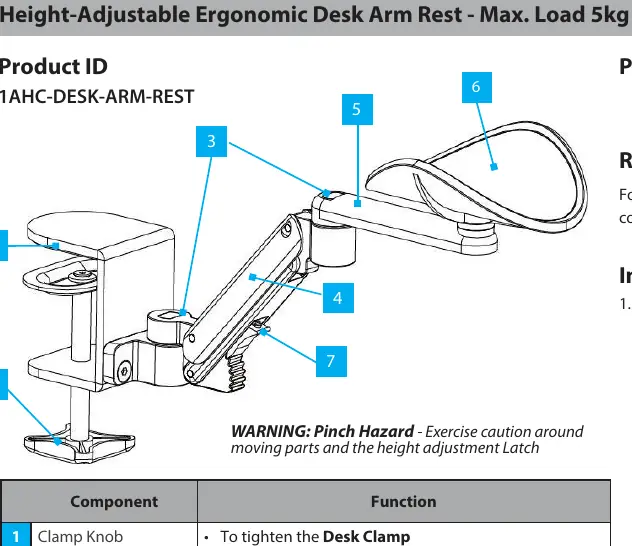
- Clamp Knob: Tightens the desk clamp.
- Desk Clamp: Mounts the arm rest to the desk.
- Swivel Points: Allows for tilt and swivel arm movement.
- Tilt Arm: Tilts from 0 to 45 degrees and rotates 180 degrees.
- Swivel Arm: Rotates 360 degrees around the tilt arm.
- Elbow/Forearm Support: Adjustable height from -5mm to 70mm above the desk; rotates 360 degrees.
- Height Adjustment Latch: Provides six adjustment angles (0, 10, 20, 25, 35, and 45 degrees).
Installation
- Adjust the Desk Clamp to the approximate thickness of your desk using the Clamp Knob located on the bottom of the clamp.
- Place the Desk Arm Rest at the desired edge of the desk.
- Tighten the Clamp securely to the desk using the Clamp Knob.
Operation and Adjustments
- Swivel: Rotate the Swivel Arm from the desk to the desired position.
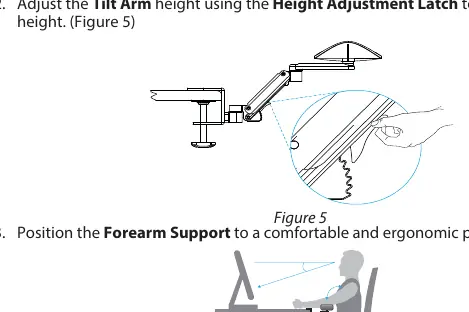
- Height Adjustment: Adjust the Tilt Arm height using the Height Adjustment Latch to the desired height.
- Positioning: Position the Forearm Support to a comfortable and ergonomic position.
Safety Information
Warning: Pinch Hazard. Exercise caution around moving parts and the height adjustment latch. Read the entire manual and ensure instructions are fully understood before assembling or using the product.
Technical Specifications
- Maximum Load: 5kg
- Desk Thickness Compatibility: Up to 2 inches (58mm)
- Height Adjustment Range: -5mm to 70mm
- Tilt Range: 0 to 45 degrees
- Swivel Range: 360 degrees
Official resources from the manual
Practical help
Common problems
Pinch hazard during adjustment
Exercise caution around moving parts and the height adjustment latch when making changes.
Before use
- Verify desk thickness is 2 inches (58mm) or less.
- Read the entire manual before assembly.
- Ensure the clamp is tightened securely to the desk surface.
- Check that the arm rest is positioned comfortably for ergonomic support.
Specs in practice
- Height Adjustment
- Allows positioning the support from 5mm below to 70mm above the desk surface.
Images and diagrams
- Figure 1 & 2: Demonstrates how to adjust the clamp knob and secure the arm rest to the desk edge.
- Figure 3 & 4: Shows the rotation range of the swivel arm.
- Figure 5: Illustrates using the height adjustment latch to set the tilt arm height.
- Figure 6: Shows the correct ergonomic positioning of the forearm support.
Model compatibility
- Compatible with desks or tables up to 2 inches (58mm) thick.

Manual page author
Emily Carter
User documentation editor
Prepares concise manual descriptions and highlights the most useful setup, operation, and maintenance information for readers.