Electronics / Monitor Accessories
User Guide for StarTech.com 1MFSW Desk Monitor Riser
Quick-start guide for the StarTech.com 1MFSW Desk Monitor Riser. Includes assembly instructions, component list, and technical specifications for this 33lb capacity stand.
Quick answers from the manual
Quick answer
- The StarTech.com 1MFSW is a desk monitor riser that elevates your monitor by 3.5 inches (9cm) and supports a maximum weight of 33lb (15kg). p. 1
Key actions
- Assemble the riser by attaching the rubber feet to the supports, then securing the supports to the stand with the provided screws using a Phillips head screwdriver. p. 1
Technical specifications
| Parameter | Value | Meaning | Pages |
|---|---|---|---|
| Weight Capacity | 33lb (15kg) | Maximum load capacity | p. 1 |
| Height | 3.5in (9cm) | Elevation height | p. 1 |
Where to find it in the PDF
- Assembly Instructions p. 1
- Warranty and Regulatory p. 2
Table of contents
Manual images
Click an image to enlargeQuick guide from the manual
This document provides assembly instructions for the StarTech.com 1MFSW Desk Monitor Riser. The stand is designed to elevate your monitor by 3.5 inches (9cm) and supports a maximum weight of 33lb (15kg).
Package Contents
- Monitor Riser Stand (x 1)
- Riser Supports (x 2)
- Rubber Feet (x 4)
- Screws (x 4)
- Quick-Start Guide (x 1)
Requirements
To assemble the monitor riser, you will need a Phillips head screwdriver.
Assembly Instructions
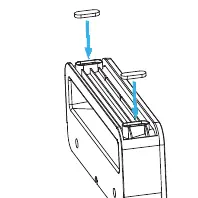
- Attach Rubber Feet: Carefully remove the adhesive backing from the four Rubber Feet. Attach them into the designated pockets on the left and right Riser Supports.
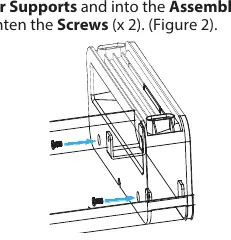
- Attach Riser Supports: Place one of the Riser Supports onto the bottom of the Monitor Riser Stand, ensuring the assembly tabs fit inside the support.
- Secure with Screws: Insert two screws through the Riser Support and into the assembly tabs. Use a Phillips head screwdriver to tighten the screws.
- Repeat: Repeat the process for the remaining Riser Support.
Technical Specifications
- Weight Capacity: 33lb (15kg)
- Height: 3.5in (9cm)
Warranty Information
This product is backed by a 5-year warranty. For further information on warranty terms and conditions, please visit www.startech.com/warranty.
Official resources from the manual
Practical help
Before use
- Ensure you have a Phillips head screwdriver available.
- Verify all package contents are present (Stand, 2 supports, 4 rubber feet, 4 screws).
- Confirm your monitor weight does not exceed 33lb (15kg).
Specs in practice
- Weight Capacity
- The maximum load the stand can support is 33lb (15kg).
Images and diagrams
- Figure 1: Shows the attachment of rubber feet to the riser supports.
- Figure 2: Shows the alignment of the riser support to the stand and the insertion of screws.
Model compatibility
- Supports monitors up to 33lb (15kg).

Manual page author
David Miller
Documentation analyst
Organizes user manual content into clear summaries, with attention to model details, product context, and everyday usability.