Electronics / Monitor Accessories
Installation Guide for StarTech.com Privacy Filter
Quick-start guide for installing StarTech.com privacy filters. Learn how to apply adhesive strips for permanent installation or use mounting tabs for removable setups.
Quick answers from the manual
Quick answer
- StarTech.com privacy filters can be installed using either adhesive strips (for permanent/slim bezel setups) or mounting tabs (for removable setups). p. 1, 2
Key actions
- Install using Adhesive Strips p. 1
- Install using Mounting Tabs p. 2
Maintenance and reset
- Clean fingerprints from the filter using the Wiping Cloth. p. 1, 2
Show 2 more answers Show less
Technical specifications
| Parameter | Value | Meaning | Pages |
|---|---|---|---|
| Privacy Angle | > 30° | Effective privacy angle off-center | p. 1 |
| Field of View | 60° | Total field of view | p. 1 |
Where to find it in the PDF
- Adhesive Strip Installation p. 1
- Mounting Tab Installation p. 2
Table of contents
Manual images
Click an image to enlargeQuick guide from the manual
This document provides installation instructions for StarTech.com Privacy Filters. Users can choose between two installation methods based on their needs: Adhesive Strips for permanent installations or displays with slim bezels, and Mounting Tabs for installations that require frequent removal of the filter.
Components
- Privacy Filter: Provides privacy effect at angles greater than 30 degrees off-center.
- Mounting Tabs: Used to secure the filter to the display bezels.
- Adhesive Strips: Used to secure the filter directly to the screen surface.
- Finger Notch: Assists in grabbing the filter for removal.
Method 1: Adhesive Strips
- Clean the screen thoroughly using the provided Wiping Cloth.
- Identify the side of the Privacy Filter intended to face outward. Place the filter on a clean, flat surface with the outward-facing side down.
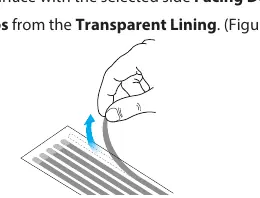
- Remove the adhesive strips from the transparent lining.
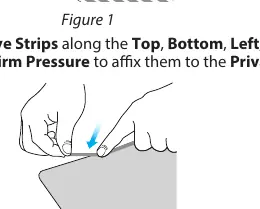
- Align the adhesive strips along the top, bottom, left, and right edges of the filter. Apply firm pressure to secure them.
- Remove the protective backing from the adhesive strips.
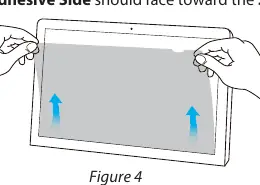
- Attach the filter to the screen, starting from the bottom and working towards the top. Ensure the adhesive side faces the screen.
- Apply gentle pressure on the locations where the adhesive strips were installed.
- Clean any fingerprints from the filter using the Wiping Cloth.
Method 2: Mounting Tabs
- Clean the screen and bezels using the Wiping Cloth.
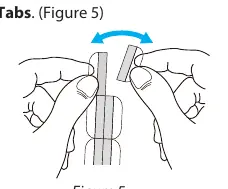
- Separate the mounting tabs.
- Remove the protective backing from the mounting tabs.
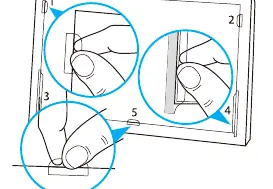
- Install one short and one long mounting tab on the left bezel.
- Repeat the previous step for the right bezel.
- Install one short mounting tab on the bottom bezel. Note: Depending on display size, additional tabs may be required on the sides or bottom.
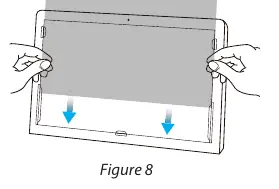
- Slide the Privacy Filter between the installed mounting tabs and the screen.
- Clean any fingerprints from the filter using the Wiping Cloth.
Usage and Maintenance
The privacy filter is effective when viewing the screen at angles greater than 30 degrees off-center from the left or right, providing a total field of view of 60 degrees. Note that the adhesive on both the mounting tabs and adhesive strips becomes less effective with frequent removal and reapplication.
Official resources from the manual
Practical help
Common problems
Adhesive strips or mounting tabs losing effectiveness
Avoid frequent removal and reapplication of the privacy filter.
Before use
- Clean the screen and bezels thoroughly with the provided cloth.
- Determine if you need a permanent installation (Adhesive Strips) or a removable one (Mounting Tabs).
- Ensure the privacy filter is oriented with the correct side facing outward before applying adhesive.
- Check if your display has slim bezels; if so, adhesive strips are recommended.
Show more Show less
Specs in practice
- Privacy Effect
- Effective at angles greater than 30 degrees off-center from the left or right.
- Field of View
- The total field of view is 60 degrees.
Images and diagrams
- Figure 1-3: Illustrates the application of adhesive strips to the filter edges.
- Figure 4: Shows the attachment of the filter to the screen.
- Figure 5-7: Demonstrates the placement of mounting tabs on the display bezels.
- Figure 8: Shows sliding the filter into the mounting tabs.
Model compatibility
- Adhesive strips are recommended for permanent installations or displays with slim bezels.
- Mounting tabs are recommended for installations requiring frequent removal of the filter.

Manual page author
Emily Carter
User documentation editor