Electronics / Networking
User Manual for Strong Repeater 1200P
Quick setup guide for the Strong Repeater 1200P. Learn how to install your Wi-Fi extender using the WPS method or manual web configuration, and find tips for optimal placement to ensure the best signal coverage.
Table of contents
Manual images
Click an image to enlargeQuick Guide from the Manual
The Strong Repeater 1200P can be set up using two primary methods: the WPS (Wi-Fi Protected Setup) button for an automatic connection, or a manual configuration via a web browser. For the best performance, ensure the repeater is placed within a reasonable range of your main router, avoiding thick walls or obstacles.
Installation with WPS
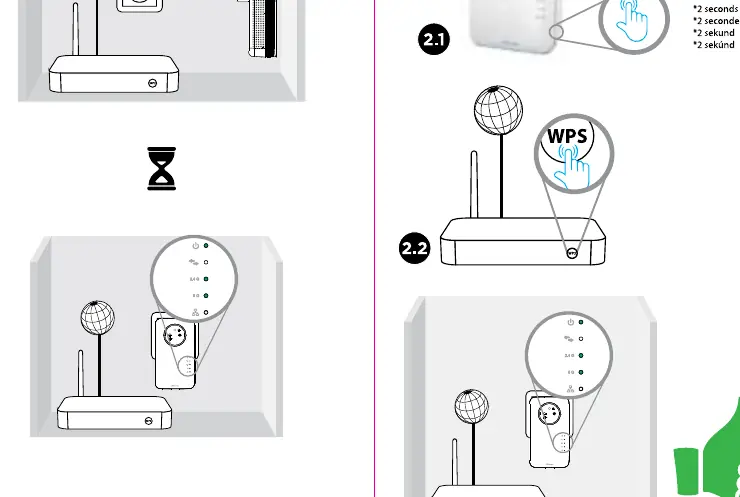
- Plug the repeater into a power outlet near your router.
- Wait for the device to initialize.
- Press the WPS button on the repeater for approximately 2 seconds.
- Within 2 minutes, press the WPS button on your main router.
- Wait for the connection to establish. Once connected, you can move the repeater to your desired location.
Manual Installation via Web Interface
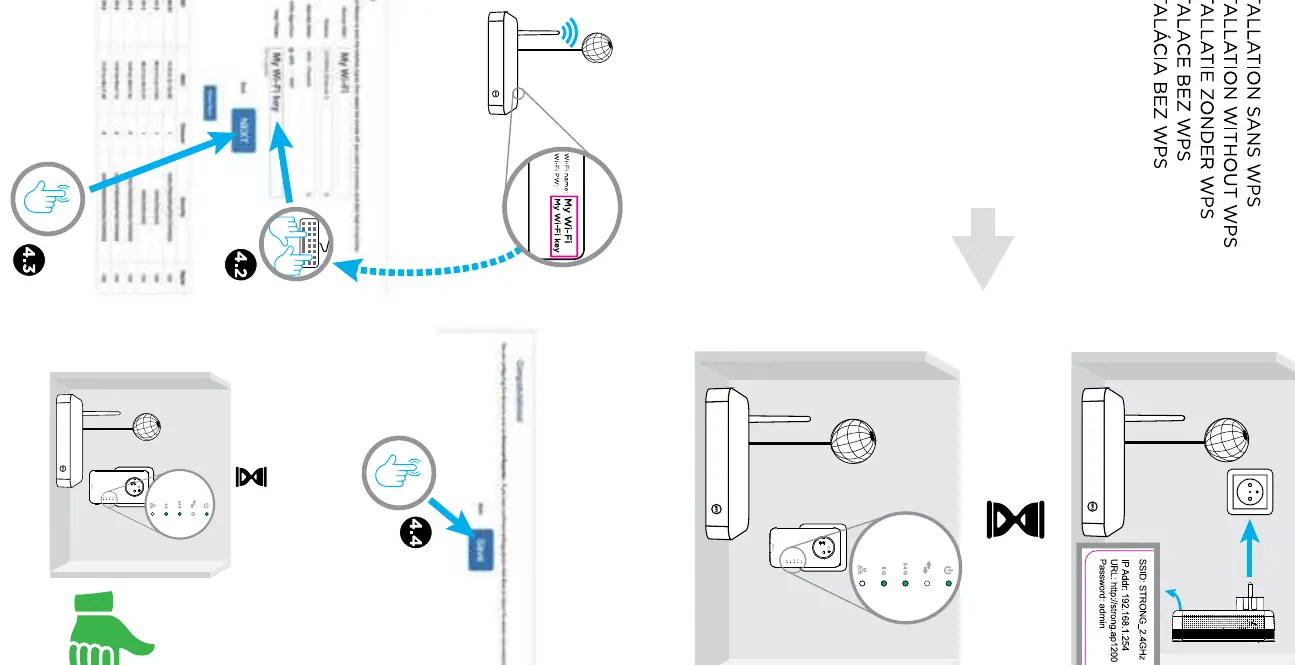
- Plug the repeater into a power outlet.
- On your computer or smartphone, search for available Wi-Fi networks and connect to the network named STRONG_2.4GHz.
- Open a web browser and enter the address http://strongap1200 in the address bar.
- Log in using the default credentials: Username: admin, Password: admin.
- Follow the on-screen instructions to select your existing Wi-Fi network and enter your Wi-Fi password to complete the configuration.
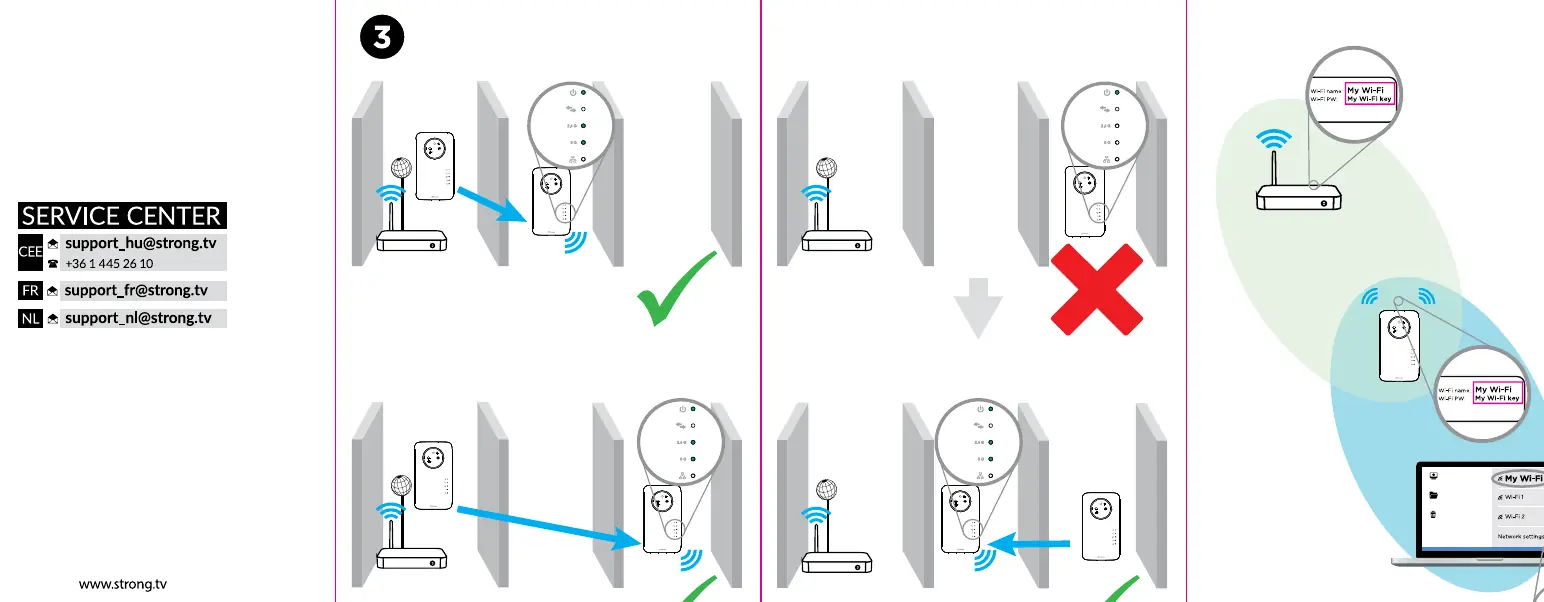
Optimal Placement
Proper placement is critical for the repeater to function correctly. The device should be placed in a location where it can still receive a strong signal from the main router. Avoid placing the repeater behind thick walls, large metal objects, or in areas with significant interference. If the repeater is too far from the router, the connection will be unstable or non-existent.
Service and Support
If you encounter issues, you can contact the service center. For CEE, email [email protected] or call +36 1 445 26 10. For France, email [email protected]. For the Netherlands, email [email protected].
Practical help
Common problems
Repeater fails to connect via WPS
Ensure you press the WPS button on the router within 2 minutes of pressing the button on the repeater. If it fails, try the manual web interface method.
Cannot access the web configuration page
Ensure your device is connected to the 'STRONG_2.4GHz' Wi-Fi network before entering the URL http://strongap1200.
Weak signal or frequent disconnections
The repeater is likely placed too far from the main router. Move it closer to the router to improve signal strength.
Before use
- Ensure your main router is powered on and broadcasting a Wi-Fi signal.
- Have your current Wi-Fi network name (SSID) and password ready.
- Place the repeater in the same room as the router during the initial setup process.
- Ensure your computer or smartphone has Wi-Fi enabled.
Images and diagrams
- Green checkmarks in the manual indicate the recommended distance and placement for the repeater relative to the router.
- A red X indicates placement that is too far from the router or obstructed by walls, which will result in poor performance.
Model compatibility
- The repeater is compatible with standard Wi-Fi routers supporting WPS or manual configuration.

Manual page author
Emily Carter
User documentation editor
Prepares concise manual descriptions and highlights the most useful setup, operation, and maintenance information for readers.