Electronics / Networking
User Manual for Ernitec Electra-PoE Injector
Quick guide for the Ernitec Electra-PoE Injector (1GB-60W and 10GB-90W models). Includes installation diagrams, technical specifications, and troubleshooting steps for power and connectivity issues.
Quick answers from the manual
Quick answer
- The Ernitec Electra-PoE Injector provides power and data to PoE devices. Connect your network switch to the 'Data in' port and your PoE device to the 'PoE out' port. Ensure the cable length is under 100m and the device is properly grounded. p. 1, 2
Key actions
- Connect the switch to the 'Data in' port and the PoE device to the 'PoE out' port. p. 1
- Connect the device to a power source and ensure proper grounding via the rear shell grounding screw. p. 2
Problems and fixes
Power indicator light off
Check power supply connection and input voltage.
p. 2
Access port light off
Check connection to access device and ensure cable length <= 100m.
p. 2
PoE port not powering PD
Verify PD compatibility and power requirements.
p. 2Technical specifications
| Parameter | Value | Meaning | Pages |
|---|---|---|---|
| Max Power Output | 60W or 90W | Maximum power delivery capacity based on model. | p. 1 |
| Working Temperature | -20 to 50°C | Operating temperature range. | p. 1 |
Where to find it in the PDF
- Product Overview and Specs p. 1
- Installation and Troubleshooting p. 2
Table of contents
Manual images
Click an image to enlargeQuick guide from the manual
The Ernitec Electra-PoE Injector is designed to provide power and data over Ethernet (PoE) to compatible devices such as AP routers, IP cameras, and IP phones. Ensure your network cable length does not exceed 100 meters. If you encounter issues, verify the power supply, cable connections, and that the connected device (PD) power requirements do not exceed the injector's output capacity.
Product Description
This industrial PoE injector complies with IEEE 802.3af/at/bt standards. It supports automatic detection of PoE-compliant devices and matches power output accordingly. It is suitable for network environments lacking nearby power outlets.
Specifications
- Models: Electra-PoE-1GB-60W (60W output), Electra-PoE-10GB-90W (90W output).
- Network Protocols: IEEE 802.3, 802.3u, 802.3ab, 802.3x, 802.3ae.
- Network Media: Cat5 UTP (<=100m) or Cat6e (10000BASE-TX).
- PoE Standards: IEEE 802.3af, 802.3at, 802.3bt.
- Working Environment: Temperature -20 to 50°C; Storage -40 to 85°C; Humidity 5-95% (non-condensing).
- Protection: 6kV surge protection, IP20 protection grade.
Product Application
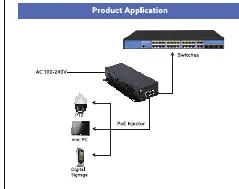
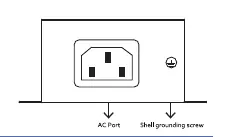
The injector connects between a network switch and the powered device (PD). Connect the switch to the 'Data in' port and the PD (e.g., PTZ camera, mini PC) to the 'PoE out' port. Ensure the device is properly grounded using the shell grounding screw on the rear panel.
Troubleshooting
- Power indicator light off: Check if the switch is connected to the power supply and that the input voltage meets requirements.
- Access port light off: Ensure the switch is connected to the access device and the network cable length is 100 meters or less.
- PoE port not powering PD: Verify the device is PoE-compatible. Ensure the power required by the PD does not exceed the maximum output of the PoE port.
Manufacturer information
Ernitec
Practical help
Common problems
Power indicator light is off
Check power supply connection and ensure input voltage meets device requirements.
Access port indicator light is off
Verify connection to the access device and ensure network cable length is 100 meters or less.
PoE port not powering the device (PD)
Ensure the connected device is PoE-compatible and that its power requirement does not exceed the injector's maximum output.
Before use
- Verify the model (1GB-60W or 10GB-90W) matches your power requirements.
- Ensure network cable length is 100 meters or less.
- Check that the connected device is PoE-compliant.
- Ensure proper grounding via the shell grounding screw.
- Verify the operating environment temperature is between -20 and 50°C.
Specs in practice
- IEEE 802.3af/at/bt
- Standards defining PoE power delivery levels.
- 6kV surge protection
- Built-in protection against electrical surges.
Images and diagrams
- Application Diagram: Shows the flow from Switch -> PoE Injector -> PD (Camera/PC).
- Panel Port Description: Identifies the Power input, PoE out port, and Data in port.
- Rear Panel: Shows the AC power input and the shell grounding screw location.
Model compatibility
- Supports 10/100/1000M network adaptive (1GB model).
- Supports 10/100/1000/10000M network adaptive (10GB model).
- Requires Cat5 or higher cabling depending on speed requirements.

Manual page author
Michael Turner
Technical manual editor
Reviews PDF manuals for structure, safety notes, and practical product details so readers can find the right information quickly.