Lighting / Fixtures
User Manual for Sunco 5/6" LED Smooth Retrofit Downlight
Quick guide for the Sunco 5/6" LED Smooth Retrofit Downlight (DL_SMDR56-13W). Includes installation steps, wiring instructions, safety warnings, and troubleshooting tips.
Table of contents
Manual images
Click an image to enlargeQuick Guide from the Manual
This document provides installation and safety instructions for the Sunco 5/6" LED Smooth Retrofit Downlight. Before beginning, ensure the power is turned off at the circuit breaker. This fixture is designed for indoor use in damp locations and is not compatible with 3rd party sensors, photo controls, occupancy sensors, or timing devices.
What's in the Box
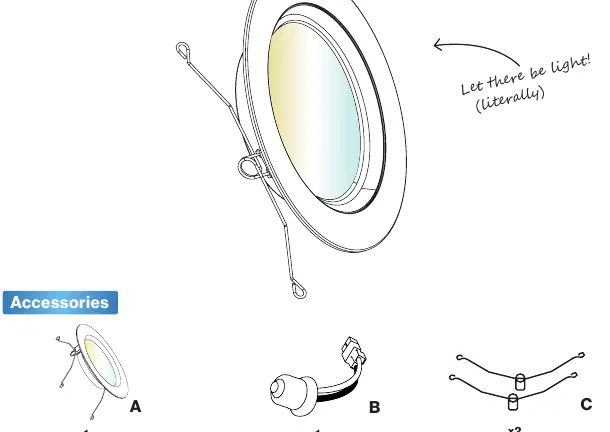
- Light Fixture
- TP24 to E26 Adapter
- Spring Clips
Safety Information
To reduce the risk of fire, electric shock, or physical injury, please adhere to the following:
- Turn off the circuit breaker before installation.
- Installation should be performed by a person familiar with the construction and operation of the product.
- Proper grounding is required.
- Do not alter, relocate, or remove wiring during installation.
- Keep the fixture away from corrosive substances.
- Suitable for damp locations (-4°F to 113°F). Not for use where directly exposed to water.
Installation Guide
Step 1: Preparation
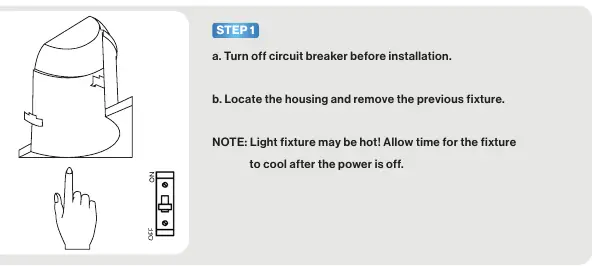
Turn off the power at the circuit breaker and locate the housing. Remove the previous fixture. Allow time for the fixture to cool if it was recently in use.
Step 2: Prepare the Luminaire
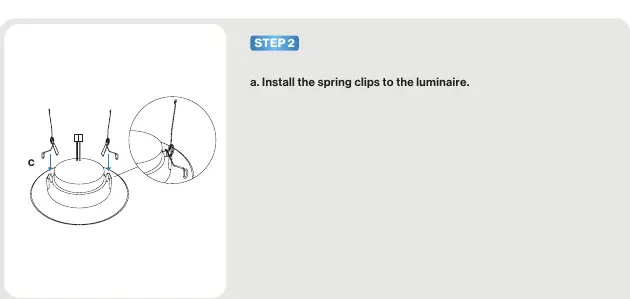
Install the spring clips onto the light fixture.
Step 3: Wiring
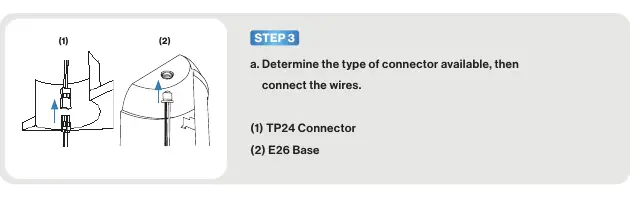
Determine the type of connector available in your housing. Connect the wires using either the TP24 connector or the E26 base adapter provided.
Step 4: Installation
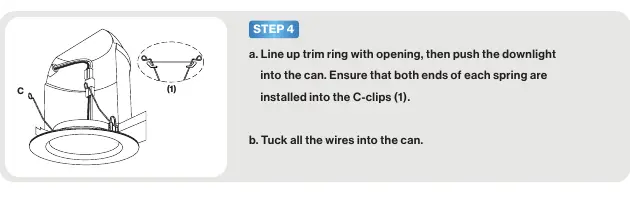
Line up the trim ring with the opening and push the downlight into the can. Ensure that both ends of each spring are installed into the C-clips. Tuck all wires neatly into the can.
Step 5: Testing
Turn the circuit breaker back on and test the light.
Product Specifications
- Voltage: 120 V
- Wattage: 13W
- Lumens: 965 lm
- Beam Angle: 120°
- Average Lifetime: 50000 Hours
- Moisture Rating: Damp
- Warranty: 7 Years
Troubleshooting
If you encounter issues, check the following:
- Light not turning on: Verify the fixture is properly connected and the circuit breaker has not tripped.
- Flickering: Ensure wiring connections are secure and the circuit is not overloaded. Verify dimmer compatibility.
- Buzzing: Check for interference from nearby electronics (televisions, radios, etc.) and verify dimmer switch compatibility.
Practical help
Common problems
Light isn't turning on
Double check if the fixture is properly connected and the circuit breaker has not been tripped.
Light flickering
Check that fixture wiring connections are secure, ensure the circuit is not overloaded, and verify dimmer switch compatibility.
Fixture buzzing
Look for nearby interferences (televisions, radios, computers) or verify dimmer switch compatibility.
Before use
- Turn off the circuit breaker.
- Verify the housing is compatible.
- Ensure no 3rd party sensors, photo controls, or timing devices are present.
- Check for shipping damage before installing.
- Ensure the environment is not directly exposed to water.
Specs in practice
- Moisture Rating
- Damp rated, suitable for bathrooms or covered porches, but not direct water exposure.
Images and diagrams
- Spring clips must be attached to the luminaire before insertion.
- Wiring requires selecting either the TP24 or E26 adapter based on existing housing connectors.
Model compatibility
- Not compatible with 3rd party sensors.
- Not compatible with photo controls.
- Not compatible with occupancy sensors.
- Not compatible with timing devices.

Manual page author
Emily Carter
User documentation editor
Prepares concise manual descriptions and highlights the most useful setup, operation, and maintenance information for readers.