Electronics / Microphones
User Manual for SYNCO G2(A2) Wireless Microphone
Quick guide for the SYNCO G2(A2) wireless microphone system. Learn how to pair transmitters, adjust gain, set up recording levels, and connect to cameras or phones.
Quick answers from the manual
Quick answer
- The SYNCO G2(A2) is a 2-person digital wireless microphone system. It features automatic pairing, adjustable gain control, low-cut filter, and mono/stereo output modes. p. 4, 5, 7, 8
Key actions
- Pairing the system p. 7, 8
- Adjusting Gain p. 9
- Switching Mono/Stereo p. 8
First start
- Charge the device fully before use. p. 5, 8
Problems and fixes
System not pairing
Perform manual pairing by long-pressing Gain Control buttons on RX and Pairing button on TX for 3 seconds.
p. 7, 8Maintenance and reset
- Use the Eject Pin to press the Reset button on the side of the device. p. 6, 9
Technical specifications
| Parameter | Value | Meaning | Pages |
|---|---|---|---|
| Working Distance | 150m (LOS) / 50m (NLOS) | Operating range | p. 12, 13 |
| Battery Life | 8H | Operating time | p. 12, 13 |
Where to find it in the PDF
- Product Overview p. 4
- Specifications p. 12, 13
Table of contents
Manual images
Click an image to enlargeQuick guide from the manual
The SYNCO G2(A2) is a 2-person digital wireless microphone system. It features automatic pairing, adjustable gain control, a low-cut filter, and mono/stereo output modes. Ensure the device is fully charged before first use.
Package list
- RX receiver x1
- TX Transmitter x2
- Carrying Bag x1
- Mic Windshield x2
- Eject Pin x1
- 3-in-1 Charging Cable x1
- External Lav Mic (With Wind Muff) x2
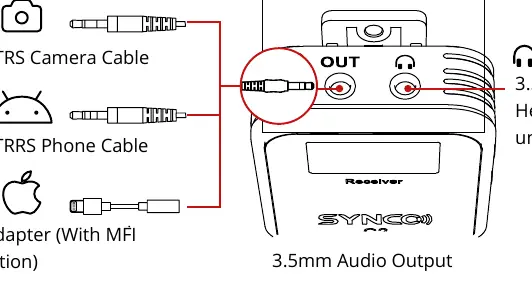
- 3.5mm TRRS Phone Cable x1
- 3.5mm TRS Camera Cable x1
Product components
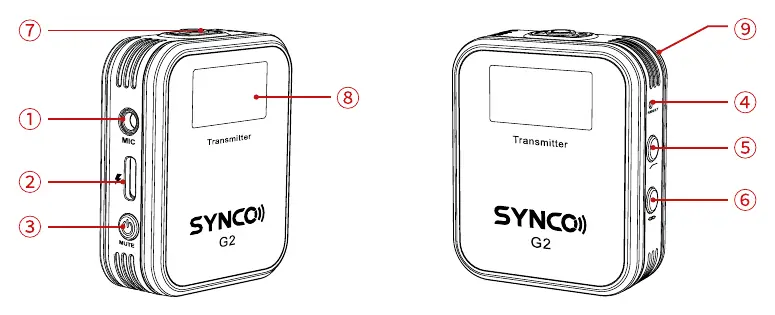
TX Transmitter: External Mic Input, USB-C Port, Power/Mute button, Reset hole, Low Cut button, Pairing button, Built-in Mic, Display Screen, Pocket Clip.
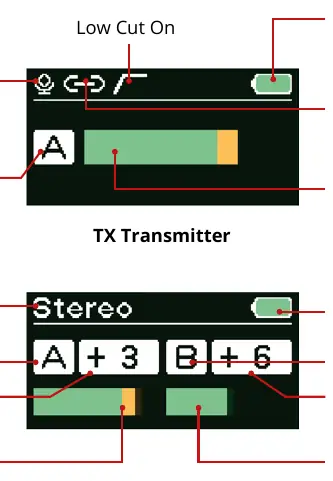
RX Receiver: USB-C Port, Power/Mono/Stereo button, Reset hole, Channel A Gain Control, Channel B Gain Control, 3.5mm Audio Output, 3.5mm Monitoring Jack, Display Screen, Pocket Clip.
Operations
Power/Mute (TX): Long press 2s to turn on/off. Short press to mute/unmute.
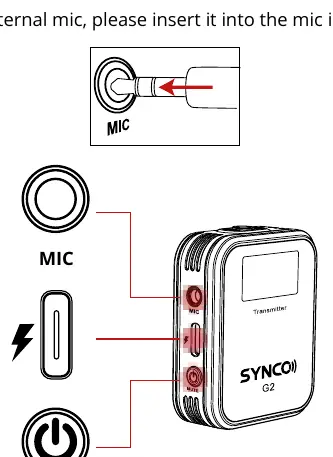
Power/Mono/Stereo (RX): Long press 2s to turn on/off. Short press to switch between Mono and Stereo modes (Note: Stereo mode is unavailable for phone devices).
Charging: Use the provided 3-in-1 USB-C cable. Input is 5V/2A.
Pairing
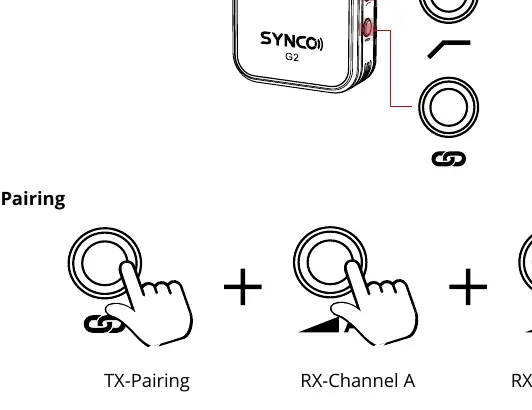
The system pairs automatically after power on. For manual pairing: Long press the Channel A Gain Control and Channel B Gain Control on the RX, and the Pairing button on the TX simultaneously for 3 seconds.
Audio monitoring and output
Use the 3.5mm Audio Output to connect to cameras or phones using the appropriate cable (TRS for cameras, TRRS for phones). Use the 3.5mm Monitoring Jack to connect headphones (impedance under 100Ω) for real-time audio monitoring.
Setting recording levels
To achieve the cleanest signal, it is recommended to set the camera's internal recording level to 1/2 or 1/3 of its maximum. Use the G2's variable gain control (0-5 levels) to adjust the input level based on your environment.
Specifications
- Wireless Transmission: Digital 2.4GHz
- Working Distance: 150m (LOS), 50m (NLOS)
- Battery Life: 8 hours
- Charging Time: 1.5 hours
- Gain Control: 0-5 levels
Safety and maintenance
- Keep the product in a dry, clean, dust-free environment.
- Keep away from corrosive chemicals, liquids, and heat sources.
- Use only a soft, dry cloth for cleaning.
- Do not disassemble the product; doing so voids the warranty.
- Repair should only be performed by authorized technicians.
Practical help
Common problems
System not pairing
Ensure both TX and RX are powered on. Perform manual pairing by long-pressing the Channel A and B Gain Control buttons on the RX and the Pairing button on the TX for 3 seconds simultaneously.
Stereo mode not working
Stereo mode is unavailable when connected to phone devices.
Before use
- Fully charge the product before first use.
- Ensure the external microphone is a TRS type.
- Check that the camera recording level is set to 1/2 or 1/3 for best signal quality.
- Verify the correct cable is used (TRS for cameras, TRRS for phones).
Specs in practice
- Working Distance
- Up to 150m in line-of-sight (LOS) area, 50m in non-line-of-sight (NLOS) area.
- Battery Life
- Approximately 8 hours of operation.
- Gain Control
- Adjustable 0-5 levels (0, 3, 6, 9, 12, 15 dB).
Images and diagrams
- TX Transmitter: External Mic Input, USB-C, Power/Mute, Reset, Low Cut, Pairing, Built-in Mic, Display, Pocket Clip.
- RX Receiver: USB-C, Power/Mono/Stereo, Reset, Channel A/B Gain Control, Audio Output, Monitoring Jack, Display, Pocket Clip.
Model compatibility
- Compatible with cameras (TRS cable) and phones (TRRS cable).
- Stereo mode is not available for phone devices.

Manual page author
Emily Carter
User documentation editor
Prepares concise manual descriptions and highlights the most useful setup, operation, and maintenance information for readers.