Lighting / Controllers & Dimmers
User Manual for T-LED dimLED OVS 1KR and OVS 4KR Remote Controller
Quick guide for T-LED dimLED OVS 1KR and OVS 4KR RF remote controllers. Includes installation, pairing, operation, and technical specifications.
Quick answers from the manual
Quick answer
- To pair the remote, either use the controller's Match key followed by the remote's On/Off or Zone key, or use the Power Restart method by cycling power and pressing the remote key 3 times. p. 1
Key actions
- Pairing via Match Key p. 1
- Pairing via Power Restart p. 1
- Wall Mounting p. 1
First start
- Remove the protective film from the battery before first use. p. 1
Problems and fixes
LED indicator not on
Replace battery or adjust battery shrapnel with a screwdriver.
p. 1Maintenance and reset
- Delete all matched remotes using Match key p. 1
- Delete all matched remotes using Power Restart p. 1
Technical specifications
| Parameter | Value | Meaning | Pages |
|---|---|---|---|
| Working voltage | 3VDC | Battery power requirement | p. 1 |
| Remote distance | 30m | Maximum range in barrier-free space | p. 1 |
| Operation temperature | -30°C ~ +55°C | Operating environment range | p. 1 |
Where to find it in the PDF
- Features, Specs, Installation, Pairing p. 1
- Key Functions, Safety p. 2
Table of contents
Quick guide from the manual
Before using the remote for the first time, ensure you remove the protective film from the battery. If the LED indicator fails to light up when a key is pressed, check the battery or ensure the battery contact is secure. The remote features a sleep state to conserve battery; press any key to wake it.
Product description
The T-LED dimLED OVS 1KR and OVS 4KR are ultrathin dimming touch wheel RF remote controllers designed for single-color LED controllers. They operate on a 2.4GHz RF signal with a range of up to 30 meters in barrier-free spaces.
Installation
The remote includes a back holder that can be mounted on the wall using one of two methods:
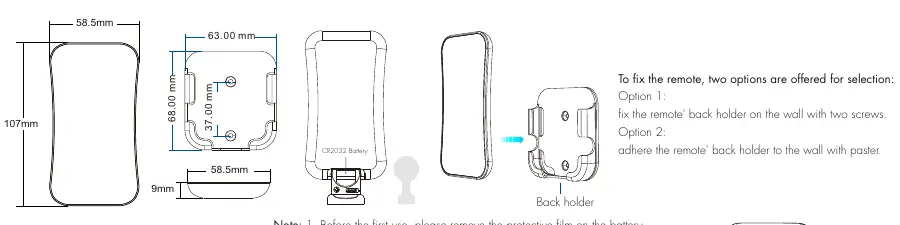
- Option 1: Fix the back holder to the wall using two screws.
- Option 2: Adhere the back holder to the wall using the provided paster.
Operation
The remote functions vary by model:
- OVS 4KR (4 Zone): Features zone selection (1, 2, 3, 4), touch wheel for brightness, and scene saving. Long press zone keys to turn off specific zones.
- OVS 1KR (1 Zone): Features a touch wheel for brightness, direct brightness buttons (100%, 75%, 50%, 25%), and scene memory.
Brightness Adjustment: Short press for 10 levels of adjustment, or long press (1-6s) for continuous 256-level adjustment.
Pairing and deleting remotes
You can pair or delete remotes using two methods:
- Method 1 (Match Key): Short press the controller's Match key, then immediately press the On/Off or Zone key on the remote. The LED indicator will flash to confirm success. To delete, press and hold the Match key for 5 seconds.
- Method 2 (Power Restart): Switch the power off and on. Immediately short press the On/Off or Zone key 3 times to match (or 5 times to delete). The light will blink to confirm the action.
Safety information
- Read all instructions carefully before installation.
- Ensure correct battery polarity when installing.
- Remove the battery if the remote will not be used for a long time.
- Replace the battery if the remote distance decreases or becomes insensitive.
- For indoor and dry location use only.
- Handle the remote gently and avoid dropping it.
Technical specifications
- Output signal: RF (2.4GHz)
- Working voltage: 3VDC (CR2032 battery)
- Working current: <5mA
- Standby current: <10μA
- Remote distance: 30m (barrier-free)
- Operation temperature: -30°C to +55°C
Practical help
Common problems
LED indicator does not light up when pressing a key
Check if the battery is dead or if there is bad contact. Replace the battery or use a screwdriver to raise the battery shrapnel.
No response from the receiver
The remote may have lost its pairing. Perform the matching procedure again.
Remote distance is short or insensitive
The battery is likely low. Replace the CR2032 battery.
Before use
- Remove the protective film from the battery.
- Ensure the battery is installed with correct positive and negative polarity.
- Ensure the remote is within 30m of the receiver.
- Verify the environment is dry and indoors.
Images and diagrams
- The remote features a central touch wheel for brightness control.
- The back holder is designed for wall mounting via screws or adhesive.
- The battery compartment is accessed on the back of the remote.
Model compatibility
- Designed for single-color LED controllers.
- OVS 4KR can be set as a 4-channel dimming remote for specific controllers like V4 or C4.

Manual page author
Emily Carter
User documentation editor
Prepares concise manual descriptions and highlights the most useful setup, operation, and maintenance information for readers.