Electronics / Camera Lenses
Owner's Manual for Tamron 20-40mm f/2.8 Di III VXD Lens
Quick guide for the Tamron 20-40mm f/2.8 Di III VXD lens. Learn how to attach the lens, use the zoom and focus rings, operate the connection port, and maintain your equipment.
Quick answers from the manual
Quick answer
- The Tamron 20-40mm f/2.8 Di III VXD (Model A062) is a zoom lens for Sony E-mount cameras. It features a connection port for firmware updates and customization via the Tamron Lens Utility software. p. 1, 2
Key actions
- Attach the lens by aligning the mount marks and rotating clockwise until it locks. p. 2
- Use the connection port to update firmware or customize settings via Tamron Lens Utility. p. 2
First start
- Turn off the camera, remove the rear cap, align the lens mount mark with the camera, and rotate clockwise. p. 2
Problems and fixes
Autofocus issues
AF performance depends on the subject; if difficult, use manual focus.
p. 2Maintenance and reset
- Clean the lens with a blower and dry cloth; do not use organic solvents. p. 2
Technical specifications
| Parameter | Value | Meaning | Pages |
|---|---|---|---|
| Focal Length | 20-40mm | Zoom range | p. 2 |
| Max Aperture | F/2.8 | Maximum aperture | p. 2 |
| Filter Diameter | 67mm | Filter size | p. 2 |
Where to find it in the PDF
- Parts and Diagrams p. 1
- Operating Instructions p. 2
- Safety Precautions p. 3
Table of contents
Manual images
Click an image to enlargeQuick guide from the manual
This manual provides essential instructions for the Tamron 20-40mm f/2.8 Di III VXD (Model A062) lens. Always turn off the camera power before attaching or detaching the lens. Ensure the lens is securely locked when mounting. The lens features a connection port for firmware updates and customization via the Tamron Lens Utility software.
Parts identification
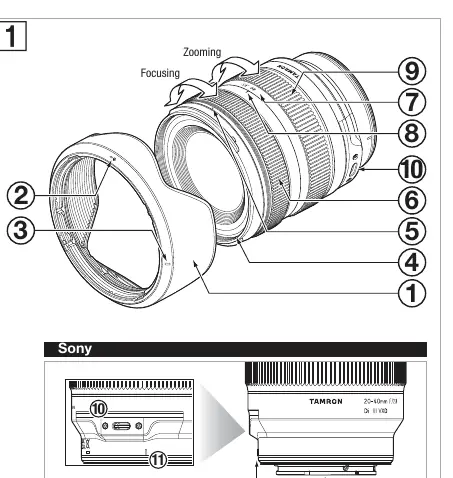
- 1: Lens hood
- 6: Focus ring
- 9: Zoom ring
- 10: Connection port
- 11: Lens mount mark
- 12: Lens-camera interface contacts
Attaching and detaching the lens
To attach the lens:
- Remove the rear lens cap.
- Align the lens mount mark (11) with the corresponding mark on the camera.
- Insert the lens and rotate it clockwise until it clicks and locks into place.
To detach the lens, rotate it in the opposite direction while holding down the lens release button on the camera.
Focusing and zooming
Focusing: Select the desired focus mode on your camera. For manual focus, rotate the focus ring (6). Note that autofocus performance may vary depending on the subject.
Zooming: Rotate the zoom ring (9) to adjust the focal length to the desired position.
Connection port
The connection port (10) allows you to connect the lens to a computer using a dedicated Tamron connection cable (sold separately). Use the TAMRON Lens Utility application to customize the focus ring settings and update the lens firmware. Do not touch the port with fingers or metal objects, and keep it free of dust and water.
Lens hood
The lens hood (1) helps block stray light that may negatively affect image quality.
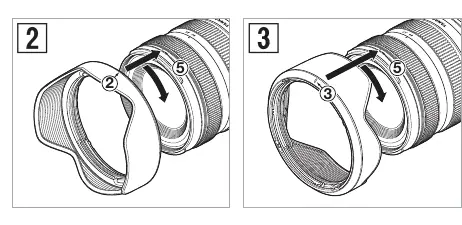
- Attaching: Align the hood attachment mark (2) on the hood with the hood release mark (5) on the lens. Rotate the hood until the hood lock mark (3) aligns with the hood release mark (5).
- Storage: Attach the hood in the reverse position and rotate until it clicks.
Precautions and maintenance
- Do not touch the lens-camera interface contacts (12).
- Avoid rapid temperature changes to prevent condensation.
- Clean the lens by blowing off dust with a blower and wiping with a dry cloth. Do not use organic solvents like thinner or benzine.
- Store the lens in a well-ventilated, clean place.
- The lens hood or body may block flash light; perform test shots if necessary.
Manufacturer information
Tamron Corporation
Practical help
Common problems
Autofocus is difficult or slow
AF performance depends on the subject. If AF is difficult, switch to manual focus or refer to your camera's manual.
Flash light is blocked
The lens hood or lens body may cast a shadow when using a flash. Perform test shots beforehand.
Condensation inside the lens
Avoid rapid temperature changes (e.g., moving from cold to warm environments). If condensation occurs, it may cause malfunctions.
Before use
- Turn off the camera power before attaching or detaching the lens.
- Ensure the lens is securely locked when attaching to the camera.
- Check the camera manual for specific focus mode settings.
- Keep the lens hood attached correctly to avoid vignetting.
Specs in practice
- Focal Length
- 20-40mm (zoom range).
- Max Aperture
- F/2.8 (constant across the zoom range).
- Filter Diameter
- 67mm (size of filters to be used).
Images and diagrams
- 6: Focus ring
- 10: Connection port
- 11: Lens mount mark
Model compatibility
- Designed for Sony E-mount cameras.

Manual page author
Michael Turner
Technical manual editor
Reviews PDF manuals for structure, safety notes, and practical product details so readers can find the right information quickly.