Electronics / Camera Lenses
Tamron 17-70mm F/2.8 Di III-A VC RXD Lens Owner's Manual
Quick guide for the Tamron 17-70mm F/2.8 Di III-A VC RXD lens. Learn how to attach the lens, use the VC (Vibration Compensation) mechanism, operate the zoom and focus, and follow safety precautions.
Quick answers from the manual
Quick answer
- The Tamron 17-70mm F/2.8 Di III-A VC RXD is a lens for Sony E and Fujifilm X mount cameras. This manual provides instructions on lens mounting, focus and zoom operation, and the use of the Vibration Compensation (VC) system. p. 2
Key actions
- Attaching the lens: Turn off camera, align lens attachment mark (10) with camera mark, insert, and turn clockwise until locked. p. 2
- Using VC: Set camera steady shot function to ON. p. 2
Problems and fixes
Viewfinder image blurred after pressing shutter halfway
This is due to the principles of VC and not a malfunction.
p. 2Technical specifications
| Parameter | Value | Meaning | Pages |
|---|---|---|---|
| Focal Length | 17-70 mm | Zoom range | p. 2 |
| Maximum Aperture | F/2.8 | Maximum aperture | p. 2 |
| Filter Size | 67 mm | Filter diameter | p. 2 |
Where to find it in the PDF
- Part Names and Diagrams p. 1
- Specifications and Usage p. 2
- Safety Precautions p. 3
Table of contents
Manual images
Click an image to enlargeQuick guide from the manual
This manual provides essential instructions for the Tamron 17-70mm F/2.8 Di III-A VC RXD lens. Key operations include mounting the lens to your camera, using the Vibration Compensation (VC) mechanism for stable shots, and proper lens hood attachment. Always read the camera's manual and the separate 'Precautions for Safe Use of Tamron Lenses' document before operation.
Part Names
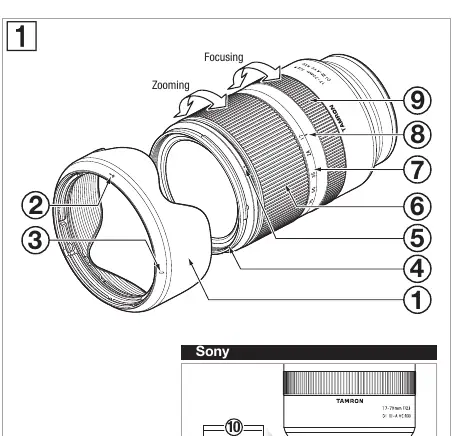
- 1: Lens hood
- 2: Hood attaching alignment mark
- 3: Hood locking mark
- 4: Filter ring
- 5: Hood release mark
- 6: Zooming ring
- 7: Focal length scale
- 8: Focal length mark
- 9: Focus ring
- 10: Lens attachment mark
- 11: Lens-camera interface contacts
Attaching and Removing the Lens
Before attaching or removing the lens, ensure the camera power is turned off. Remove the rear cap of the lens. Align the lens attachment mark (10) with the mounting mark on the camera and insert the lens. Turn the lens clockwise until it locks. To remove, turn the lens in the opposite direction while pressing the lens release button on the camera.
Switching Focus Mode
Select the desired focus mode on the camera. For manual focusing, turn the focus ring (9) to acquire the desired focus.
VC (Vibration Compensation) Mechanism
The VC mechanism reduces image blur caused by hand-held shooting. To activate, set your camera's steady shot function to ON. Press the shutter button halfway and confirm the viewfinder image is stable before taking a picture.
VC is effective in:
- Dimly lit locations
- Locations where flash photography is prohibited
- Locations where a tripod cannot be used
VC may not perform sufficiently when:
- Shooting from a vehicle that is shaking greatly
- Shooting during excessive movement of the camera
- Using a tripod (deactivate steady shot setting)
- Taking pictures under bulb photography (long exposures)
Lens Hood
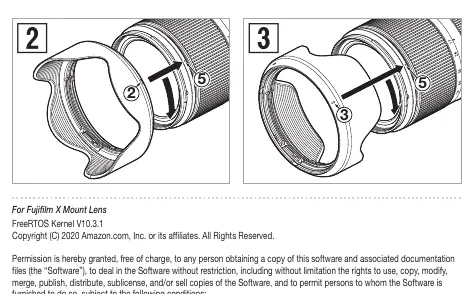
The lens hood (1) eliminates stray light. To attach, align the hood attaching alignment mark (2) with the hood release mark (5) on the lens. Rotate the hood in the direction of the arrow until the hood locking mark (3) meets the hood release mark (5). To stow, attach it in reverse.
Usage Precautions
- Do not touch the lens-camera interface contacts with your fingers.
- If temperature changes suddenly, condensation may form.
- Clean the lens with a blower or dry cloth; never use benzene, thinner, or other organic solvents.
- Store in a clean, well-ventilated place.
Safety Precautions
- Do not view the sun or strong light sources directly through the lens.
- Do not disassemble, repair, or modify the lens.
- Keep the lens out of the reach of small children.
- Do not place the lens in direct sunlight or extremely hot places like inside a car.
- Always attach the lens cap when not in use.
Manufacturer information
Tamron Corporation
Practical help
Common problems
Viewfinder image blurred after pressing shutter halfway
This is due to the principles of the VC mechanism and is not a malfunction.
Lens rattles when camera is turned off or lens is removed
This is not a malfunction.
Autofocus difficulty
Depends on the subject; check camera settings.
Perimeter of photographed image is darkened
The lens hood may not be attached properly.
Before use
- Read the 'Precautions for Safe Use of Tamron Lenses' document.
- Read your camera's instruction manual.
- Ensure the camera power is OFF before attaching or removing the lens.
- Check that the lens is firmly locked after attaching.
- Ensure the lens hood is properly attached to avoid vignetting.
Specs in practice
- Focal Length
- 17-70 mm
- Maximum Aperture
- F/2.8
- Minimum Object Distance (MOD)
- 0.19 m (Wide) / 0.39 m (Tele)
Images and diagrams
- Part 1: Lens hood
- Part 6: Zooming ring
- Part 9: Focus ring
- Part 10: Lens attachment mark
- Part 11: Lens-camera interface contacts
Model compatibility
- Compatible with Sony E (APS-C) and FUJIFILM X (APS-C) mounts.
- Check camera manual for specific compatibility details.

Manual page author
Michael Turner
Technical manual editor
Reviews PDF manuals for structure, safety notes, and practical product details so readers can find the right information quickly.