Electronics / Televisions
TCL 11.6cf Top Freezer Refrigerator User Manual
Quick guide for the TCL 11.6cf Top Freezer Refrigerator. Includes installation steps, temperature control settings, maintenance tips, and troubleshooting.
Table of contents
Manual images
Click an image to enlargeQuick Guide
This manual provides essential instructions for the TCL 11.6cf Top Freezer Refrigerator. Before using the appliance, ensure it has been properly installed, leveled, and allowed to stand upright for at least 2 hours. The refrigerator features adjustable temperature controls for both the fridge and freezer compartments.
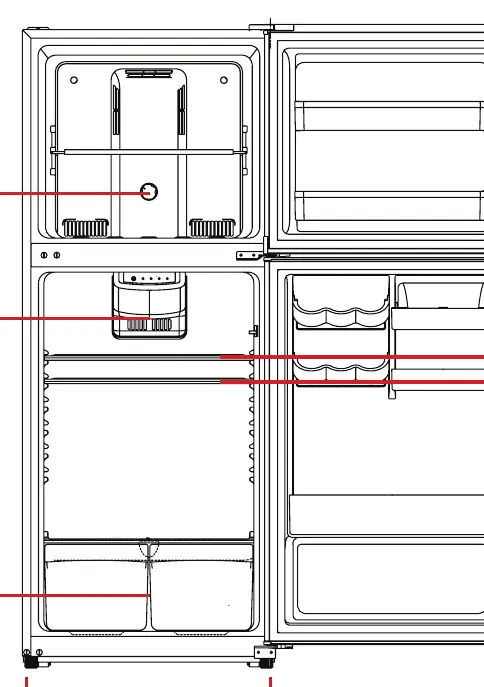
Safety Information
WARNING: Do not use electrical appliances inside the refrigerator unless approved by the manufacturer. The appliance uses isobutane (R600a) refrigerant, which is flammable. Ensure adequate ventilation and avoid damaging the refrigerant circuit. Do not store explosive substances like aerosol cans in the unit. Electrical components must be replaced by qualified service personnel.
Installation
Important: Allow 5 inches of space between the back and sides of the unit for proper air circulation. Locate the unit away from direct sunlight, heat sources (stoves, radiators), and moist areas. The floor must be strong enough to support the unit when fully loaded. Adjust the leveling legs at the bottom to ensure the unit is stable.
Electrical Connection
The appliance requires a standard 115V AC, 60Hz grounded outlet. Do not use an extension cord. If the power cord is too short, have a qualified electrician install an outlet near the appliance. A surge protector is recommended in areas prone to power surges.
Operating Your Appliance
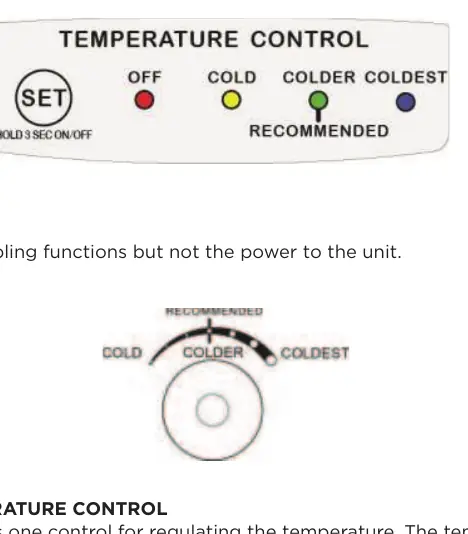
The refrigerator has a temperature control panel located at the top of the refrigerator compartment and a control knob in the freezer. For initial startup, set both to "COLDEST" and run for at least 4 hours before adding food. Afterward, adjust to "Recommended" or "COLDER" settings based on your needs. The freezer control balances cold air distribution between the two compartments.
Care and Maintenance
Cleaning: Unplug the unit before cleaning. Use a solution of 2 tablespoons of baking soda per quart of water for the interior. Do not use metal objects or sharp tools to remove frost. Vacation: For short vacations (less than 3 weeks), leave the unit running. For long vacations, remove all food, unplug the unit, clean it, and leave the door slightly open to prevent odors and mold.
Troubleshooting
If the unit does not operate, check the power connection and circuit breaker. If the compressor cycles frequently, ensure the door is closed properly, the gasket is sealing, and the unit is not overloaded. Rattling or gurgling noises are often normal refrigerant flow sounds.
Manufacturer information
TCL
Practical help
Common problems
Unit does not operate
Check if the unit is plugged in or if the circuit breaker has tripped.
Compressor cycles frequently
Check if the door is opened too often, not closed completely, or if the temperature control is set incorrectly.
Unit makes excessive noise
Normal operation includes gurgling or rattling sounds from refrigerant flow. Ensure the unit is level.
Door will not close properly
Ensure the unit is level, the gasket is clean, and baskets are correctly positioned.
Before use
- Remove all exterior and interior packaging.
- Verify all parts are present (shelves, drawers, bins).
- Let the unit stand upright for approximately 2 hours before connecting to power.
- Clean the interior surface with lukewarm water and a soft cloth.
- Ensure 5 inches of clearance on the back and sides for ventilation.
- Adjust leveling legs to stabilize the unit.
Specs in practice
- 115V AC, 60Hz
- Standard electrical power requirement.
Images and diagrams
- Temperature controls are located inside the refrigerator and freezer compartments.
- Levelling legs are located at the bottom front of the unit.
Model compatibility
- Optional automatic ice-maker is sold separately.
- Not recommended for environments below 50°F (13°C) or above 110°F (43°C).

Manual page author
David Miller
Documentation analyst
Organizes user manual content into clear summaries, with attention to model details, product context, and everyday usability.