Computers / Tablets
TCL TAB 10L Gen 2 Tablet User Manual
Comprehensive user guide for the TCL TAB 10L Gen 2 tablet, covering safety, setup, troubleshooting, and technical specifications.
Table of contents
Product Overview
The TCL TAB 10L Gen 2 is a versatile tablet designed for daily digital tasks. It features a 6000 mAh battery, a 10-inch display, and supports Wi-Fi connectivity. The device is intended for indoor use and should be handled with care to maintain its performance and longevity.
Safety and Usage
Safety is paramount when using your tablet. Avoid using the device in environments with extreme temperatures (outside 0°C to 40°C) or high humidity. Keep the tablet away from medical devices like pacemakers, maintaining a distance of at least 15 cm. Do not attempt to open, disassemble, or modify the device, as the battery is non-removable and tampering will void the warranty. Always use original TCL-approved chargers and accessories to prevent damage.
Getting Started
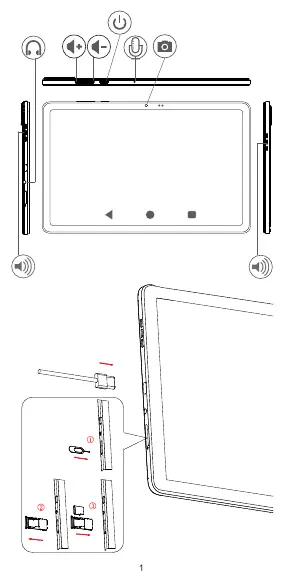
Before first use, ensure the battery is fully charged. If the device has been stored for a long time, it may take up to 20 minutes for the charging indicator to appear on the screen. Use the provided USB Type-C cable for charging. To insert a microSD card, use the provided tool to open the card tray located on the side of the device.
Maintenance and Care
The tablet does not require periodic maintenance. Clean the screen and body with a soft, dry, lint-free cloth. Do not use water, alcohol, thinners, or other solvents for cleaning. Protect the device from drops, impacts, and bending. If the screen is cracked or damaged, stop using the device immediately to avoid injury.
Troubleshooting
If the tablet becomes unresponsive, press and hold the Power button until it shuts down, then restart it. For performance issues, remove unnecessary apps or files. If the device fails to boot, charge it for at least 20 minutes. A factory reset can be performed via Settings > System > Reset, but note that this will erase all personal data. Always back up your data before performing a reset.
Contact and Support
For further assistance, visit the official website at tcl.com. You can also contact the TCL Call Center at 0212 900 37 36 or visit their support page at https://www.tcl.com/global/en/mobile-support/hotline&service-center.html for more information.
Official resources from the manual
Manufacturer information
TCL
Practical help
Common problems
Tablet does not turn on or is frozen
Charge for at least 20 minutes. If it still fails, hold the Power button to force a restart, or perform a factory reset via the recovery menu (Power + Volume Up).
Battery drains quickly
Ensure a full 240-minute charge. Reduce screen brightness, turn off unused features like GPS/Bluetooth/Wi-Fi, and close background apps.
Cannot connect to PC
Check the USB cable and port. Ensure MTP mode is enabled on Windows or use Android File Transfer on Mac.
Tablet heats up during use
This is normal during heavy processing. Close demanding apps and let the device cool down.
Before use
- Charge the battery fully before the first use.
- Ensure the environment temperature is between 0°C and 40°C.
- Back up all important data before performing any system resets.
- Check that you are using the original TCL charger and cable.
- Verify that the device is not exposed to moisture or rain.
Specs in practice
- Connectivity
- Wi-Fi 802.11a/b/g/n/ac and Bluetooth V5.0.
Images and diagrams
- The diagram shows the power button, volume keys, microphone, and camera placement.
- The illustration demonstrates the correct method for inserting a microSD card using the ejection tool.
Model compatibility
- Only use TCL-approved batteries and chargers.
- 5150-5350 MHz Wi-Fi band is restricted to indoor use only.
- Requires Android File Transfer for Mac connectivity.

Manual page author
Emily Carter
User documentation editor
Prepares concise manual descriptions and highlights the most useful setup, operation, and maintenance information for readers.