Electronics / Smart Trackers
User Manual for Teltonika TAT140 Asset Tracker
Quick guide for the Teltonika TAT140 4G LTE CAT 1 Asset Tracker. Learn how to set up the device, insert the SIM card, configure settings via USB or SMS, and understand LED indicators and mounting recommendations.
Table of contents
Manual images
Click an image to enlargeQuick guide from the manual
The Teltonika TAT140 is a 4G LTE CAT 1 asset tracker. To get started, you need to insert a Micro-SIM card, connect the battery, and configure the device using the Teltonika Configurator software on a Windows PC or via SMS commands. Ensure the SIM card has the PIN request disabled before insertion.
Know your device
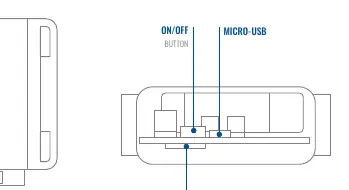
The device features an internal battery, a Micro-SIM slot, a Micro-USB port for configuration, and an ON/OFF button. The device is designed for asset tracking and requires proper mounting for optimal GNSS signal reception.
Device setup
Follow these steps to prepare the device for use:
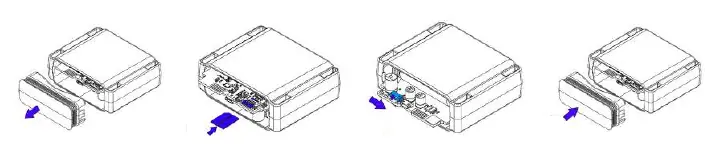
- Remove the device cover.
- Insert the Micro-SIM card into the slot, ensuring the cut-off corner is pointing forward.
- Flip the internal switch to the ON position.
- Reattach the cover securely.
Configuration
The device comes with default factory settings. To customize these, use the Teltonika Configurator software on a Windows computer:
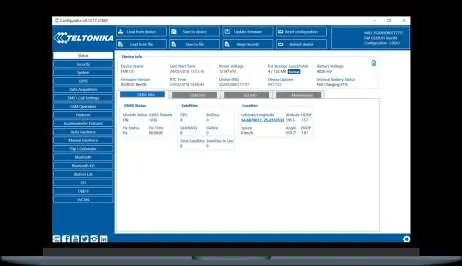
- Download and install the required COM port drivers.
- Connect the device to your PC using a Micro-USB cable.
- Launch the Teltonika Configurator.
- Use the Status window to view device information and the GPRS section to configure server and data acquisition settings.
- Always save changes to the device using the Save to device button.
SMS configuration
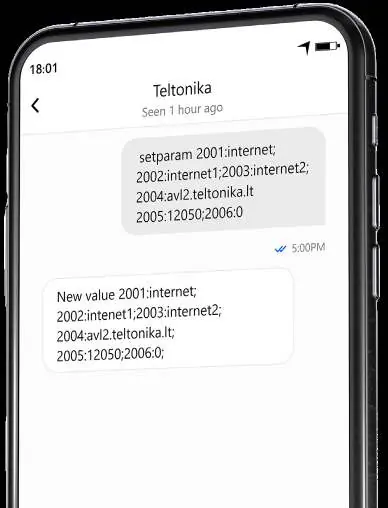
You can quickly configure the device by sending an SMS command. Ensure two space symbols are inserted before the SMS text. The command format is: setparam 2001:APN;2002:APN_username;2003:APN_password;2004:Domain;2005:Port;2006:0. Replace the placeholders with your specific network and server settings.
Mounting recommendations
For best performance, mount the TAT140 so that the internal GNSS antenna is pointed towards the sky. Ensure the device is not covered by metal or other obstructions that could interfere with the GNSS signal.
LED indications
The status LED provides information about the device state:
- On: Start-up and self-tests.
- Off: Device is in sleep mode or turned off.
- Blink every 5 seconds: Device is working, and the modem is turned on.
Basic characteristics
The TAT140 operates on LTE Cat 1 and GSM networks. It features an accelerometer for movement detection, IP68 ingress protection, and a 7.2V 2200mAh Li-SOCl2 swappable battery. The operating temperature range is -20 °C to +60 °C.
Safety information
Operate the device safely by following these guidelines:
- Do not use uncertified batteries, as they may cause malfunction or explosion.
- Do not attempt to charge the batteries.
- Protect the device and batteries from moisture and extreme temperatures.
- Dispose of batteries at designated recycling centers, not with household waste.
Practical help
Common problems
Connection to server not initiated
Check if the SIM card is inserted correctly, verify APN/Domain/Port settings, ensure GPRS functionality is enabled by your provider, and check for GSM coverage.
Device not detected by PC
Ensure you have installed the necessary COM port drivers and that the device is powered on and connected via a working Micro-USB cable.
Before use
- Ensure the SIM card PIN request is disabled.
- Download and install the latest Teltonika Configurator.
- Install the required COM port drivers on your Windows PC.
- Ensure MS .NET Framework 4.6.2 is installed on your computer.
- Verify the SIM card cut-off corner orientation before insertion.
Specs in practice
- Operating temperature
- -20 °C to +60 °C; ensure the environment is within this range.
- Ingress Protection
- IP68 rating indicates the device is dust-tight and protected against long periods of immersion in water.
Images and diagrams
- The device diagram highlights the location of the ON/OFF button, Micro-USB port, Micro-SIM slot, and the battery compartment.
Model compatibility
- Configuration software requires Microsoft Windows OS.
- Requires MS .NET Framework 4.6.2.
- Supports LTE Cat 1, GSM, GPRS, GNSS, and Bluetooth LE.

Manual page author
Emily Carter
User documentation editor
Prepares concise manual descriptions and highlights the most useful setup, operation, and maintenance information for readers.