Home / Water Detectors
Tesla AC Magic Dock User's Manual
Quick guide for the Tesla AC Magic Dock. Learn how to safely operate the charging dock, release the cable for Tesla or J1772 vehicles, and use the Tesla app for public charging.
Quick answers from the manual
Quick answer
- The AC Magic Dock is a versatile charging solution for both Tesla vehicles and vehicles with a J1772 charging port. For public charging, you must use the Tesla app to unlock the dock. p. 4, 6
Key actions
- Charging a Tesla p. 5
- Charging a J1772 vehicle at a public location p. 6
Problems and fixes
Reporting charging issues
Use the Tesla app to report the issue, providing your vehicle make/model and the dock location.
p. 6Where to find it in the PDF
- Safety Warnings p. 2
- Charging Instructions p. 5, 6
Table of contents
Manual images
Click an image to enlargeImportant Safety Information
Before using the AC Magic Dock, please read and follow these safety instructions to prevent fire, electrical shock, or serious injury:
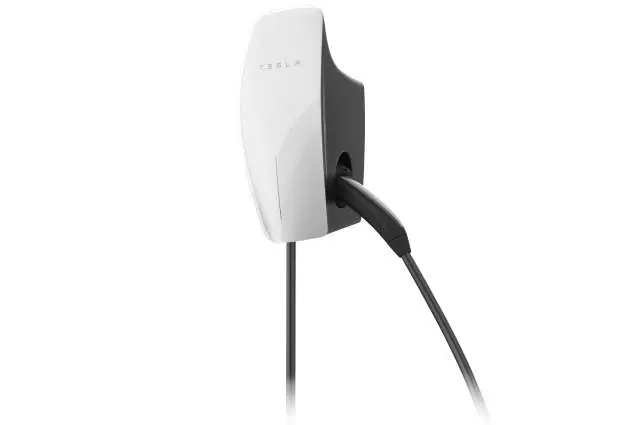
- Do not use the dock if it appears cracked, frayed, broken, or damaged.
- Do not attempt to open, disassemble, or modify the unit; it is not user-serviceable.
- Protect the dock from moisture, water, and foreign objects at all times.
- Handle with care during transport; do not subject it to strong force, impact, or pull/twist the cable.
- Medical Devices: The dock may affect implantable medical devices like pacemakers. Consult your device manufacturer before use.
- Cleaning: Do not use cleaning solvents.
Charging Your Vehicle
The AC Magic Dock supports both Tesla vehicles and vehicles equipped with a J1772 charging port.
Charging a Tesla
The procedure is the same as any other Tesla charging station. Simply plug the vehicle in. At public locations, authentication is not required, and you do not need to use the mobile app.
Charging a Vehicle with J1772
Charging at a home location requires only releasing the connector. Charging at a public location requires authentication via the Tesla app:
- Download the Tesla app and create an account.
- Use the app to find the charging location.
- Follow the app instructions to unlock the AC Magic Dock.
- Open the charge port door on your vehicle.
- Release the J1772 connector from the dock (see below).
- Follow the app instructions to start charging.
- When finished, disconnect the cable from your vehicle and return it to the dock.
Releasing the Charge Cable
The method for releasing the cable depends on the vehicle type:
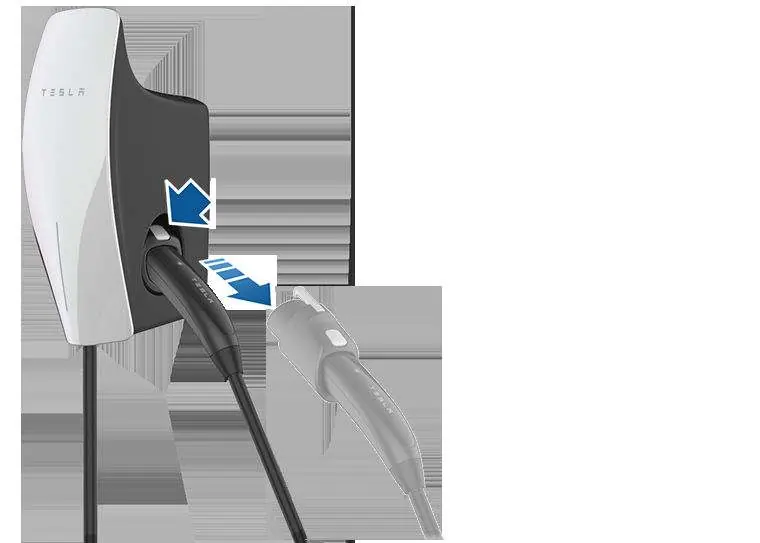
- Tesla Vehicle: Simply pull the connector handle to remove the Tesla connector.
- J1772 Vehicle: Press the button located at the top of the adapter to release it from the dock. An audible tone will sound when the connector is docked or un-docked.
Compliance
This device complies with FCC Part 15 rules and ISED Canada requirements. It is designed to operate with a minimum distance of 20 cm between the radiator and your body (RF Exposure/MPE).
Practical help
Common problems
Charging issue at a public location
Use the Tesla app to report the issue. Provide the make and model of your vehicle and the location of the AC Magic Dock.
Connector will not release
Ensure you are using the correct release method: pull the handle for Tesla connectors, or press the button on top for J1772 adapters.
Before use
- Inspect the dock and cable for cracks, fraying, or damage.
- Ensure the area is free of moisture and water.
- Download the Tesla app if using a public charging station.
- Verify that the charging cable does not obstruct pedestrians or other vehicles.
Specs in practice
- MPE (Maximum Permissible Exposure)
- Safety standard requiring a minimum distance of 20 cm between the device and your body.
Images and diagrams
- The release mechanism for the J1772 adapter requires pressing the button on the top of the connector handle.
- The Tesla connector is released by simply pulling the handle.
Model compatibility
- Compatible with Tesla vehicles.
- Compatible with vehicles equipped with a J1772 charging port.

Manual page author
Emily Carter
User documentation editor
Prepares concise manual descriptions and highlights the most useful setup, operation, and maintenance information for readers.