Power / EV Chargers
User Manual for Tesla Smart Sensor Water
Quick guide for the Tesla Smart Sensor Water. Learn how to install, pair with your gateway, and maintain your water leak detector.
Table of contents
Manual images
Click an image to enlargeQuick guide from the manual
The Tesla Smart Sensor Water is a ZigBee-based device designed to detect water leaks. This guide provides essential steps for setting up, pairing, and installing your sensor to ensure reliable operation.
Product Description
The device consists of the following main components:
- Status indicator: LED light showing the device status.
- Button: Used for resetting and pairing the device.
- Sensing probe: Located on the bottom, detects the presence of water.
Network Setting
Before using the sensor, you must power it on and pair it with your ZigBee gateway:
- Power on: Insert a thin blade or coin into the slot on the battery cover. Rotate it counter-clockwise to open the cover. Remove the battery insulation film and close the cover.
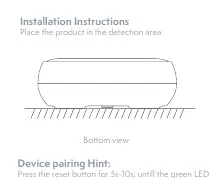
- Pairing: Press and hold the reset button for 5-10 seconds. The green LED will turn on. Once it turns off, release the button. The green LED will flash, indicating it is ready for network setting.
- App configuration: Open the Tesla Smart app, locate your Gateway, click on Add sub-device, and follow the on-screen instructions.
Note: If the button is pressed for more than 10 seconds, the network setting process is cancelled. A successful pairing is indicated by the green LED staying on for 5 seconds.
Installation
Place the product in the detection area where water leaks are most likely to occur. Ensure the sensing probe is in contact with the surface to be monitored.
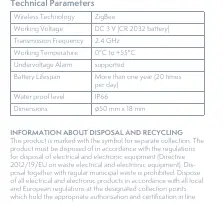
Technical Parameters
- Wireless Technology: ZigBee
- Working Voltage: DC 3 V (CR 2032 battery)
- Transmission Frequency: 2.4 GHz
- Working Temperature: 0°C to +55°C
- Waterproof Level: IP66
- Dimensions: 50 mm x 18 mm
Disposal and Recycling
This product is marked with the symbol for separate collection. It must be disposed of in accordance with local and European regulations for electrical and electronic equipment. Do not dispose of this product with regular municipal waste.
Practical help
Common problems
Pairing fails
Ensure the gateway is in pairing mode and the sensor is within range. Press the reset button for 5-10 seconds until the green LED flashes.
Device not responding
Check if the battery insulation film has been removed and the battery is properly inserted.
Before use
- Remove the battery insulation film from the battery compartment.
- Ensure you have a compatible ZigBee gateway connected to the Tesla Smart app.
- Place the sensor in the area where water leaks are likely to occur.
Specs in practice
- Wireless Technology
- ZigBee (requires a compatible gateway to function).
- Waterproof Level
- IP66 (dust-tight and protected against powerful water jets).
Images and diagrams
- Battery compartment: Located on the bottom; use a coin to rotate the cover counter-clockwise.
- Reset button: Located on the top surface; press and hold for 5-10 seconds to enter pairing mode.
Model compatibility
- Requires a ZigBee gateway to connect to the Tesla Smart app.

Manual page author
David Miller
Documentation analyst
Organizes user manual content into clear summaries, with attention to model details, product context, and everyday usability.