Home Appliances / Space Heaters
User Guide for TESY GCV 80 47 24D C22 ECW Electric Water Heater Wi-Fi Module
Quick guide for setting up and using the built-in Wi-Fi module for your TESY electric water heater. Learn how to connect to the tesyCloud app, configure weekly schedules, and use energy-saving modes.
PDF source: polski · summary: English
Quick answers from the manual
Quick answer
- This manual provides instructions for connecting and operating the built-in Wi-Fi module for TESY electric water heaters using the 'tesyCloud' mobile application. p. 15, 16, 17
Key actions
- Register on www.mytesy.com p. 15
- Install 'tesyCloud' app p. 15
Problems and fixes
Failed connection to Wi-Fi
Check if the Wi-Fi symbol is active, ensure the appliance is powered, and move closer.
p. 17Show 3 more answers Show less
Maintenance and reset
- Use the 'RESET' function to restore factory settings if you forget the Wi-Fi password. p. 17
Technical specifications
| Parameter | Value | Meaning | Pages |
|---|---|---|---|
| Model Name | ESP32-WROOM-32 | Wi-Fi module model | p. 15 |
Where to find it in the PDF
- Quick Start p. 15, 16
- Troubleshooting p. 17
Table of contents
Manual images
Click an image to enlargeQuick guide from the manual
This document provides instructions for connecting and operating the built-in Wi-Fi module for TESY electric water heaters using the 'tesyCloud' mobile application. The module allows for remote control, energy monitoring, and scheduling.
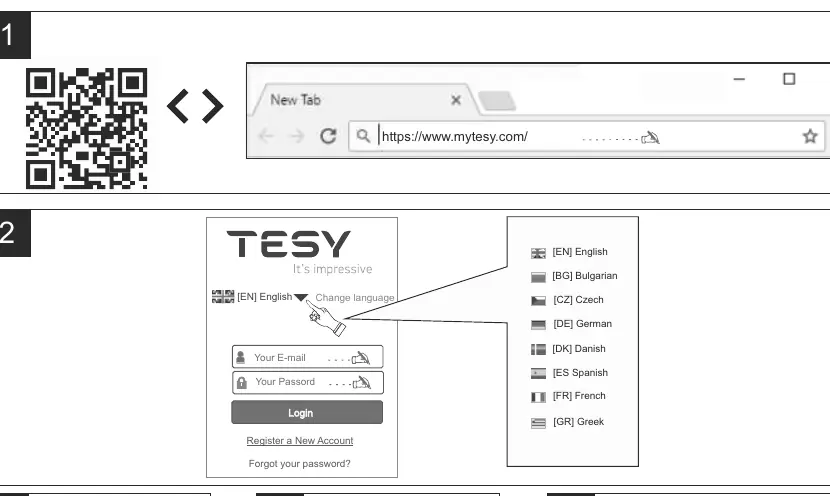
App Setup and Registration
To use the Wi-Fi features, you must first register an account:
- Visit www.mytesy.com in your web browser.
- Choose 'Register as a new user' and fill in the form with a valid email address.
- Follow the activation link sent to your email to confirm your account.
- Download the tesyCloud app from the Google Play Store or Apple App Store.
Adding a Device
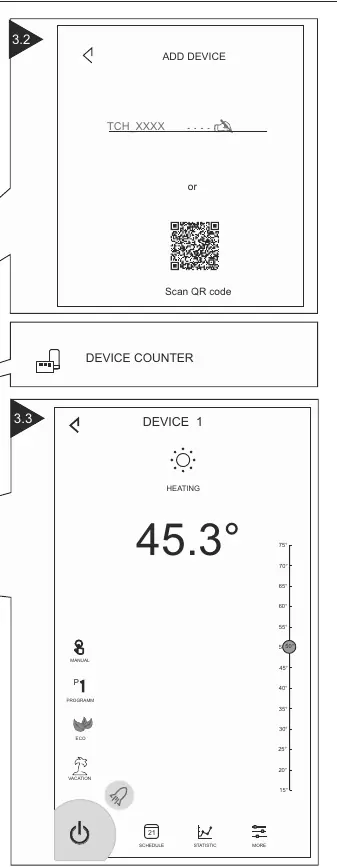
Once registered, you can add your water heater to the app:
- Open the 'tesyCloud' app and log in with your credentials.
- Press the '+' button to add a new device.
- Follow the on-screen instructions to connect the device to your local Wi-Fi network (Cloud mode) or set it up for local control.
- Ensure the Wi-Fi module is active (indicated by a steady Wi-Fi symbol on the control panel).
Operating Modes
The app allows you to control the water heater using several modes:
- Manual Control: Use the slider to manually set the desired water temperature.
- Weekly Programmer (P1, P2, P3): Set a weekly schedule for water heating based on your habits.
- Eco Smart Mode: The heater learns your habits to optimize energy consumption while maintaining comfort. Choose between ECO, EC1, or EC2.
- Vacation Mode: Set your return date and time to ensure hot water is ready when you return.
- BOOST Function: Heats water to the maximum temperature without changing the current operating algorithm.
Additional Settings
The app includes an Energy Calculator to monitor power consumption. Ensure you select the correct volume of your water heater in the app settings for accurate calculations. You can also rename your devices for easier identification.
Troubleshooting
If you encounter issues, ensure your router is connected to the internet and the appliance is within range. If you forget your Wi-Fi password, use the 'RESET' function on the appliance to restore factory settings.
Official resources from the manual
Manufacturer information
TESY
Practical help
Common problems
Failed to connect to Wi-Fi
Check if the Wi-Fi symbol is active on the display, ensure the appliance is powered, and move closer to the device.
Water heater not visible in app
Ensure your router is connected to the internet and the appliance is connected to the router. Verify the correct email is used in the app.
Forgot Wi-Fi password
Use the 'RESET' function on the appliance to restore factory settings.
Before use
- Ensure you have a device with a reliable web browser and internet connection.
- Register an account at www.mytesy.com.
- Download the 'tesyCloud' app from Google Play or App Store.
- Ensure the Wi-Fi module is switched on (indicated by a steady Wi-Fi symbol).
Show more Show less
Specs in practice
- Frequency range
- 2.412 - 2.484 GHz
- Rated RF output power
- 20 dBm
Images and diagrams
- The app interface allows you to select operating modes, monitor status, and view energy consumption.
- Weekly programmer allows setting temperature for each hour of the day.
- Eco Smart mode optimizes energy usage based on usage patterns.
Model compatibility
- The water heater is designed for indoor use in heated premises where the temperature does not drop below 4°C.
- Not designed for continuous flow operation.

Manual page author
Michael Turner
Technical manual editor