Home Appliances / Space Heaters
User Manual for TESY HL-202H Fan Heater
Quick guide for the TESY HL-202H fan heater. Includes safety instructions, operating modes, maintenance, and troubleshooting tips.
Quick answers from the manual
Quick answer
- The TESY HL-202H is a fan heater with two power settings (1000W/2000W) and a ventilation-only mode. It features a thermostat for temperature control and built-in overheating protection. p. 4
Key actions
- Turn the thermostat switch clockwise to the final position. p. 4
- Set power to 1000W or 2000W. p. 4
First start
- Unpack and check for damage. Place on a horizontal, stable surface. Ensure the voltage matches your local electrical system. p. 3
Problems and fixes
Appliance overheats and turns off
Disconnect from mains, set switch to '0', wait 10-15 minutes for cooling.
p. 4Maintenance and reset
- Clean ventilation openings regularly with a vacuum cleaner. p. 4
Technical specifications
| Parameter | Value | Meaning | Pages |
|---|---|---|---|
| Power | 1000W / 2000W | Heating power settings | p. 4 |
Where to find it in the PDF
- Operation p. 4
Table of contents
Manual images
Click an image to enlargeQuick guide from the manual
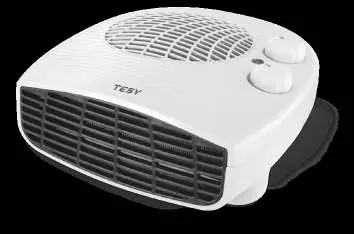
The TESY HL-202H is a portable fan heater designed for domestic use. It features two heating power levels (1000W and 2000W) and a ventilation-only mode. The device includes a thermostat for temperature regulation and built-in overheating protection.
Safety Precautions
- Children: Children under 3 years should be kept away unless under constant supervision. Children aged 3-8 may only operate the on/off switch if supervised and instructed.
- Water: Do not use the heater in close proximity to bathrooms, showers, or swimming pools. Never submerge the appliance in water.
- Placement: Use only on a horizontal, stable surface. Do not mount on walls or ceilings. Keep at least 1m distance in front and 50cm behind the heater from furniture and other objects.
- Covering: Never cover the appliance to avoid overheating.
- Electrical: Do not place directly under a power socket. Do not use with programmers or timers that turn the device on automatically.
Operation
The heater is controlled by two dials: a thermostat and a power switch.
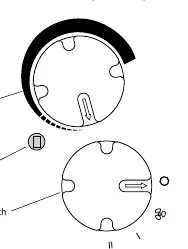
- Ventilation only: Turn the power switch to the fan icon position.
- Reduced power heating (1000W): Turn the power switch to setting I.
- Full power heating (2000W): Turn the power switch to setting II.
- Turning off: Turn the power switch to the 'O' position.
Thermostat Adjustment: Once the room reaches the desired temperature, turn the thermostat dial counter-clockwise until the appliance turns off. The thermostat will then maintain this temperature automatically.
Cleaning and Maintenance
- Always turn off and unplug the appliance before cleaning.
- Clean the body with a damp cloth, vacuum cleaner, or brush.
- Do not use abrasive detergents.
- If not in use for a long period, store in the original packaging.
Overheating Protection
The built-in protection automatically turns off the heater in case of an error. If this happens, unplug the device, set the switch to '0', and wait 10-15 minutes for it to cool down before restarting.
Manufacturer information
TESY
Practical help
Common problems
Appliance overheats and turns off
Ensure air inlets/outlets are not blocked. Clean ventilation openings with a vacuum cleaner.
Appliance stops working unexpectedly
Overheating protection may have triggered. Unplug, set switch to '0', wait 10-15 minutes for cooling, then restart.
Before use
- Check for transport damage
- Ensure voltage matches local supply
- Place on a horizontal, stable surface
- Keep at least 1m distance from flammable objects
- Ensure air inlets/outlets are clear
Specs in practice
- Summer service
- Ventilation only mode
Images and diagrams
- The control panel features a thermostat dial and a power switch dial.
- The power switch has positions for: Off (0), Ventilation, 1000W (I), and 2000W (II).
Model compatibility
- Not suitable for use in bathrooms, showers, or near swimming pools.
- Not for use in rooms smaller than 4 square meters.

Manual page author
David Miller
Documentation analyst
Organizes user manual content into clear summaries, with attention to model details, product context, and everyday usability.