Lighting / Portable Lighting
User Manual for Trotec TDS 20 R, TDS 30 R, TDS 50 R Electric Fan Heater
Quick guide for Trotec TDS 20 R, TDS 30 R, and TDS 50 R electric fan heaters. Includes safety instructions, operation, troubleshooting, maintenance, and technical specifications.
Quick answers from the manual
Quick answer
- The Trotec TDS R series are electric fan heaters. TDS 20 R, 30 R, and 50 R models differ in heating capacity and airflow. They feature an integrated thermostat and overheating protection. p. 5
Key actions
- Switching on: Set the selection switch to the desired heating level and adjust the temperature with the rotary switch. p. 8
- Shutdown: Set the selection switch to ventilation, run for 3 minutes, then switch to 0. p. 8
First start
- Unpack the device, remove packaging, fully unwind the power cable, and place on a stable, upright surface. p. 7
Problems and fixes
Device does not start
Check power connection, fuse, and cable. Wait 10 minutes before restarting.
p. 9Maintenance and reset
- Clean air inlets/outlets before every start-up. Clean exterior as needed. p. 10, 11
Technical specifications
| Parameter | Value | Meaning | Pages |
|---|---|---|---|
| Heating capacity (TDS 20 R) | 1500 W / 3000 W | Power levels | p. 12 |
| Heating capacity (TDS 30 R) | 2500 W / 5000 W | Power levels | p. 12 |
| Heating capacity (TDS 50 R) | 4500 W / 9000 W | Power levels | p. 12 |
Where to find it in the PDF
- Operation p. 8
- Technical Data p. 12
Table of contents
Manual images
Click an image to enlargeQuick guide from the manual
The Trotec TDS R series are electric fan heaters designed for heating closed rooms such as construction trailers, garages, workshops, and warehouses. Before use, ensure the device is placed on a firm, stable, and upright surface. Maintain a minimum distance of 50 cm from walls and objects, and at least 1 m from combustible materials. Always check the power cable for damage before use.
Device description
The devices generate heat using a heating element and distribute it via a fan. They feature an integrated thermostat for automatic temperature control. The TDS 30 R and TDS 50 R models are equipped with a time-delay thermostat that regulates the device's rundown operation after switching off.
Operation
Switching on:
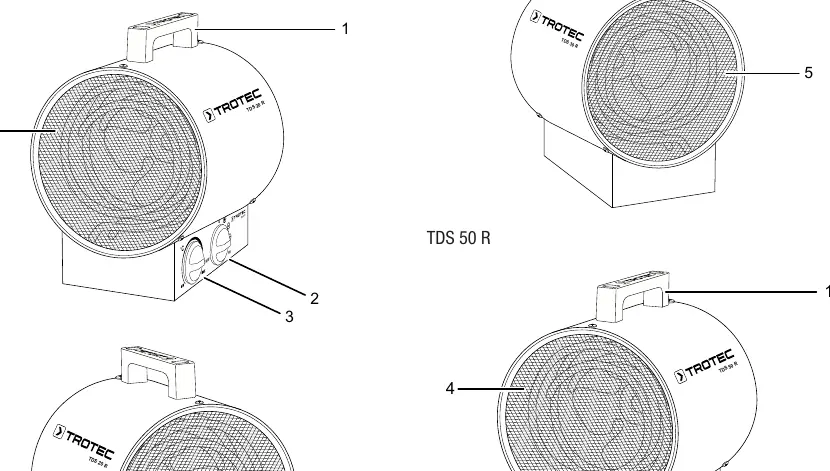
- Set the selection switch (ventilation and heating levels) to the desired heating level.
- Set the desired temperature using the stepless rotary switch.
Shutdown:
- Turn the selection switch to the ventilation setting.
- Keep the fan running for 3 minutes to allow the device to cool down.
- Switch the device off by setting the selector switch to the 0 position.
- Disconnect the power cable from the mains socket.
Maintenance
Regular maintenance is required to ensure safe operation:
- Before every start-up: Check air inlets and outlets for dirt/foreign objects and clean if necessary. Check for damage.
- As needed: Clean the exterior, visually check the inside for dirt, and check attachment screws.
- Cleaning: Use a soft, damp, lint-free cloth. Never immerse the device in water. Do not use aggressive cleaning agents.
Troubleshooting
If the device does not start, check the power connection, on-site fusing, and the power cable for damage. If the fan is running but there is no heat, check the room temperature (thermostat may have switched off) or if the overheating protection has tripped. If the device is loud or vibrates, ensure it is set up in a stable, upright position.
Technical data
The devices operate in a range of -20 °C to +45 °C. They are rated IPX0 (no water protection). Minimum distance to walls and objects is 50 cm on all sides.
Practical help
Common problems
Device does not start
Check power connection, on-site fusing, and power cable for damage. Wait 10 minutes before restarting.
Fan is running, but no heat
Check if the room temperature has reached the set value, or if the overheating protection has tripped.
Fan is not running
Check if the device is switched on and the power connection is secure.
Reduced air current
Check air inlet and outlet for obstructions and dirt.
Device is loud or vibrates
Ensure the device is set up in a stable and upright position.
Before use
- Check the power cable and mains plug for damage.
- Ensure the device is placed on a firm, stable, and upright surface.
- Verify that the air inlet and outlet are not obstructed.
- Maintain a minimum distance of 50 cm from walls and objects.
- Keep a safety distance of at least 1 m from combustible materials.
- Ensure the mains connection corresponds to the technical specifications.
Specs in practice
- Heating capacity
- The power output levels available for heating.
- Amount of air
- The volume of air circulated by the fan per hour (m³/h).
- Type of protection
- IPX0 indicates the device has no protection against water ingress.
Images and diagrams
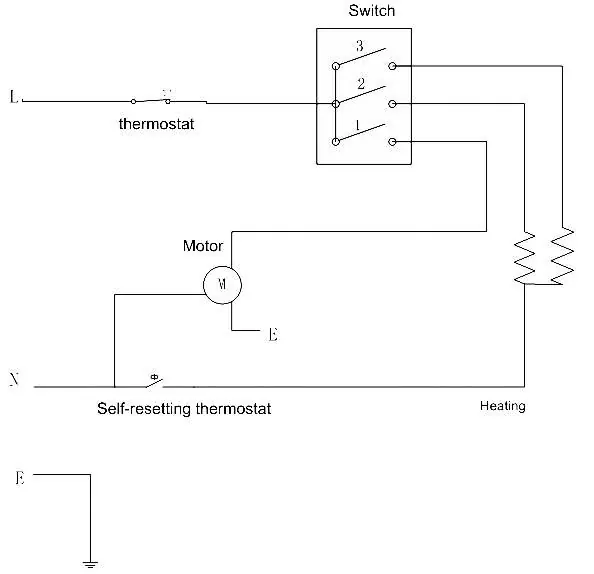
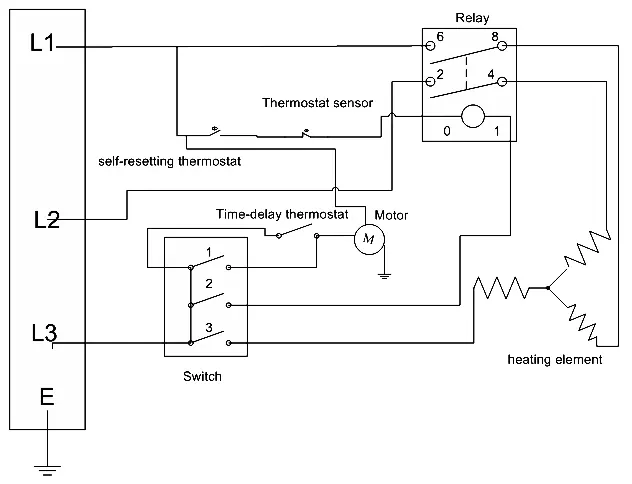
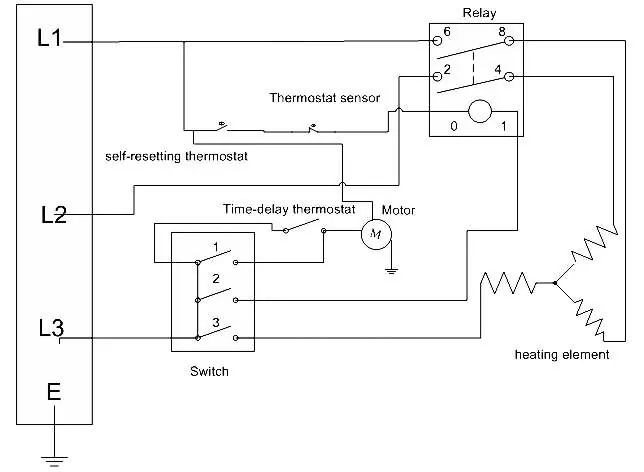
- Circuit diagrams are provided for each model (TDS 20 R, TDS 30 R, TDS 50 R) to assist with technical understanding.
- Spare parts lists are included for each model, detailing components like the heating element, motor, and thermostat.
Model compatibility
- TDS 30 R and TDS 50 R feature a time-delay thermostat for automatic rundown operation.
- TDS 20 R uses a 1/N/PE~230 V connection, while TDS 30 R and TDS 50 R use 3-phase connections.

Manual page author
David Miller
Documentation analyst
Organizes user manual content into clear summaries, with attention to model details, product context, and everyday usability.