Electronics / Headphones Earbuds
User Manual for Tracer SIN Wireless Headphones
Quick guide for Tracer SIN wireless headphones. Learn how to charge, pair, connect to your computer, and use the audio cable. Includes technical specifications and safety tips.
Quick answers from the manual
Quick answer
- To use the Tracer SIN headphones, connect the USB transmitter to your PC, turn on the headphones, and then start your media player. Ensure the headphones are charged for 3 hours before the first use. p. 3, 4
Key actions
- Charging the headphones p. 3, 4
- Pairing the headphones p. 4
First start
- Initial setup sequence p. 4
Problems and fixes
Headphones do not work after pairing
Ensure the media player was closed during the pairing process. Re-connect the USB transmitter.
p. 4Maintenance and reset
- Pairing reset p. 4
Technical specifications
| Parameter | Value | Meaning | Pages |
|---|---|---|---|
| Transmitting range | 10 m | Operating distance | p. 6 |
| Charging time | 2 hours | Typical charging duration | p. 4 |
Where to find it in the PDF
- Safety and Requirements p. 2
- Usage and Pairing p. 3, 4
- Technical Specifications p. 6
Table of contents
Manual images
Click an image to enlargeQuick guide from the manual
The Tracer SIN is a 2.4GHz wireless headphone system designed for PC use. To ensure proper operation, follow the specific connection sequence: connect the USB transmitter to the PC, turn on the headphones, and then launch your media player. The device requires a USB 2.0 port and is compatible with Windows XP, Vista, and Windows 7.
Safety and Usage
Prolonged listening at high volumes can damage hearing. Adjust the volume to a comfortable level and avoid using the headphones in dangerous situations where environmental awareness is required.
Charging
Before the first use, charge the battery for 3 hours to reach full capacity. The headphones must be turned off during charging. The LED indicator will glow red during charging and turn off when fully charged. The typical charging time is approximately 2 hours.
Connection and Pairing
To connect the headphones to your computer:
- Connect the USB transmitter to a USB port on your computer.
- Turn on the headphones and the USB transmitter.
- The indicator light should turn green. If the light blinks, press and hold the code key until it turns green.
- Ensure the media player is closed before pressing the code key to avoid pairing issues.
- Once paired successfully, this procedure does not need to be repeated.
Wearing and Audio Cable
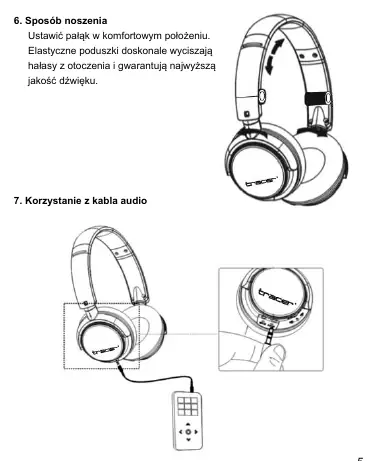
Adjust the headband for a comfortable fit. The ear cushions provide sound insulation. You can also use the included audio cable to connect the headphones to other digital audio players.
Technical Specifications
- Transmitting range: 10 m
- Frequency: 2.4 GHz
- Modulation: GFSK
- Transmitting power: 10 dBm
- Frequency response: 20 Hz - 20 KHz
- S/N Ratio: > 85 dB
- Work Voltage: 2.2 - 3.5 V DC
- Weight: +/- 160 g
Practical help
Common problems
Headphones not working
Ensure the correct connection sequence: connect USB transmitter first, then turn on headphones, then start the media player.
Pairing failure
Ensure the media player is closed before pressing the code key. Re-connect the USB transmitter if necessary.
Headphones not connecting
If the indicator light blinks, press and hold the code key until it turns solid green.
Before use
- Charge the battery for 3 hours before the first use
- Ensure the computer has a USB 2.0 port
- Turn off the headphones while charging
- Close the media player before pairing
- Use an extension adapter if connecting to a desktop PC
Specs in practice
- Transmitting range
- Maximum distance of 10 meters from the transmitter
- Charging time
- Approximately 2 hours for a full charge
- Work Voltage
- 2.2 to 3.5 V DC
Images and diagrams
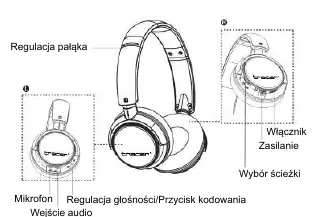
- Headband adjustment mechanism
- Microphone and audio input location
- Volume control and code key button
- Power switch and track selection buttons
Model compatibility
- Compatible with Windows XP, Vista, and Windows 7
- Compatible with Windows Media Player, iTunes, RealPlayer, KuGoo

Manual page author
David Miller
Documentation analyst
Organizes user manual content into clear summaries, with attention to model details, product context, and everyday usability.