Electronics / Headphones Earbuds
User Manual for Tracer Gamezone Mobile Hybrid BT+2.4G Headset
Quick guide for the Tracer Gamezone Mobile Hybrid BT+2.4G headset. Learn how to connect via 2.4G, Bluetooth, or 3.5mm cable, manage controls, and charge your device.
Quick answers from the manual
Quick answer
- The Tracer Gamezone Mobile Hybrid BT+2.4G is a multi-mode headset. You can connect it via 2.4G wireless (using the included receiver), Bluetooth, or a 3.5mm wired cable. p. 5, 7, 12, 14
Key actions
- Power On/Off: Hold the MFB button for 3 seconds. p. 6, 13
- Play/Pause: Short press the MFB button. p. 6, 13
Problems and fixes
Low battery
Charge via Type-C port. Red light indicates charging.
p. 9, 16Technical specifications
| Parameter | Value | Meaning | Pages |
|---|---|---|---|
| Battery | 600mAh | Lithium battery capacity. | p. 3, 10 |
| Speaker | 50mm | Driver size. | p. 3, 10 |
Where to find it in the PDF
- Parts Diagram p. 2
- Specifications p. 3, 10
Table of contents
Quick guide from the manual
The Tracer Gamezone Mobile Hybrid BT+2.4G headset supports three connection modes: 2.4G wireless, Bluetooth, and wired (3.5mm audio cable). The headset features a detachable microphone, volume control, and a multi-function button (MFB) for media and call management.
Device Overview
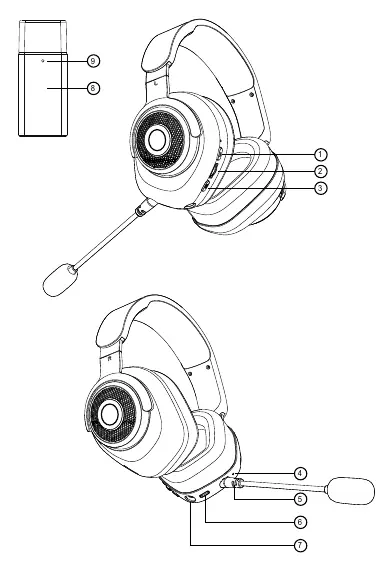
- MFB (Multi-Function Button): Power on/off and media control.
- Volume Scroll Wheel: Adjusts audio levels.
- Microphone Switch: Toggles microphone on/off.
- Microphone Options: Includes a detachable microphone and a built-in hidden microphone.
- Connectivity: USB Type-C port for charging, 3.5mm jack for wired audio, and 2.4G transmitter.
Connection Modes
Wired Mode (3.5mm Audio Cable)
Connect the headset to your audio device using the included 3.5mm cable. The headset can be used in this mode without being powered on. Note that advanced functions like play/pause or microphone control are not available in wired mode.
2.4G Mode
- Plug the 2.4G receiver into your PC, PS4, or other compatible device. The receiver light will flash.
- Press the power button on the headset to turn it on.
- The headset indicator will flash red and blue while pairing and turn steady once connected.
- Use the volume wheel to adjust sound.
Bluetooth Mode
- Turn on the headset and double-click the MIC button to enter wireless mode. You will hear a "Wireless mode" prompt.
- The indicator will flash, and you will hear a "pairing" prompt.
- Enable Bluetooth on your phone and search for "Tracer Hybrid".
- Select "Tracer Hybrid" to pair. A "connected" prompt confirms the connection.
Charging
Use a USB-A to Type-C cable to charge the headset. The red indicator light turns on during charging and turns off when the process is complete. The headset can be used while charging. The charger should provide between 5W and 10W of power.
Safety and Maintenance
- Charging: Use a power source with voltage below 3.1V to protect the battery.
- Heat: Keep away from radiators, stoves, and other heat sources.
- Volume: Avoid long-term use at maximum volume to protect your hearing.
- Service: Do not attempt to repair the device yourself; contact after-sales support for any damage.
Practical help
Common problems
Headset not connecting
Ensure the receiver is plugged in, the headset is powered on, and it is in the correct pairing mode (2.4G or Bluetooth).
Microphone not working
Check if the microphone is muted (short press the mic button). Ensure the detachable mic is connected or the hidden mic is active.
Low battery warning
A beep sounds every minute and the red LED flashes when the voltage drops to 3.1V.
Before use
- Charge the headset using a 5V USB-C power source (5-10W).
- Ensure the 2.4G receiver is connected to your device for 2.4G mode.
- For wired mode, ensure the 3.5mm cable is fully inserted.
- Check that the microphone is not muted.
Specs in practice
- Battery Capacity
- 600mAh, providing up to 20 hours of continuous playback (depending on mode).
- Wireless Range
- Up to 10 meters.
- Charging Time
- Approximately 2 hours.
Images and diagrams
- 1: MFB (Multi-Function Button)
- 2: Volume Scroll Wheel
- 3: Microphone Switch
- 4: Hidden Microphone
- 5: Detachable Microphone
Model compatibility
- Compatible with most smartphones and devices supporting wireless headset protocols.
- 2.4G mode is compatible with PC, PS4, and other devices with USB ports.

Manual page author
Michael Turner
Technical manual editor
Reviews PDF manuals for structure, safety notes, and practical product details so readers can find the right information quickly.