Electronics / Headphones Earbuds
User Manual for Tracer Ulight 2-in-1 Camping Lamp
Quick guide for the Tracer Ulight 2-in-1 camping lamp. Learn how to charge, operate light modes, and safely use your device with this manual.
Quick answers from the manual
Quick answer
- The Tracer Ulight 2-in-1 is a portable camping lamp with a solar panel. It features a main lamp and a top light, both rechargeable via USB-C. It is designed for domestic use. p. 2
Key actions
- Charge the lamp p. 2
First start
- Charge the device p. 2
Problems and fixes
Light source failure
The light source is non-replaceable; the entire fixture must be disposed of.
p. 2Technical specifications
| Parameter | Value | Meaning | Pages |
|---|---|---|---|
| Main lamp brightness | 300 lm | Luminous flux | p. 2 |
| Top light brightness | 140 lm | Luminous flux | p. 2 |
Where to find it in the PDF
- Product Diagram and Usage p. 2
Table of contents
Quick guide from the manual
The Tracer Ulight 2-in-1 is a portable camping lamp featuring a main lamp and a top light, both rechargeable via USB-C. It includes a solar panel for charging assistance. Please note that the light source is non-replaceable; if it fails, the entire unit must be disposed of.
Product description
The device consists of the following main components:
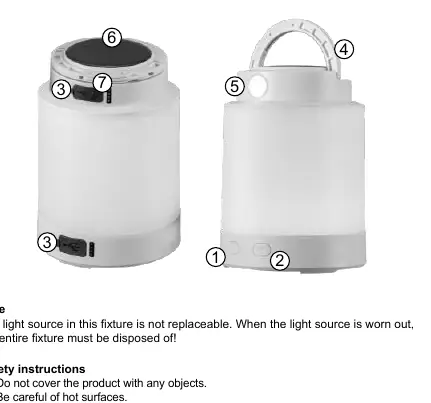
- ON/OFF button
- RGB button
- USB-C port cover
- Hanging bracket
- Top lamp
- Solar panel
- Top lamp ON/OFF button
Charging instructions
Warning: Charge the product only using the included USB-C cable.
- Open the USB-C port cover.
- Connect the included USB cable to a power source.
- A flashing indicator light confirms the device is charging.
- Ensure the charger provides between 0.5W and 5.0W for optimal charging speed.
Operation and light modes
The lamp offers multiple lighting modes controlled by dedicated buttons:
- Top Light: Press the top ON/OFF button to turn on the main light source in strong mode. Press again for soft mode. Press a third time to activate the side torch.
- Main Lamp: Press the main ON/OFF button to turn on the main lamp. Press again to switch to soft light mode.
- RGB Mode: Press the RGB button to activate colored light mode. Each subsequent press changes the color.
Safety precautions
- This device is intended for domestic use only.
- Do not use the lamp while it is still in the packaging.
- Do not expose the device to moisture, excessive heat, or open flames.
- Do not cover the product with any objects.
- Do not stare directly into the light source.
- Do not attempt to disassemble or repair the product yourself.
- If the battery is damaged (e.g., leakage, deformation), do not use the device and contact the service center.
Technical specifications
- Main Lamp: 300 lm, LED + RGB
- Top Light: 140 lm, LED
- Power Input: DC 5V, 1A
- Battery: IMR 18650 lithium-ion manganese battery (3.7V)
Disposal
The device contains a built-in lithium-ion battery that is not user-replaceable. At the end of its service life, the device must be disposed of at an authorized collection point or service center. Do not dispose of the device with municipal waste.
Practical help
Common problems
Device not charging
Ensure you are using the included USB-C cable and a charger providing between 0.5W and 5.0W.
Light not turning on
Check if the battery is charged. If the light source is worn out, the entire unit must be disposed of as it is non-replaceable.
Before use
- Charge the device fully before first use.
- Ensure the USB-C port cover is closed when not charging.
- Do not use the lamp while it is still in the packaging.
Specs in practice
- Luminous flux
- Brightness of the light, measured in lumens (lm). Higher values mean brighter light.
- Input voltage
- Requires DC 5V, 1A for charging.
Images and diagrams
- 1. ON/OFF button
- 2. RGB button
- 3. USB-C port cover
- 4. Hanging bracket
- 6. Solar panel
Model compatibility
- Requires a USB-C charger (not included).
- Charger power must be between 0.5W and 5.0W.

Manual page author
David Miller
Documentation analyst
Organizes user manual content into clear summaries, with attention to model details, product context, and everyday usability.