Mobile / Smartphones
Trevi DJ 12E60 BT Hi-Fi Wireless LED Headphones User Guide
Comprehensive user guide for the Trevi DJ 12E60 BT Hi-Fi wireless headphones with multicolor LED lighting. Includes setup, pairing, charging, and troubleshooting instructions.
Table of contents
Product Overview
The Trevi DJ 12E60 BT is a high-fidelity wireless headset featuring integrated multicolor LED lighting. Designed for versatility, it supports wireless connectivity for music playback and hands-free calling, as well as a wired connection option for standard audio use.
Getting Started
Before first use, ensure the internal battery is fully charged. Connect the provided USB Type-C cable to the charging port on the headphones and a compatible 5V 1A power source. The LED indicator will turn red during charging and blue once fully charged. To power on or off, press and hold the power button until you hear the corresponding voice prompt.
Wireless Pairing
To connect the headphones to your smartphone or tablet, power on the unit; the LED will flash red and blue. Enable wireless connectivity on your external device, search for 'DJ 12E60 BT' in the device list, and select it. If prompted for a code, enter '0000'. Once successfully paired, the LED will flash slowly in blue.
Controls and Operation
The headphones feature intuitive controls for managing your media and calls:
- Play/Pause: Press the play/pause button once.
- Volume Control: Long press the next track button to increase volume or the previous track button to decrease it.
- Track Navigation: Short press the next or previous track buttons to skip songs.
- LED Lighting: Long press the play/pause button to toggle the multicolor LED lights on or off.
- Call Management: Press the play/pause button once to answer or end a call, long press to reject an incoming call, or double-press quickly to redial the last number.
Wired Connection
You can use the headphones as a standard wired headset by connecting them to an external device using a 3.5mm stereo jack cable (not included). Ensure the headphones are powered off before connecting the cable to the Audio In port.
Safety and Maintenance
To prevent potential hearing damage, avoid listening at high volumes for extended periods. Charge the battery within a temperature range of 5°C to 35°C. Avoid leaving the battery charging overnight. The internal battery is not user-replaceable; removal and disposal must be performed only by qualified technical personnel.
Manufacturer information
TREVI S.p.A.
Practical help
Common problems
Connection interrupted
Ensure devices are within 8 meters. If the connection fails to restore automatically, repeat the pairing procedure.
Device not pairing
Ensure the headphones are in pairing mode (flashing red/blue) and that the external device is searching for new hardware.
Before use
- Charge the battery fully using the provided USB Type-C cable.
- Ensure the headphones are powered off before attempting a wired connection.
- Keep the devices within one meter during the initial pairing process.
Specs in practice
- Wireless Version
- V5.3 for stable and efficient connectivity.
- Transmission Power
- 2.5mW, optimized for short-range wireless audio.
- Charging Input
- 5V 1A standard USB power requirement.
Images and diagrams
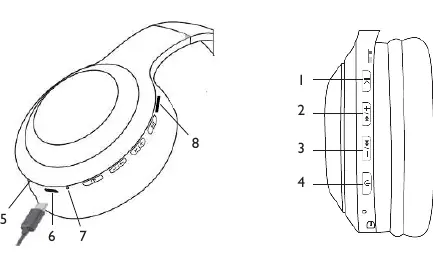
- Button 1: Play/Pause, Call management, LED toggle.
- Button 2: Next track, Volume up.
- Button 3: Previous track, Volume down.
- Button 4: Power On/Off.
- Port 5: Audio In jack, Port 6: USB Type-C charging, Port 8: Micro SD slot.
Model compatibility
- Compatible with most Bluetooth-enabled smartphones and tablets.
- Wired mode works with any device featuring a standard 3.5mm headphone jack.
- Some devices may not be fully compatible due to evolving wireless standards.

Manual page author
Emily Carter
User documentation editor
Prepares concise manual descriptions and highlights the most useful setup, operation, and maintenance information for readers.