Electronics / Headphones Earbuds
User Manual for Trevi FLEX PLUS 90 4G Senior Phone
Quick guide for the Trevi FLEX PLUS 90 4G senior phone. Learn how to insert the SIM and battery, set up SOS emergency features, use speed dial, and troubleshoot common issues.
Table of contents
Manual images
Click an image to enlargeQuick guide from the manual
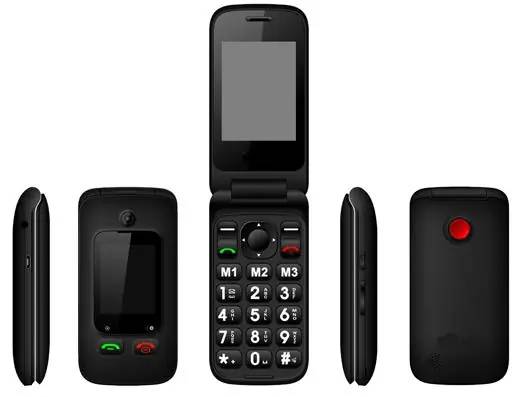
The Trevi FLEX PLUS 90 4G is a senior-friendly mobile phone featuring a flip design, SOS emergency button, and a charging cradle. This guide covers the essential setup and operation steps to get you started quickly.
Installation
Before using the phone, you must install the SIM card and battery:
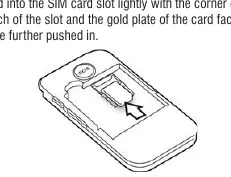
- Remove the back cover by lifting it from the designated notch.
- Insert the SIM card into the slot, ensuring the gold contacts face down and the cut corner aligns with the slot notch.
- Insert the battery, aligning its contacts with the phone's pins.
- Replace the back cover carefully.
Charging
You can charge the phone using the supplied USB type-C cable and power adapter. You may charge the phone directly or by placing it into the included charging cradle. The LED indicator will turn red during charging and green when fully charged.
SOS Emergency Function
The SOS function allows you to call emergency numbers or family members in case of need:
- Go to Menu > SOS to configure the settings.
- You can add up to 5 emergency numbers in the SOS number list.
- To activate, press and hold the SOS button on the back of the phone for 3 seconds. The phone will send an SMS and call the numbers in the list sequentially until answered.
Speed Dial
You can assign frequently called numbers to specific keys for quick access:
- Go to Menu > Settings > Speed Dial.
- Assign numbers to the M1, M2, and M3 keys, or numeric keys 2-9.
- To call, simply press and hold the corresponding key on the idle screen.
Troubleshooting
If you encounter issues, check the following:
- Poor reception: Avoid high-rise buildings or areas with network congestion.
- Failed to turn on: Check the battery level or charge the phone.
- SIM card error: Ensure the SIM card is inserted correctly or contact your network provider.
- Failed to charge: Check the connection, clean the battery contacts, or replace the battery/charger.
Manufacturer information
TREVI S.p.A.
Practical help
Common problems
Poor reception
Avoid using the phone near high-rise buildings or during peak network traffic times.
Failed to turn on
Check the battery level or charge the phone for at least 4 minutes if completely drained.
SIM card error
Ensure the SIM card is inserted correctly and is not damaged.
Failed to charge
Check the connection, clean the battery contacts, or ensure the charger is functioning.
Before use
- Insert SIM card
- Insert battery
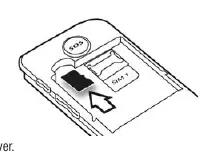
- Insert Micro SD card (optional)
- Charge battery fully
Images and diagrams
- The phone features a flip design with a main screen and keypad, a secondary external screen, and a dedicated SOS button on the back.
Model compatibility
- Supports Micro SD cards formatted in FAT.
- Use only the supplied power adapter.

Manual page author
Emily Carter
User documentation editor
Prepares concise manual descriptions and highlights the most useful setup, operation, and maintenance information for readers.