Power / Power Banks
User Manual for UGREEN 20000mAh Portable Charger PB720
Quick guide for the UGREEN 20000mAh Portable Charger (PB720). Learn how to charge the device, use low-current mode, and understand technical specifications.
Quick answers from the manual
Quick answer
- The UGREEN PB720 is a 20000mAh portable charger supporting up to 65W fast charging. It features a standard charging mode and a low-current mode for smaller devices. p. 1, 2
Key actions
- Turn off p. 2
- Activate low-current mode p. 2
First start
- Fully charge the device before first use. p. 1
Technical specifications
| Parameter | Value | Meaning | Pages |
|---|---|---|---|
| Capacity | 20000mAh | Total battery capacity | p. 2 |
| Max Output | 65W | Maximum power delivery | p. 2 |
Where to find it in the PDF
- First use and charging p. 1
- Operation and specs p. 2
Table of contents
Manual images
Click an image to enlargeQuick guide from the manual
This guide provides essential instructions for operating the UGREEN 20000mAh Portable Charger (Model PB720). For optimal performance, it is recommended to use a charger and cable with at least 65W power output.
Getting Started
Before using the power bank for the first time, please ensure it is fully charged. To achieve the best charging efficiency, use a power adapter and cable capable of 65W or higher.
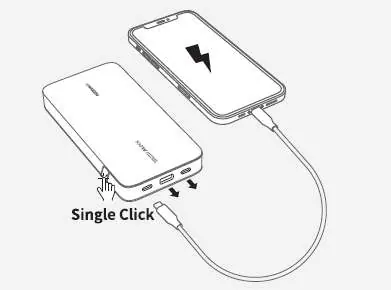
Device Operation
The power bank is controlled via the power button:
- Turning On: Single click the power button when the device is not charging.
- Turning Off: Double click the power button.
Low-Current Mode
This mode is designed for charging low-power devices such as earbuds or smartwatches.
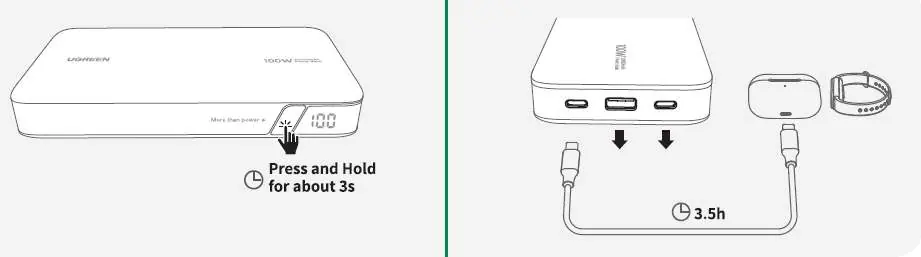
- To Activate: Press and hold the power button for 3 seconds.
- To Exit: Press and hold the power button again for 3 seconds, or wait for 3.5 hours for the mode to automatically turn off.
Technical Specifications
- Capacity: 20000mAh
- Battery Type: Lithium-ion
- USB-C1 Input: 65W Max
- USB-C1/USB-C2 Output: 5V-3A / 9V-3A / 15V-3A / 20V-3.25A
- Total Output: 65W Max
- Dimensions: 130 x 80 x 26 mm
- Charging Time: Approximately 2 hours (using a 65W charger)
Manufacturer information
UGREEN
Practical help
Common problems
Device charging is slow
Ensure you are using a charger and cable that supports at least 65W power output.
Small devices (earbuds/watches) do not charge properly
Activate the low-current mode by pressing and holding the power button for 3 seconds.
Before use
- Fully charge the power bank before the first use.
- Use a 65W or higher power adapter for optimal charging speed.
Specs in practice
- USB-C1 Input
- The maximum power the power bank can receive for recharging itself.
- Total Output
- The maximum combined power the device can deliver to connected devices.
- Low-current mode
- A specialized mode for safely charging devices that require very little power.
Images and diagrams
- The power button is used for turning the device on/off and toggling low-current mode.
- USB-C ports are used for both input and output.
Model compatibility
- Supports fast charging up to 65W.
- Compatible with devices requiring low-current charging.

Manual page author
David Miller
Documentation analyst
Organizes user manual content into clear summaries, with attention to model details, product context, and everyday usability.