Power / Power Banks
UGREEN 20000mAh 130W Portable Power Bank User Manual
Quick guide for the UGREEN 20000mAh 130W Portable Power Bank (PB721). Learn about port usage, button operations, power distribution, and troubleshooting steps.
Quick answers from the manual
Quick answer
- The UGREEN PB721 is a 20000mAh 130W power bank. Use a 65W PD charger for the fastest recharge time (approx. 2 hours). p. 1, 2, 3
Key actions
- Power On: Single click. Power Off: Hold 6s. Trickle Mode: Hold 3s. p. 2
First start
- Connect the device to the appropriate port; it will start working automatically. p. 3
Problems and fixes
Overcurrent or Overtemperature protection
Unplug all cables, turn off, and wait 30 minutes (for temperature) or restart (for current).
p. 2Maintenance and reset
- If protection triggers, unplug all cables and restart or wait 30 minutes. p. 2
Technical specifications
| Parameter | Value | Meaning | Pages |
|---|---|---|---|
| Battery Capacity | 20000mAh | Total energy storage | p. 1 |
| Max Output | 130W | Total power delivery | p. 2 |
Where to find it in the PDF
- Product Overview and Specs p. 1
- Operations and Troubleshooting p. 2
- Charging Instructions p. 3
Table of contents
Manual images
Click an image to enlargeQuick guide from the manual
This document provides essential operating instructions for the UGREEN 20000mAh 130W Portable Power Bank (Model: PB721). For optimal performance, it is recommended to use a 65W PD charger to recharge the power bank, which takes approximately 2 hours.
Product Overview
The device features the following interface components:
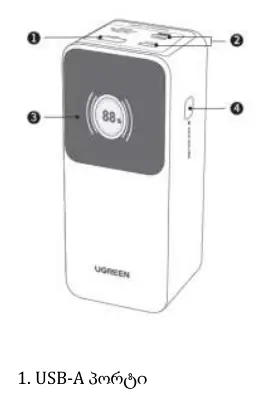
- USB-A Port: Output port.
- USB-C1 Port: Input/Output port.
- USB-C2 Port: Output port.
- Button: Used for power control, screen management, and mode selection.
Button Operations
The power button controls various functions based on the interaction:
- Power On: Single click.
- Power Off: Press and hold for 6 seconds.
- Screen Off: Double click.
- Screen On: Single click.
- Switch Screen Display: Single click.
- Trickle Mode: Press and hold for 3 seconds to activate or deactivate.
Charging the Power Bank
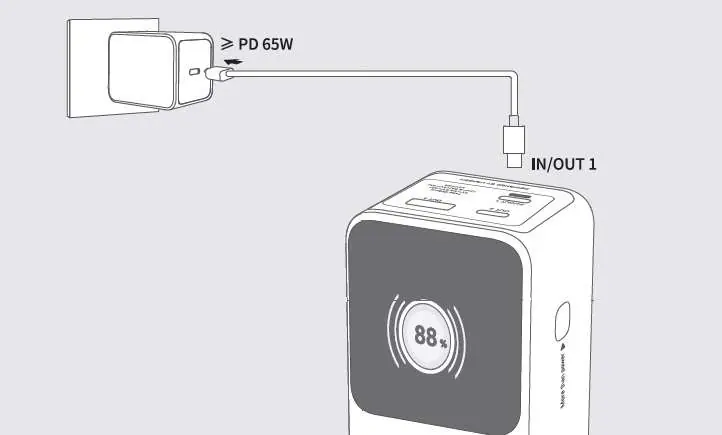
To charge the power bank, connect it to a power source using the USB-C1 port. It is highly recommended to use a 65W PD charger for fast charging. The device will begin charging automatically upon connection.
Power Distribution
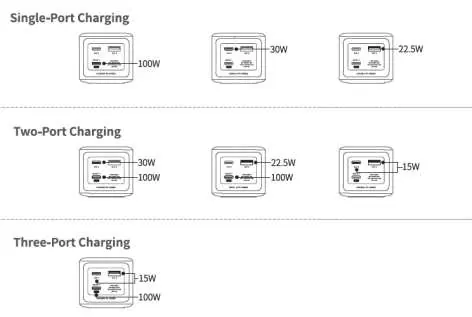
The power bank supports multiple output configurations depending on how many devices are connected simultaneously. The total maximum output is 130W. Refer to the power distribution diagrams for specific wattage allocation per port when using single, dual, or triple-port charging.
Troubleshooting
If the device encounters issues, follow these steps:
- Overcurrent Protection: Unplug all cables, turn off the device, and restart it.
- Overtemperature Protection: Unplug all cables, turn off the device, and wait 30 minutes before using it again.
Manufacturer information
UGREEN
Practical help
Common problems
Overcurrent protection triggered
Unplug all cables, turn off the device, and restart.
Overtemperature protection triggered
Unplug all cables, turn off the device, and wait 30 minutes before next use.
Before use
- Use a 65W PD charger for the fastest recharge time.
- Ensure the device is not overheating.
- Identify the correct port (USB-C1 is for input/output, USB-A and USB-C2 are for output).
Specs in practice
- Battery Capacity
- 20000mAh total capacity.
- Total Output
- 130W Max combined output.
- Input (USB-C1)
- Supports up to 65W input for fast recharging.
Images and diagrams
- The power distribution diagrams illustrate how the 130W total power is split between ports when charging one, two, or three devices simultaneously.
Model compatibility
- Supports fast charging protocols via USB-C PD.

Manual page author
Michael Turner
Technical manual editor
Reviews PDF manuals for structure, safety notes, and practical product details so readers can find the right information quickly.