Power / Power Banks
User Manual for Ugreen PB723 20000mAh Powerbank
Quick guide for the Ugreen PB723 20000mAh 130W powerbank. Learn how to charge devices, use the display, operate buttons, and understand power distribution.
Quick answers from the manual
Quick answer
- The Ugreen PB723 is a 20000mAh 130W powerbank. It features a built-in USB-C cable, two USB-C ports, and one USB-A port. It supports fast charging and a trickle charging mode for low-power devices. p. 1, 2, 3
Key actions
- Turn on/off p. 5
- Enable Trickle Charging p. 5, 7
First start
- Fully charge the device before first use. p. 6
Problems and fixes
ICP error
Unplug and replug the charging cable.
p. 5
188 error
Unplug all cables and wait 30 minutes.
p. 5Maintenance and reset
- If not used for over a month, charge to 50% and check periodically. p. 11
Technical specifications
| Parameter | Value | Meaning | Pages |
|---|---|---|---|
| Capacity | 20000mAh | Total battery capacity | p. 2 |
| Total Output | 130W | Maximum combined output power | p. 2 |
Where to find it in the PDF
- Product Overview p. 3
- Specifications p. 2
Table of contents
Manual images
Click an image to enlargeQuick guide from the manual
The Ugreen PB723 is a 20000mAh powerbank with a total output of 130W. It features a built-in USB-C cable, two USB-C ports, and one USB-A port. Before first use, fully charge the device. For fastest charging, use a 100W or higher PD charger. Note that charging the powerbank using both the built-in cable and an external cable simultaneously is not supported.
Product Overview
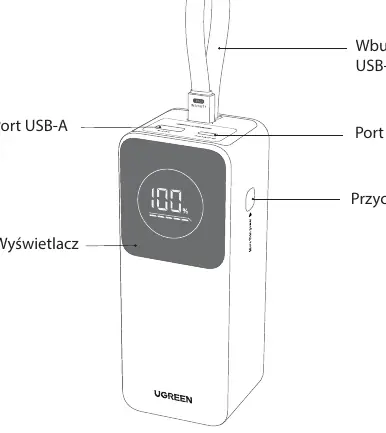
The device includes a built-in USB-C cable, a USB-A port, a USB-C port, a display screen, and a side button for operation.
Charging the Powerbank
You can charge the powerbank using two methods:
- Option 1: Use the built-in USB-C cable.
- Option 2: Use the USB-C port with an external cable.
For optimal performance, use a 100W PD charger. Charging time is approximately 1.6 hours with a 100W PD charger.
Charging Devices
The powerbank supports charging via the built-in cable, USB-C port, or USB-A port. Simply connect your device; the powerbank will turn on automatically. If it does not start, press the button. The powerbank will turn off automatically 3 minutes after the connected device is disconnected.
Display and Button Operations
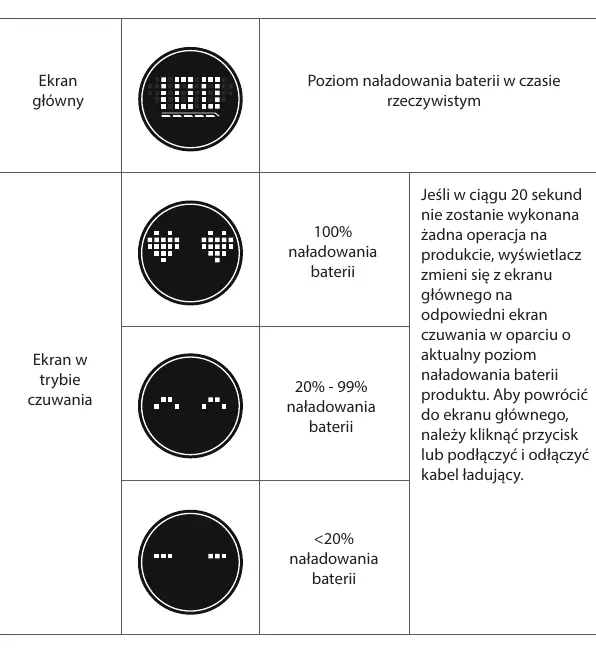
The display shows the battery level in real-time. If no operation is performed for 20 seconds, the display switches to standby mode based on the battery level. To return to the main screen, click the button or connect/disconnect a charging cable.
Button Functions
- Power On (Manual): Single click.
- Power Off (Manual): Press and hold for about 6 seconds.
- Turn Display Off: Double click.
- Turn Display On: Single click.
- Trickle Charging Mode: Press and hold for 3 seconds.
Trickle Charging Mode
Recommended for low-power devices like Bluetooth headphones or watches. To enable, press and hold the button for 3 seconds; the display will show a scrolling digit. The mode turns off automatically after 4 hours or can be manually disabled by holding the button for 3 seconds.
Power Distribution
The powerbank supports various output configurations:
- Single Port: Up to 100W.
- Dual Port: Various combinations (e.g., 100W + 30W).
- Triple Port: 100W + 10W + 10W.
When using the built-in cable and USB-C2 simultaneously, max output is 130W. When using the built-in cable, USB-C2, and USB-A simultaneously, max output is 120W.
Troubleshooting
- ICP on screen: Overcurrent/short circuit protection. Unplug and replug the charging cable.
- 188 on screen: Overheating protection. Unplug all cables and wait 30 minutes before further use.
Safety and Maintenance
- Do not use the powerbank if the casing is damaged, deformed, or overheated.
- Keep away from children.
- Do not cover the powerbank during charging.
- Store in a dry place, away from moisture, dust, and heat sources.
- If not used for over a month, charge to 50% and check periodically.
Manufacturer information
UGREEN
Practical help
Common problems
Display shows 'ICP'
Overcurrent or short circuit protection triggered. Unplug and reconnect the charging cable.
Display shows '188'
Overheating protection triggered. Unplug all cables and wait 30 minutes before using again.
Powerbank does not charge devices automatically
Press the button manually to start charging.
Before use
- Fully charge the powerbank before the first use.
- Use a 100W or higher PD charger for the fastest charging speed.
- Ensure cables and chargers meet the powerbank's specifications.
- Do not use 'multi-in-one' cables for simultaneous charging of multiple devices.
Specs in practice
- Trickle Charging
- A special mode for charging low-power devices like Bluetooth headphones without triggering auto-off.
Images and diagrams
- The top panel contains the USB-A port, USB-C port, and the built-in USB-C cable.
- The side button controls power, display, and trickle mode.
- The display provides real-time battery percentage.
Model compatibility
- Charging the powerbank via the built-in cable and an external cable simultaneously is not supported.
- The powerbank automatically turns off 3 minutes after the connected device is disconnected.

Manual page author
Michael Turner
Technical manual editor
Reviews PDF manuals for structure, safety notes, and practical product details so readers can find the right information quickly.