Computers / Tablets
User Manual for UMAX VisionBook 10T LTE Tablet
Quick start guide and safety instructions for the UMAX VisionBook 10T LTE tablet. Learn how to insert SIM and Micro-SD cards, power on the device, and follow essential safety guidelines.
Table of contents
Manual images
Click an image to enlargeQuick Start Guide
This guide provides essential information for setting up and safely operating your UMAX VisionBook 10T LTE tablet. Before using the device, ensure it is charged and that you have the necessary SIM or Micro-SD cards if required.
Device Overview
The tablet features the following components:
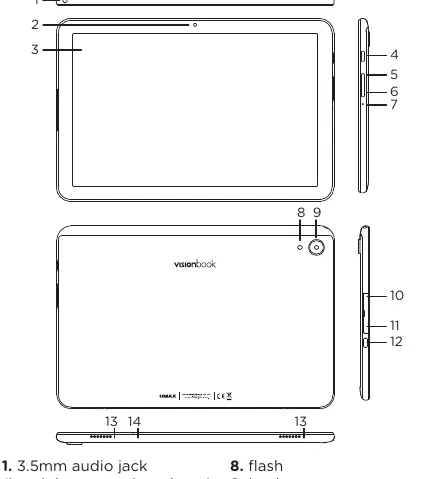
- 1. 3.5mm audio jack: For headphones and microphone.
- 2. Front camera: For video calls and selfies.
- 3. Touch screen: Primary interface.
- 4. On/Off button: Power control.
- 5. Volume + button: Increase volume.
- 6. Volume - button: Decrease volume.
- 7. Reset: System reset pinhole.
- 8. Flash: For the back camera.
- 9. Back camera: Main camera.
- 10. Micro-SIM card slot: For mobile data and calling.
- 11. Micro-SD card slot: For storage expansion.
- 12. USB Type-C: For charging and data transfer.
- 13. Speakers: Audio output.
- 14. Microphone: For voice input.
Getting Started
Turning On
Press and hold the power button for a couple of seconds to turn on your tablet. If the device does not turn on, it may need to be charged first.
Adding Micro-SD Storage
You can expand your storage space for saving files and installing programs by adding a microSD card (microSD, microSDHC, or microSDXC). The maximum supported capacity is 128 GB.
- Turn off the tablet before inserting the card.
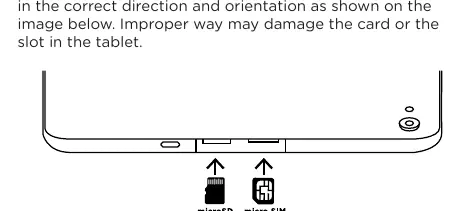
- Insert the card in the correct direction and orientation as shown in the device diagram.
- Improper insertion may damage the card or the slot.
Calling and Using Data
To enable calling, text messaging, and 4G LTE mobile data transfers, insert a micro SIM card.
- Turn off the tablet before inserting the card.
- Insert the card in the correct direction and orientation.
- Improper insertion may damage the card or the slot.
Safety Information
Operating Conditions: Maintain an operating temperature between 10°C and 35°C and storage temperature between -25°C and 45°C. Keep relative humidity between 0% and 90% (noncondensing).
- Battery: Do not attempt to replace or remove the built-in battery yourself. It must be replaced by an authorized service provider.
- Handling: Place the tablet on a stable surface to allow air circulation. Avoid dropping, burning, puncturing, or crushing the device.
- Liquid Exposure: Keep the tablet away from drinks, oils, lotions, and wet environments (rain, snow, fog).
- Charging: Use only the included power adapter. Do not charge in wet locations or with wet hands.
- Medical Interference: The device contains magnets and radios that may interfere with pacemakers or defibrillators. Maintain a safe distance.
- Repetitive Motion: If you experience discomfort during use, stop and consult a physician.
- Explosive Atmospheres: Do not use the device in areas with high concentrations of flammable chemicals, vapors, or particles (e.g., grain dust, metal powders).
Technical Support
For technical support, contact Umax Czech a.s. at +420 800 118 629 or via email at [email protected]. The manufacturer address is Kolbenova 962/27e, 198 00 Prague 9, Czech Republic. Further information is available at www.umax.cz.
Official resources from the manual
Practical help
Common problems
Tablet will not turn on
Ensure the battery is charged. Connect the included power adapter and try again.
Micro-SD or SIM card not recognized
Ensure the tablet was turned off during insertion and that the card is oriented correctly according to the diagram.
Device overheating or battery issues
Do not attempt to remove the battery. Contact an authorized service provider.
Before use
- Charge the tablet fully before first use.
- Verify you have a compatible Micro-SD card (up to 128GB) if expanding storage.
- Verify you have a Micro SIM card if using mobile data.
- Power off the tablet before inserting any cards.
- Ensure the environment is within the operating temperature range (10°C to 35°C).
Specs in practice
- Micro-SD Capacity
- Supports microSD, microSDHC, or microSDXC cards up to 128 GB.
- Operating Temperature
- 10°C to 35°C; do not operate outside this range to prevent damage.
Images and diagrams
- The overview diagram identifies the location of the power button, volume controls, camera, and card slots.
- The insertion diagram illustrates the correct orientation for Micro-SD and Micro SIM cards.
Model compatibility
- Supports 4G LTE mobile data.
- Only use the included power adapter to avoid safety risks.

Manual page author
Michael Turner
Technical manual editor
Reviews PDF manuals for structure, safety notes, and practical product details so readers can find the right information quickly.